cancel
Showing results for 
Search instead for 
Did you mean: 

The Power BI Data Visualization World Championships is back! Get ahead of the game and start preparing now! Learn more

Reply
NILU090
Helper II
Helper II

Inactive relationship chart filter

Hi Team,

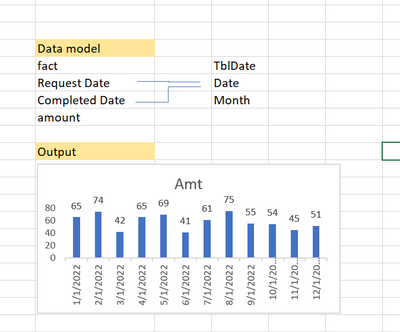
i have following data modelling. Both relationships are INACTIVE.

I want to show output chart as per completed date.

also i have added filter of year. so everything should filter as per selected year.

please help me on this.


NILU090_0-1666002470518.png


1 ACCEPTED SOLUTION
JorgePinho
Solution Sage
Solution Sage

1st - Create a measure somethin like this: Amount_CompleteDate = CALCULATE(SUM(fact[amount]), USERELATIONSHIP(fact[Completed Date], TblDate[Date]))


2nd - Create a Bar Chart and use Date on the X-Axis and the measure on the Y-Axis.


Hope it works 🙂

View solution in original post

1 REPLY 1
JorgePinho
Solution Sage
Solution Sage

1st - Create a measure somethin like this: Amount_CompleteDate = CALCULATE(SUM(fact[amount]), USERELATIONSHIP(fact[Completed Date], TblDate[Date]))


2nd - Create a Bar Chart and use Date on the X-Axis and the measure on the Y-Axis.


Hope it works 🙂

Helpful resources

Announcements
Power BI DataViz World Championships

Power BI Dataviz World Championships

The Power BI Data Visualization World Championships is back! Get ahead of the game and start preparing now!

December 2025 Power BI Update Carousel

Power BI Monthly Update - December 2025

Check out the December 2025 Power BI Holiday Recap!

FabCon Atlanta 2026 carousel

FabCon Atlanta 2026

Join us at FabCon Atlanta, March 16-20, for the ultimate Fabric, Power BI, AI and SQL community-led event. Save $200 with code FABCOMM.