
Join us at FabCon Atlanta from March 16 - 20, 2026, for the ultimate Fabric, Power BI, AI and SQL community-led event. Save $200 with code FABCOMM.
Register now!Vote for your favorite vizzies from the Power BI Dataviz World Championship submissions. Vote now!
Hi All,
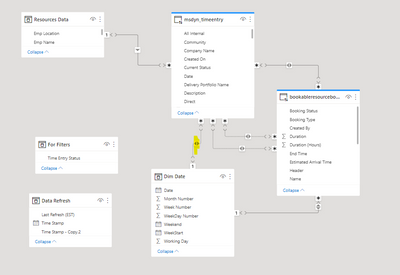
I have below tables which has active and inactive relationship assigned, Highlighted Relation is an inactive relationship between dim date and timeentry start date. I am doing a comparison between Forecasted hours(From table bookable resource) and Actual Hours(From table Timeentry) here.
Below is the result which i am getting currently while visualizing data in table. I am getting correct value in forecasted table since this has active relation with dim date table, however i am not getting correct value for actual hours since the table relation is not active.
Have tried using this formula to get actual hours worked :
Regards,
Ashish Gupta
Solved! Go to Solution.
@Ashish9201 , Many to Many bi- directional indexes are creating loops, so relationships are not valid and inactive. Please correct the model using bridge tables
https://www.seerinteractive.com/blog/join-many-many-power-bi/
Hi @amitchandak ,
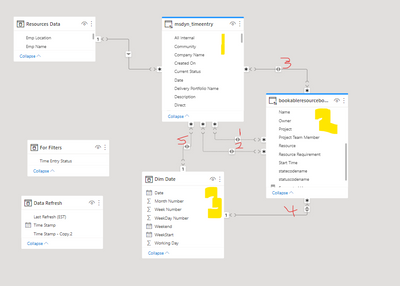
Let me explain the relationship of tables here, hope this can help you in resolving my difficulty
1 relation is inactive between "Dates" Many to many (table 1 and 2)
2 relation is inactive between "Projects" Many to many (table 1 and 2)
3 relation is active between "Resources" Many to many (table 1 and 2)
4 relation is active between "Dates" Many to one (table 2 and 3)
5 relation is inactive between "Dates" Many to one (table 1 and 3)
@Ashish9201 , Many to Many bi- directional indexes are creating loops, so relationships are not valid and inactive. Please correct the model using bridge tables
https://www.seerinteractive.com/blog/join-many-many-power-bi/
Vote for your favorite vizzies from the Power BI World Championship submissions!
If you love stickers, then you will definitely want to check out our Community Sticker Challenge!
Check out the January 2026 Power BI update to learn about new features.
| User | Count |
|---|---|
| 63 | |
| 53 | |
| 42 | |
| 20 | |
| 17 |
| User | Count |
|---|---|
| 123 | |
| 105 | |
| 45 | |
| 32 | |
| 24 |