This is best Fabric, Power BI, SQL and AI community event. How do we know? The last event sold out! Save €200 with code FABCMTY200.
Register nowA new Data Days event is coming soon! This time we’re going bigger than ever. Fabric, Power BI, SQL, AI and more. Don't miss out.
Hello
I do not understand what happens to me, I display in the panel a table in which I take numeric columns from different tables to show the data and appear Do not summarize according to what I want to show, however, when the same table I want to show it as a chart, one of the columns no longer shows Summarize and already the chart ceases to make sense.
I have been looking for information to solve this situation and tell you that sometimes the data is not created the right way, but is that I do not understand that the data is displayed correctly for a table and not for a chart can help me?
Thank you
Hi @Ana_Martinez ,
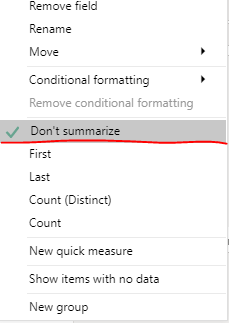
You could check if you selected "Don't summarize" option.
You could share some screenshots here to explain the problem more clearly.
Hard to visualize what is going on. Please see this post regarding How to Get Your Question Answered Quickly: https://community.powerbi.com/t5/Community-Blog/How-to-Get-Your-Question-Answered-Quickly/ba-p/38490
Check out the May 2026 Power BI update to learn about new features.
Sign up to receive a private message when registration opens and key events begin.
If you have recently started exploring Fabric, we'd love to hear how it's going. Your feedback can help with product improvements.
| User | Count |
|---|---|
| 30 | |
| 28 | |
| 23 | |
| 19 | |
| 17 |
| User | Count |
|---|---|
| 48 | |
| 46 | |
| 41 | |
| 21 | |
| 18 |