cancel
Showing results for 
Search instead for 
Did you mean: 

The Power BI Data Visualization World Championships is back! Get ahead of the game and start preparing now! Learn more

Reply
shakeelsyed
Helper I
Helper I

Importing data with latest records

Hi, 


In a schema I have 200+ tables in SQL, approx. +5million records in it and I would want to import only top 100 records from all these tables into power bi desktop and create 200+ tables. Is there any possibility to do so?


Thanks

Shakeel

5 REPLIES 5
v-yuta-msft
Community Support
Community Support

Hi shakeelsyed,


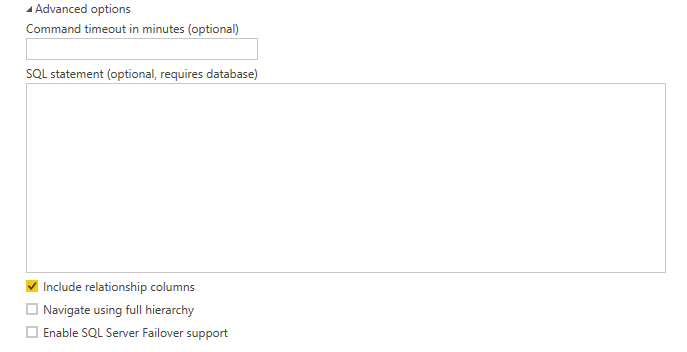
Click Advanced options-> input the sql statement to import top 100 records in every table.

Capture.PNG 


Regards,

Jimmy Tao

Thanks Jimmy Tao,


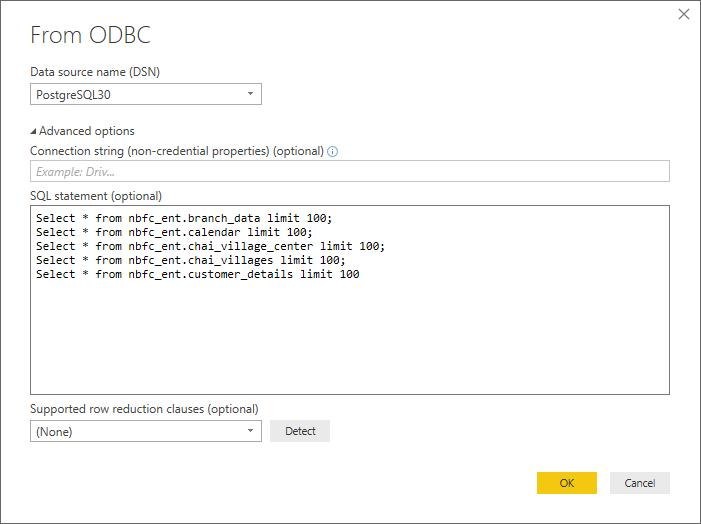
I have tried that way but its only taking data from the last query and creating only one table with it. any other trick to do so?


Advance Options ScreenshotAdvance Options Screenshot

akafuma
New Member

Importing data with latest records - This post is really important ! It plays an very important role in our daily life in every type of business . whether it is small sacle business or large scale business.
here you get related inforamation with complete guigance  here  - 
Acer Support

prakash11440278
Post Prodigy
Post Prodigy

Try to Insert required field (Normally by Date) in Report level filter and use the Relative filter as input Top N = 100


Thanks for your quick reply!


in that case, I will be able to load only one table at a time, whereas I want to upload all 200+ table at once to avoid duplication of work.


Thanks

Helpful resources

Announcements
Power BI DataViz World Championships

Power BI Dataviz World Championships

The Power BI Data Visualization World Championships is back! Get ahead of the game and start preparing now!

December 2025 Power BI Update Carousel

Power BI Monthly Update - December 2025

Check out the December 2025 Power BI Holiday Recap!

FabCon Atlanta 2026 carousel

FabCon Atlanta 2026

Join us at FabCon Atlanta, March 16-20, for the ultimate Fabric, Power BI, AI and SQL community-led event. Save $200 with code FABCOMM.