This time we’re going bigger than ever. Fabric, Power BI, SQL, AI and more. We're covering it all. You won't want to miss it.
Learn moreLevel up your Power BI skills this month - build one visual each week and tell better stories with data! Get started
I have an excel sheet as below and i want to import only chines names and blanks into power bi and delete remaining rows.
Excel Sheet data:
-----------------
| ID | Name |
| 1 | shiv |
| 2 | kumar |
| 3 | 24567 |
| 4 | 谢谢 |
| 5 | 你好 |
| 6 | 明天见 |
| 7 |
Data in Power BI should look like:
---------------------------------------
| ID | Name |
| 4 | 谢谢 |
| 5 | 你好 |
| 6 | 明天见 |
| 7 |
in the given example above i have shown few records but i have millions of rows to do this.
Solved! Go to Solution.
@Anonymous
Sorry I had missed the null
File attached as well
try this
= Table.SelectRows(#"Changed Type", each List.ContainsAny({"",null}, {Text.Select([Name],List.Transform({1..126}, each Character.FromNumber(_)))}))
Hi @Anonymous
Try adding this step in Query Editor
It works with your sample data
= Table.SelectRows(#"Changed Type", each Text.Select([Name],List.Transform({1..126}, each Character.FromNumber(_)))="")
See the attached file
@Anonymous
Sorry I had missed the null
File attached as well
try this
= Table.SelectRows(#"Changed Type", each List.ContainsAny({"",null}, {Text.Select([Name],List.Transform({1..126}, each Character.FromNumber(_)))}))
Thank you so much @Zubair_Muhammad it worked.
However, i didnt get this trasform List.Transform({1..126) that how it works?. if possible, pls explain.
Thank you again for swift response and help 🙂
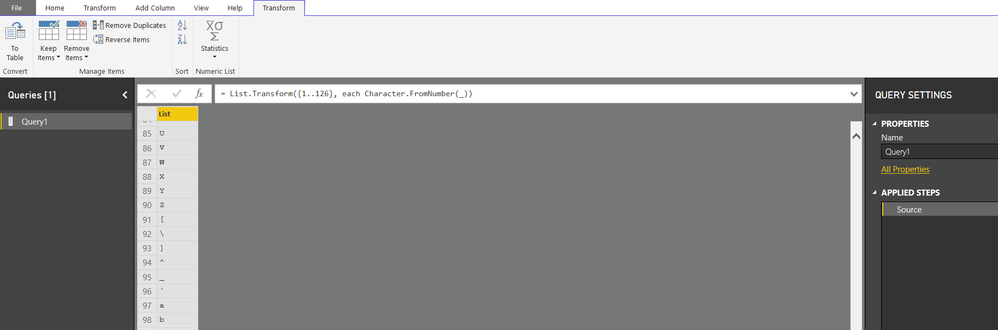
@AnonymousThis function results in a list of majority of characters that we can type from the keyboard
List.Transform({1..126}, each Character.FromNumber(_))
Create a blank query and cope paste above code you will get
Check out the April 2026 Power BI update to learn about new features.
Sign up to receive a private message when registration opens and key events begin.
If you have recently started exploring Fabric, we'd love to hear how it's going. Your feedback can help with product improvements.
| User | Count |
|---|---|
| 30 | |
| 24 | |
| 23 | |
| 17 | |
| 15 |
| User | Count |
|---|---|
| 63 | |
| 36 | |
| 30 | |
| 22 | |
| 22 |