Join us at FabCon Atlanta from March 16 - 20, 2026, for the ultimate Fabric, Power BI, AI and SQL community-led event. Save $200 with code FABCOMM.
Register now!The Power BI Data Visualization World Championships is back! Get ahead of the game and start preparing now! Learn more
I have an excel sheet as below and i want to import only chines names and blanks into power bi and delete remaining rows.
Excel Sheet data:
-----------------
| ID | Name |
| 1 | shiv |
| 2 | kumar |
| 3 | 24567 |
| 4 | 谢谢 |
| 5 | 你好 |
| 6 | 明天见 |
| 7 |
Data in Power BI should look like:
---------------------------------------
| ID | Name |
| 4 | 谢谢 |
| 5 | 你好 |
| 6 | 明天见 |
| 7 |
in the given example above i have shown few records but i have millions of rows to do this.
Solved! Go to Solution.
@Anonymous
Sorry I had missed the null
File attached as well
try this
= Table.SelectRows(#"Changed Type", each List.ContainsAny({"",null}, {Text.Select([Name],List.Transform({1..126}, each Character.FromNumber(_)))}))
Hi @Anonymous
Try adding this step in Query Editor
It works with your sample data
= Table.SelectRows(#"Changed Type", each Text.Select([Name],List.Transform({1..126}, each Character.FromNumber(_)))="")
See the attached file
@Anonymous
Sorry I had missed the null
File attached as well
try this
= Table.SelectRows(#"Changed Type", each List.ContainsAny({"",null}, {Text.Select([Name],List.Transform({1..126}, each Character.FromNumber(_)))}))
Thank you so much @Zubair_Muhammad it worked.
However, i didnt get this trasform List.Transform({1..126) that how it works?. if possible, pls explain.
Thank you again for swift response and help 🙂
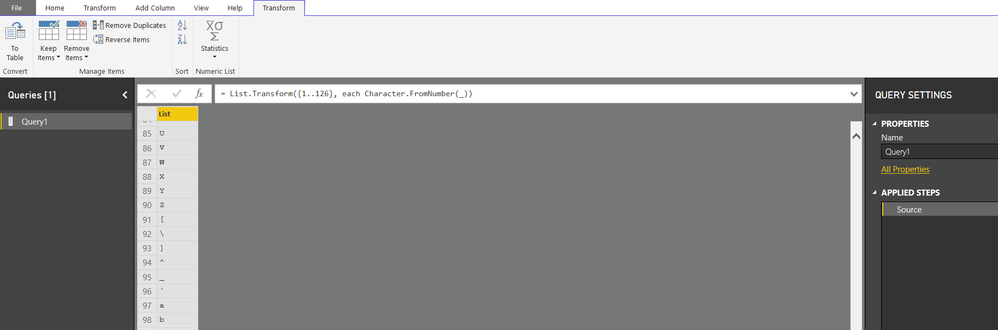
@AnonymousThis function results in a list of majority of characters that we can type from the keyboard
List.Transform({1..126}, each Character.FromNumber(_))
Create a blank query and cope paste above code you will get
The Power BI Data Visualization World Championships is back! Get ahead of the game and start preparing now!
Check out the November 2025 Power BI update to learn about new features.
| User | Count |
|---|---|
| 59 | |
| 46 | |
| 42 | |
| 23 | |
| 18 |
| User | Count |
|---|---|
| 192 | |
| 125 | |
| 99 | |
| 67 | |
| 48 |