Join us at FabCon Atlanta from March 16 - 20, 2026, for the ultimate Fabric, Power BI, AI and SQL community-led event. Save $200 with code FABCOMM.
Register now!The Power BI Data Visualization World Championships is back! Get ahead of the game and start preparing now! Learn more
Hi,
I have access database that uses ODBC connection to extract data which is stored in the SQL server. I installed power BI desktop and need to import data from this access database. How can i achieve this? I was able to connect to SQL server directly using "ODBC" as data source however I DO NOT want to connect to SQL server directly. I need to extract the same data from access database since my access database is well establised and contains 100s of queries that I use everyday. Please help.
Thanks
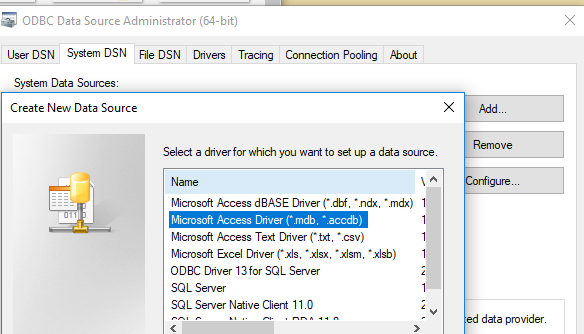
You just need to create a DSN opening connection to Access Database with Access Driver.
Then get data from ODBC in Power BI Desktop and select that created DSN.
Regards,
I was able to create the system DSN (the one that you indicated) however, it did not solve my issue. The access database that i need to import in power BI is itself extracting the data from SQL server via ODBC connection. The following is the error i am getting when i try to load the data from my access database in power BI desktop. Help please..Thanks in advance
@ontario234 so are you saying you are pulling from a sql database through access to power bi?
your image is broken
Proud to be a Super User!
Yes. I don't have SQL server on my computer. I use access to extract data from SQL server database and my access in well established with number of queries that i use everyday. This is the reason i need to import access database in power BI so i could use the already built queries to create graphs and all sorts of other analysis. Thx
Below is the error i am getiing when i try to load data from access database(mentioned in the post above) in power BI
DataSource.Error: ODBC: ERROR [HY000] [Microsoft][ODBC Microsoft Access Driver] ODBC--connection to 'Sql Server' failed.
Details:
DataSourceKind=Odbc
DataSourcePath=dsn=access2
OdbcErrors=Table
I am having a very similar problem...has this issue been solved?
Many thanks
Check out the November 2025 Power BI update to learn about new features.
Advance your Data & AI career with 50 days of live learning, contests, hands-on challenges, study groups & certifications and more!
| User | Count |
|---|---|
| 57 | |
| 44 | |
| 41 | |
| 21 | |
| 18 |
| User | Count |
|---|---|
| 183 | |
| 114 | |
| 93 | |
| 61 | |
| 45 |