cancel
Showing results for 
Search instead for 
Did you mean: 

The Power BI Data Visualization World Championships is back! It's time to submit your entry. Live now!

Reply
VipinReddy
Microsoft Employee
Microsoft Employee

Import and Direct query working differently.

Hi All, 


I have two tables which are shown below. 

Table1 

ID NameArea Amount
1Name1India100
2Name2USA100
3Name3Canada200

Table 2 

ID Review 
1TRUE
2FALSE


I have created a visual in PowerBI which shows the count of IDs and amount based on area and I am applying the review filter on it as not true, which means I only want to see the records that are not reviewed. 


Case1 - Table 2 Import Mode 

This is of my visual looks. 

Area Count of ID's Amount 
USA1100
Canada1200


Case2 - Table 2 Direct Query mode. 

Area Count of ID's Amount 
USA1100


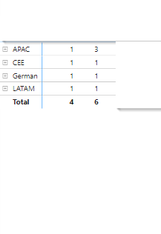
The relationship between table1 and table2 is the same in both cases. Why is the visual not showing Canada's record in direct query mode? What is the difference between Import and direct query in this situation? Will I be able to show Canada's record using direct query mode? 


I am attaching original PowerBI screenshots below. 

Import Mode - 

VipinReddy_0-1643658013335.png

Direct Query Mode

VipinReddy_1-1643658088111.png


2 REPLIES 2
v-kkf-msft
Community Support
Community Support

Hi @VipinReddy ,


What is the version of Desktop you are using?

How to create your inter-table relationships?

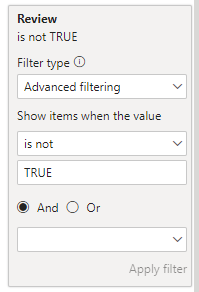
Is the filtering done in the slicer or in the filter pane? If in the filter pane, are you using the following advanced filtering?


vkkfmsft_0-1644216900343.png


Best Regards,
Winniz

amitchandak
Super User
Super User

@VipinReddy , That is strange. Ideally, there should not be any different.

Please check if something getting added to power query (in open data transformation)


Also run a group by query on database and check is there any issue there

Share with Power BI Enthusiasts: Full Power BI Video (20 Hours) YouTube
Microsoft Fabric Series 60+ Videos YouTube
Microsoft Fabric Hindi End to End YouTube

Helpful resources

Announcements
FabCon Atlanta 2026 carousel

FabCon Atlanta 2026

Join us at FabCon Atlanta, March 16-20, for the ultimate Fabric, Power BI, AI and SQL community-led event. Save $200 with code FABCOMM.