cancel
Showing results for 
Search instead for 
Did you mean: 

The Power BI Data Visualization World Championships is back! Get ahead of the game and start preparing now! Learn more

Reply
GeorgesKV
Helper I
Helper I

Import a PivotTable to PowerBi?

Hi all,

So we are changing to a unique dashboard instead of creating multiple excel files for each week in various reports, I'm having a problem with one of them.

It's a Capacity Utilization based on Billable and non Billable Hours, one of the colums where I get the data has 2 text values "no" and "yes", so I've created two pivot table, one with the total counting both but showing 2 row for each employee and the "yes" and "no" options with the hours for each one, the colums is year and month, and another Pivot Table where it shows only the billable ones.

With that I have a Colum with Line chart for each employee where Colum is the total utilization (sum of yes and no) and billables and the line is the % of each. -- Here is my problem, because I see that Power Bi doesn't read a specific row to create a chart, but colums, so in the excel I just use the "=" to the pivot sheet with the results for each employee for each month but I can't do that on PowerBi, and if I just import this data for PBI it won't read since it's a bunch of rows and not colums, I was thinking about creating 4 more colums, one with the "sum if yes" one "sum" for everything "% of sum yes" and "% sum".

If anyone wants to help I can send over the excel with the pivots and etctera.

https://imgur.com/a/LXkcE3i  - The problematic one


Regards,

1 ACCEPTED SOLUTION

Hi @GeorgesKV,


Please be aware of your data safety. 

If I understand your requirements correctly, it could be done by four measures as follows. Please also check out the demo in the attachment.


sumOfYes =
CALCULATE (
    COUNTROWS ( 'PM__Time_Detail_by_Month_by_Bra' ),
    PM__Time_Detail_by_Month_by_Bra[Billable] = "Yes"
)
sumOfNo =
CALCULATE (
    COUNTROWS ( 'PM__Time_Detail_by_Month_by_Bra' ),
    PM__Time_Detail_by_Month_by_Bra[Billable] = "No"
)
%sumOfYes =
DIVIDE (
    CALCULATE (
        COUNTROWS ( 'PM__Time_Detail_by_Month_by_Bra' ),
        PM__Time_Detail_by_Month_by_Bra[Billable] = "Yes"
    ),
    CALCULATE (
        COUNTROWS ( 'PM__Time_Detail_by_Month_by_Bra' ),
        ALL ( PM__Time_Detail_by_Month_by_Bra[Billable] )
    ),
    0
)
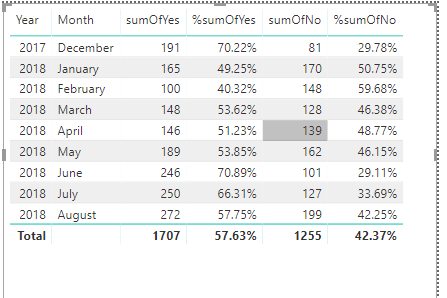
%sumOfNo =
DIVIDE (
    CALCULATE (
        COUNTROWS ( 'PM__Time_Detail_by_Month_by_Bra' ),
        PM__Time_Detail_by_Month_by_Bra[Billable] = "No"
    ),
    CALCULATE (
        COUNTROWS ( 'PM__Time_Detail_by_Month_by_Bra' ),
        ALL ( PM__Time_Detail_by_Month_by_Bra[Billable] )
    ),
    0
)

sub_of


Best Regards,
Dale

Community Support Team _ Dale
If this post helps, then please consider Accept it as the solution to help the other members find it more quickly.

View solution in original post

4 REPLIES 4
v-jiascu-msft
Microsoft Employee
Microsoft Employee

Hi @GeorgesKV,


The link is invalid. It's better to share a sample file. Then we can test and build solutions. 

I think you need several measures in your scenario. Then put it in a table visual, the result will be aggregated by context. Please provide a sample file.


Measure = count('table'[column])


Best Regards,
Dale

Community Support Team _ Dale
If this post helps, then please consider Accept it as the solution to help the other members find it more quickly.

Did my sample help?

Hi @GeorgesKV,


Please be aware of your data safety. 

If I understand your requirements correctly, it could be done by four measures as follows. Please also check out the demo in the attachment.


sumOfYes =
CALCULATE (
    COUNTROWS ( 'PM__Time_Detail_by_Month_by_Bra' ),
    PM__Time_Detail_by_Month_by_Bra[Billable] = "Yes"
)
sumOfNo =
CALCULATE (
    COUNTROWS ( 'PM__Time_Detail_by_Month_by_Bra' ),
    PM__Time_Detail_by_Month_by_Bra[Billable] = "No"
)
%sumOfYes =
DIVIDE (
    CALCULATE (
        COUNTROWS ( 'PM__Time_Detail_by_Month_by_Bra' ),
        PM__Time_Detail_by_Month_by_Bra[Billable] = "Yes"
    ),
    CALCULATE (
        COUNTROWS ( 'PM__Time_Detail_by_Month_by_Bra' ),
        ALL ( PM__Time_Detail_by_Month_by_Bra[Billable] )
    ),
    0
)
%sumOfNo =
DIVIDE (
    CALCULATE (
        COUNTROWS ( 'PM__Time_Detail_by_Month_by_Bra' ),
        PM__Time_Detail_by_Month_by_Bra[Billable] = "No"
    ),
    CALCULATE (
        COUNTROWS ( 'PM__Time_Detail_by_Month_by_Bra' ),
        ALL ( PM__Time_Detail_by_Month_by_Bra[Billable] )
    ),
    0
)

sub_of


Best Regards,
Dale

Community Support Team _ Dale
If this post helps, then please consider Accept it as the solution to help the other members find it more quickly.

Thank you. I've removed all the private info, leaving only public and changed info so it's safe. Anyhow the link expired. I will look into this, thank you again.

Helpful resources

Announcements
Power BI DataViz World Championships

Power BI Dataviz World Championships

The Power BI Data Visualization World Championships is back! Get ahead of the game and start preparing now!

December 2025 Power BI Update Carousel

Power BI Monthly Update - December 2025

Check out the December 2025 Power BI Holiday Recap!

FabCon Atlanta 2026 carousel

FabCon Atlanta 2026

Join us at FabCon Atlanta, March 16-20, for the ultimate Fabric, Power BI, AI and SQL community-led event. Save $200 with code FABCOMM.