cancel
Showing results for 
Search instead for 
Did you mean: 

A new Data Days event is coming soon! This time we’re going bigger than ever. Fabric, Power BI, SQL, AI and more. Don't miss out.

Reply
Anonymous
Not applicable

Import Query and Direct Query

Hi

    I need help to for Direct query.I am using Direct query and I  need to add new column for DAX function Expression can you please me how to use DAX function in Direct Query mode becase Direct query mode data model is not avalable.

1 ACCEPTED SOLUTION

Hi @Anonymous,


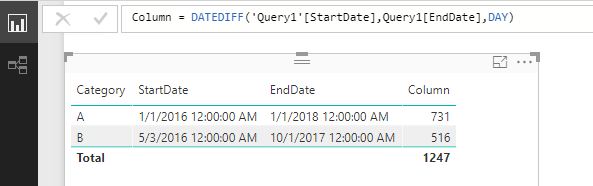
The DateDiff() function is supported in DirectQuery, please update your desktop to the latest June version then test again. 


q5.PNG


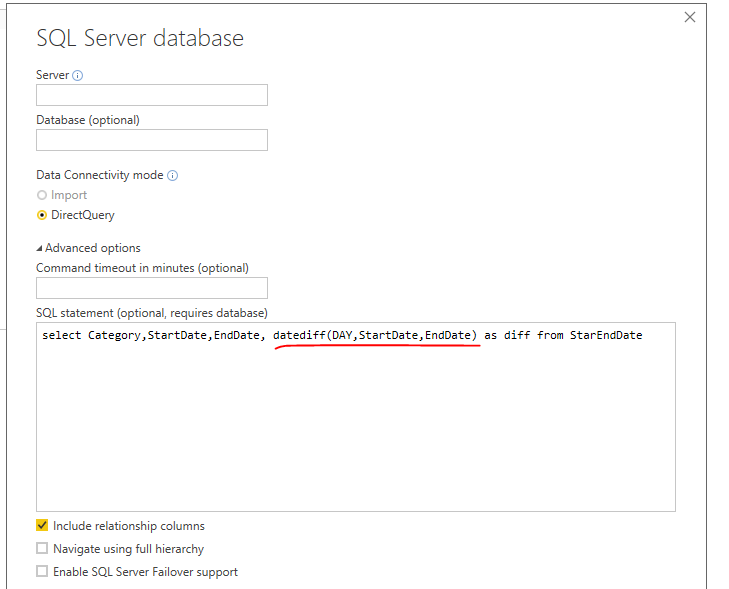
Also you can calcualte the date difference in T-SQL queruy as I suggested before: 


q6.PNG


Best Regards,
Qiuyun Yu 

Community Support Team _ Qiuyun Yu
If this post helps, then please consider Accept it as the solution to help the other members find it more quickly.

View solution in original post

5 REPLIES 5
v-qiuyu-msft
Community Support
Community Support

Hi @Anonymous,


From this article, you can see there is a limitation of calculated column in DirectQuery mode: 


  • Limitations in calculated columns: Calculated columns are limited to being intra-row, as in, they can only refer to values of other columns of the same table, without the use of any aggregate functions. Additionally, the DAX scalar functions (such as LEFT()) that are allowed, will be limited to those which can simply be pushed to the underlying source, hence will vary depending upon the exact capabilities of the source. Functions that are not supported will not be listed in autocomplete when authoring the DAX for a calculated column, and would result in an error if used.


In your scenario, it depends on which logic you would like use for calculated column. If you want to use aggregate functions, eg: Average, Sum which are not supported in DirectQuery. You can try to specify the calculated column in T-SQL query when get data. 


Best Regards,
Qiuyun Yu

Community Support Team _ Qiuyun Yu
If this post helps, then please consider Accept it as the solution to help the other members find it more quickly.
Anonymous
Not applicable

Hi Qiuyun Yu


          Thank you for your help .But I need to use DAX Function like Date and Time Function,Time Intelligence Fuction,Filter Function,Logical Function this functions using with DirectQuery becase my comapny report requiered calculated function and they wants live data and Data will be update every 15 min thats why I am using Direct Query.


Thanks


Hi @Anonymous,


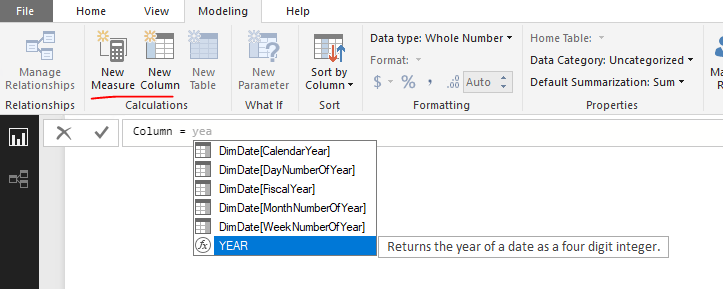
Based on my test, most of Date and Time Function,Time Intelligence Function,Filter Function,Logical Function is supported in DirectQuery, you can click New Column button then type desired function, if it's available in prompt dropdown list, then it's supported to use this function. Otherwise, it's not able to use it. 


q6.PNG


Best Regards,
Qiuyun Yu

Community Support Team _ Qiuyun Yu
If this post helps, then please consider Accept it as the solution to help the other members find it more quickly.
Anonymous
Not applicable

Hi

   Qiuyun Yu ,


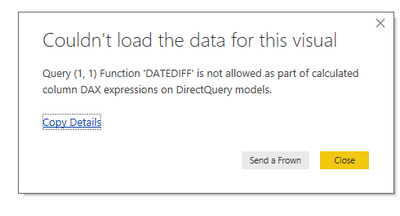
         Yes, You are right and but I need calculated column in Direct Query mode. year support but I need different function use for my report . I still getting error below image.Capture_DAX_function_error.PNG


Thanks.

Hi @Anonymous,


The DateDiff() function is supported in DirectQuery, please update your desktop to the latest June version then test again. 


q5.PNG


Also you can calcualte the date difference in T-SQL queruy as I suggested before: 


q6.PNG


Best Regards,
Qiuyun Yu 

Community Support Team _ Qiuyun Yu
If this post helps, then please consider Accept it as the solution to help the other members find it more quickly.

Helpful resources

Announcements
May Power BI Update Carousel

Power BI Monthly Update - May 2026

Check out the May 2026 Power BI update to learn about new features.

Fabric SQL PBI Data Days

Data Days 2026 coming soon!

Sign up to receive a private message when registration opens and key events begin.

New to Fabric survey Carousel

New to Fabric Survey

If you have recently started exploring Fabric, we'd love to hear how it's going. Your feedback can help with product improvements.

Power BI DataViz World Championships carousel

Power BI DataViz World Championships - June 2026

A new Power BI DataViz World Championship is coming this June! Don't miss out on submitting your entry.