This is best Fabric, Power BI, SQL and AI community event. How do we know? The last event sold out! Save €200 with code FABCMTY200.
Register nowA new Data Days event is coming soon! This time we’re going bigger than ever. Fabric, Power BI, SQL, AI and more. Don't miss out.
Hi
I need help to for Direct query.I am using Direct query and I need to add new column for DAX function Expression can you please me how to use DAX function in Direct Query mode becase Direct query mode data model is not avalable.
Solved! Go to Solution.
Hi @Anonymous,
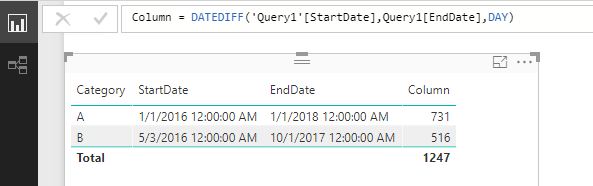
The DateDiff() function is supported in DirectQuery, please update your desktop to the latest June version then test again.
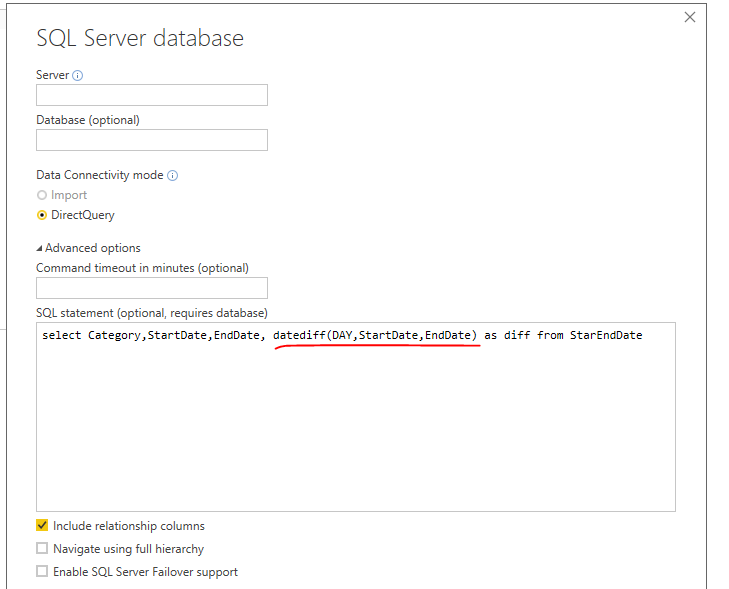
Also you can calcualte the date difference in T-SQL queruy as I suggested before:
Best Regards,
Qiuyun Yu
Hi @Anonymous,
From this article, you can see there is a limitation of calculated column in DirectQuery mode:
In your scenario, it depends on which logic you would like use for calculated column. If you want to use aggregate functions, eg: Average, Sum which are not supported in DirectQuery. You can try to specify the calculated column in T-SQL query when get data.
Best Regards,
Qiuyun Yu
Hi Qiuyun Yu
Thank you for your help .But I need to use DAX Function like Date and Time Function,Time Intelligence Fuction,Filter Function,Logical Function this functions using with DirectQuery becase my comapny report requiered calculated function and they wants live data and Data will be update every 15 min thats why I am using Direct Query.
Thanks
Hi @Anonymous,
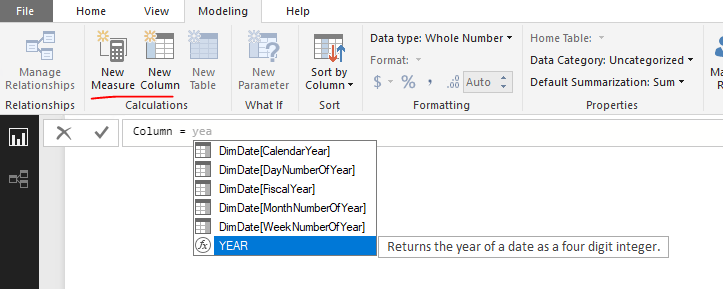
Based on my test, most of Date and Time Function,Time Intelligence Function,Filter Function,Logical Function is supported in DirectQuery, you can click New Column button then type desired function, if it's available in prompt dropdown list, then it's supported to use this function. Otherwise, it's not able to use it.
Best Regards,
Qiuyun Yu
Hi
Qiuyun Yu ,
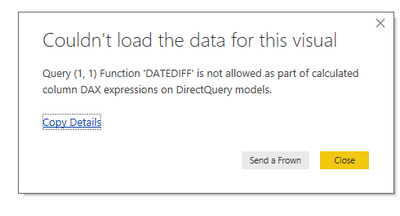
Yes, You are right and but I need calculated column in Direct Query mode. year support but I need different function use for my report . I still getting error below image.
Thanks.
Hi @Anonymous,
The DateDiff() function is supported in DirectQuery, please update your desktop to the latest June version then test again.
Also you can calcualte the date difference in T-SQL queruy as I suggested before:
Best Regards,
Qiuyun Yu
Check out the May 2026 Power BI update to learn about new features.
Sign up to receive a private message when registration opens and key events begin.
If you have recently started exploring Fabric, we'd love to hear how it's going. Your feedback can help with product improvements.
| User | Count |
|---|---|
| 27 | |
| 27 | |
| 25 | |
| 19 | |
| 14 |
| User | Count |
|---|---|
| 52 | |
| 47 | |
| 39 | |
| 21 | |
| 20 |