This is best Fabric, Power BI, SQL and AI community event. How do we know? The last event sold out! Save €200 with code FABCMTY200.
Register nowA new Data Days event is coming soon! This time we’re going bigger than ever. Fabric, Power BI, SQL, AI and more. Don't miss out.
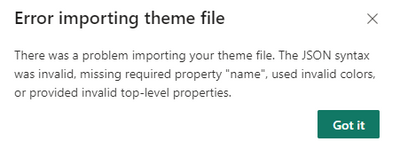
I am trying to import a custom theme into my Power BI report, but I keep getting an error message
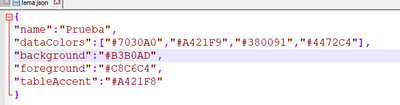
{
"name":"Prueba",
"dataColors":["#7030A0","#A421F9","#380091","#4472C4"],
"background":"#B3B0AD",
"foreground":"#C8C6C4",
"tableAccent":"#A421F8"
}
Please consider marking replies as a Solution to your issue so others facing similar problems can find answers that worked.
And if you don't ming my asking: what was the action(s) that fixed it?
Proud to be a Super User! | |
Thanks you , I was able to solve it with your help
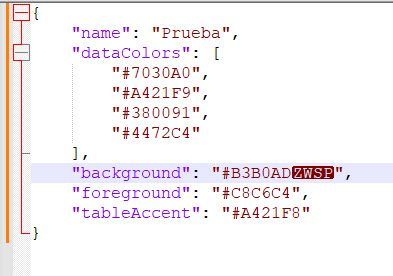
I copied and pasted your JSON into Notepad++ and did a Format as JSON. There was some wierd character string at the end of the "backgroud" node:
Proud to be a Super User! | |
thanks for you replay , but I tried with note ++ and in my case there is no this no additional characters
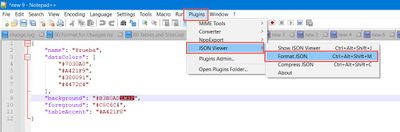
Did you try to format the pasted text as JSON?
Another possible solution, however tedious it is to work, is to start small with your custom JSON theme. Start with name and dataColors only. Apply that. If that works, create a COPY and add to that background. (But save your original in case this edited copy bombs out). AND, when making changes, do NOT copy and paste, type them out manually so as to avoid hidden special characters.
Proud to be a Super User! | |
Check out the May 2026 Power BI update to learn about new features.
Sign up to receive a private message when registration opens and key events begin.
If you have recently started exploring Fabric, we'd love to hear how it's going. Your feedback can help with product improvements.
| User | Count |
|---|---|
| 31 | |
| 26 | |
| 23 | |
| 22 | |
| 15 |
| User | Count |
|---|---|
| 62 | |
| 47 | |
| 28 | |
| 24 | |
| 21 |