cancel
Showing results for 
Search instead for 
Did you mean: 

The FabCon + SQLCon recap series starts April 14th at 8am Pacific. If you’re tracking where AI is going inside Fabric, this first session is a can't miss. Register now

Reply
Anonymous
Not applicable

Implementing soft RLS in Power BI based on User login

Dear All,


I am coming from Tableau world and started working in Power BI . Need  your help for below issue .

My requirement is to display data based on user login in few visuals & in few visuals all the data. So I cannot implement the normal RLS feature .

In one visual need to show the Team's data of User Logged in ,  I have 2 tables ( Users & Tasks Export ) and are joined based on email id .


I am using below DAX formula to achieve this , its not working


RLS User Team Tasks =

// To get the team name from "Users" table based on user login

var CurrentUserTeam=CALCULATE( MAX('Users'[Team ]),'Users'[UserMail]=USERPRINCIPALNAME())

// To filter the 'Task" table using above calculated variable to show only logged in User's team data

var CurrentUserTeamFilter=FILTER('Tasks','Tasks'[Team]=CurrentUserTeam)

return

SWITCH(

        TRUE(),

        SELECTEDVALUE('Tasks'[Team])=CurrentUserTeam, CALCULATE( [#Total Task],CurrentUserTeamFilter),

        BLANK()

)


Upon debugging above DAX  formula second variable is not getting filtered as per expectation , its giving an error "The expression refers to multiple columns . Multiple columns cannot be converted to scalar value " . Can you please let me know if there is any alternative way to achieve this .


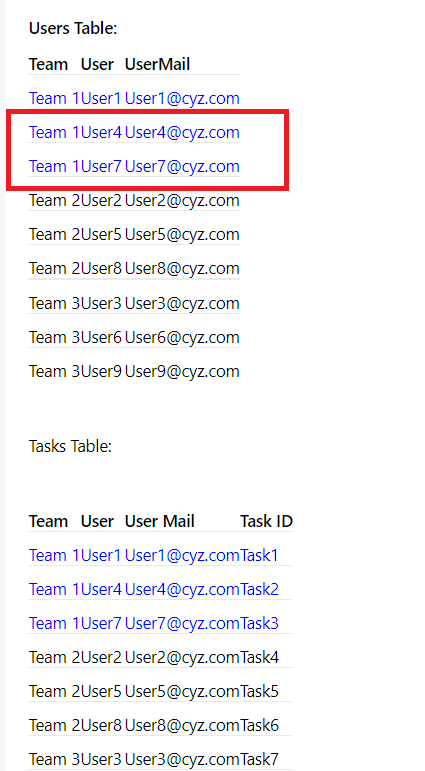
If User1 or User4 or User7 logins they need to see below highlighted blue data


Users Table:

Team

User

UserMail

Team 1

User1

User1@cyz.com

Team 1

User4

User4@cyz.com

Team 1

User7

User7@cyz.com

Team 2

User2

User2@cyz.com

Team 2

User5

User5@cyz.com

Team 2

User8

User8@cyz.com

Team 3

User3

User3@cyz.com

Team 3

User6

User6@cyz.com

Team 3

User9

User9@cyz.com


Tasks Table:


Team

User

User Mail

Task ID

Team 1

User1

User1@cyz.com

Task1

Team 1

User4

User4@cyz.com

Task2

Team 1

User7

User7@cyz.com

Task3

Team 2

User2

User2@cyz.com

Task4

Team 2

User5

User5@cyz.com

Task5

Team 2

User8

User8@cyz.com

Task6

Team 3

User3

User3@cyz.com

Task7

Team 3

User6

User6@cyz.com

Task8

Team 3

User9

User9@cyz.com

Task9


Thank you,

Kalyan.


1 ACCEPTED SOLUTION
Anonymous
Not applicable

Hi @Anonymous ,


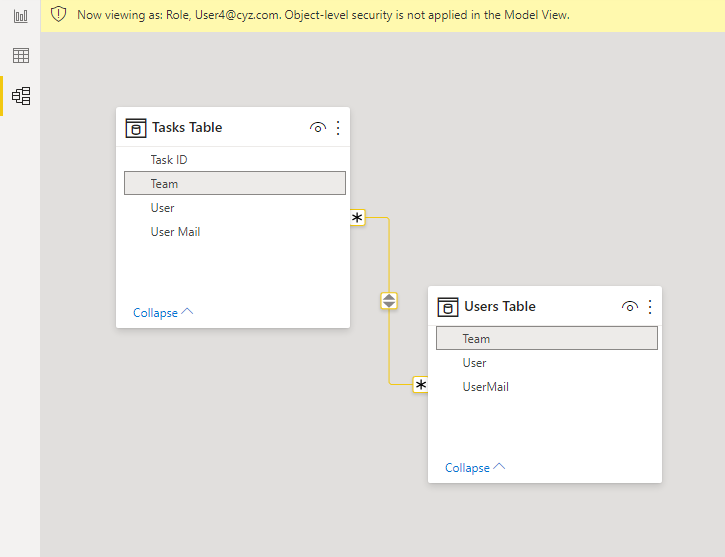
Do you want user 1 to be able to see the information of user 1, user 4 and user 7?
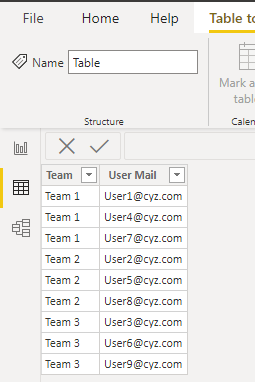
If so, please create the following relationship

15.png

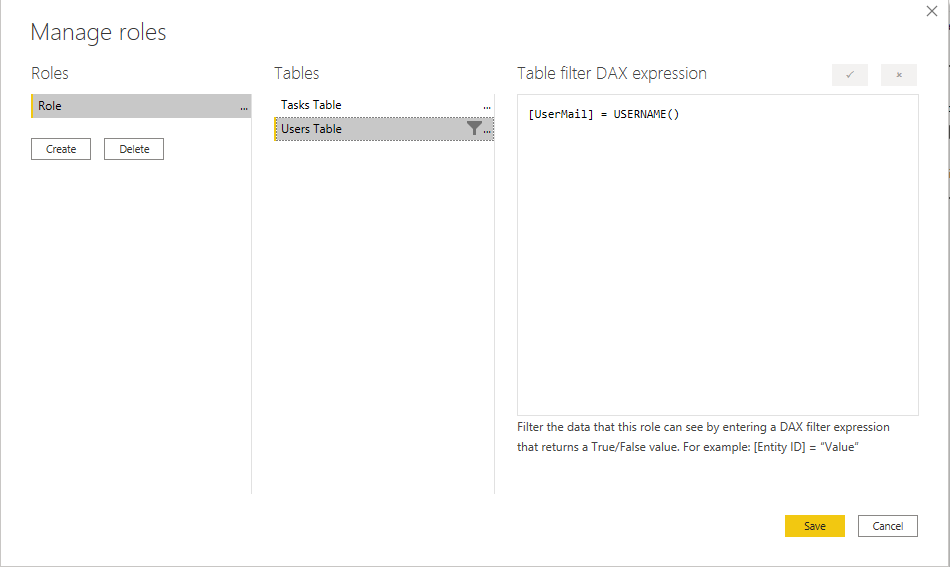
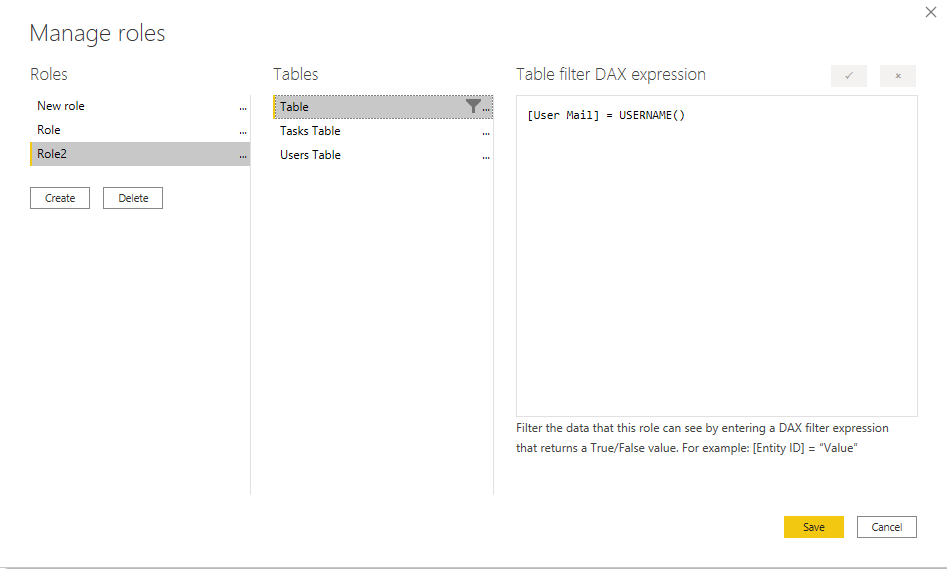
Then create the following role16.png


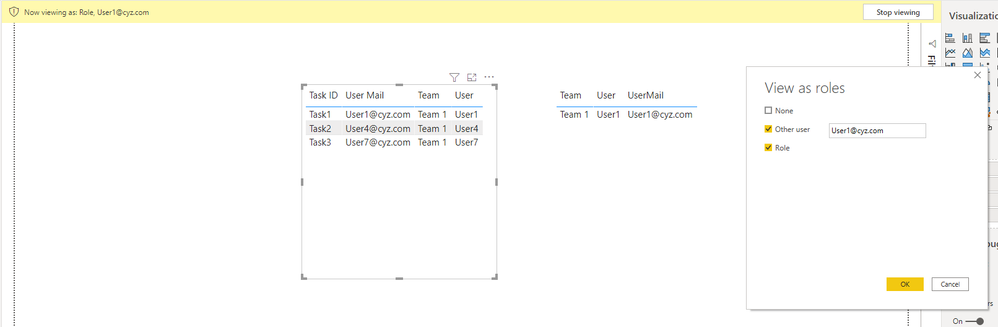
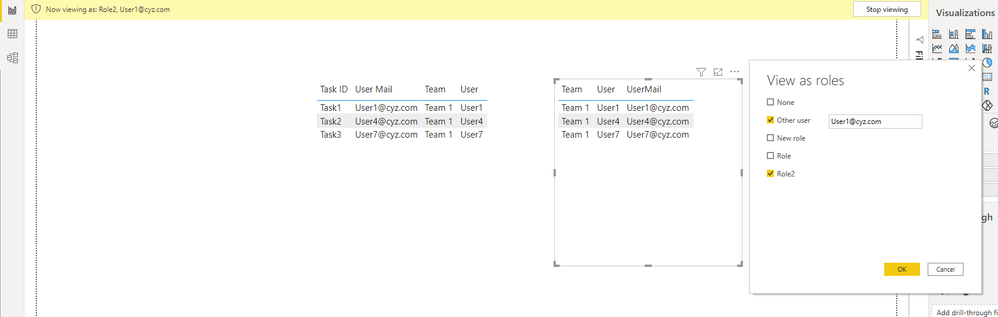
Test result


19.png


You will find that the box circled in red is not displayed. 

18.png

If you want to display it, you need to create a new table as follows.

22.png

Pay attention to the direction of relationships

21.png


23.png

24.png


You can check more details from the attachment.


Reference: https://radacad.com/what-do-you-need-to-implement-dynamic-row-level-security-in-power-bi


Best Regards,

Stephen Tao


If this post helps, then please consider Accept it as the solution to help the other members find it more quickly.

View solution in original post

3 REPLIES 3
Anonymous
Not applicable

Dear Stephen,

Thank you so much for your time and explanation . I will try to impliment the solution and let you know .

Here my concerns I need to show some visuals on entire data set as per requirement  , is it possible ? Please let me know 


Thanks,

Kalyan

Anonymous
Not applicable

Hi @Anonymous ,


Yes, it is possibile. As you can see from the content I just replied, the visual of the table is also one of the many visuals.😊


Best Regards,

Stephen Tao


If this post helps, then please consider Accept it as the solution to help the other members find it more quickly.

Anonymous
Not applicable

Hi @Anonymous ,


Do you want user 1 to be able to see the information of user 1, user 4 and user 7?
If so, please create the following relationship

15.png

Then create the following role16.png


Test result


19.png


You will find that the box circled in red is not displayed. 

18.png

If you want to display it, you need to create a new table as follows.

22.png

Pay attention to the direction of relationships

21.png


23.png

24.png


You can check more details from the attachment.


Reference: https://radacad.com/what-do-you-need-to-implement-dynamic-row-level-security-in-power-bi


Best Regards,

Stephen Tao


If this post helps, then please consider Accept it as the solution to help the other members find it more quickly.

Helpful resources

Announcements
New to Fabric survey Carousel

New to Fabric Survey

If you have recently started exploring Fabric, we'd love to hear how it's going. Your feedback can help with product improvements.

Power BI DataViz World Championships carousel

Power BI DataViz World Championships - June 2026

A new Power BI DataViz World Championship is coming this June! Don't miss out on submitting your entry.

Join our Fabric User Panel

Join our Fabric User Panel

Share feedback directly with Fabric product managers, participate in targeted research studies and influence the Fabric roadmap.

March Power BI Update Carousel

Power BI Community Update - March 2026

Check out the March 2026 Power BI update to learn about new features.