cancel
Showing results for 
Search instead for 
Did you mean: 

Did you hear? There's a new SQL AI Developer certification (DP-800). Start preparing now and be one of the first to get certified. Register now

Reply
Anonymous
Not applicable

Implementing SQL Lag and Lead functions in Power BI Direct Query

CustomerIDLast InteractionDays to Repeat
X18/07/2019NULL
Y02/01/2019-29
Y31/01/2019-84
Y25/04/20190
Y25/04/2019-156
Y28/09/2019-23
Y21/10/2019NULL
Z05/09/2019-56
Z31/10/2019NULL


Hi Everyone, 


I am stuck with a problem where I need to see when a customer repeat contacts us using dates within the same column. I am using a SQL lead function to get the number of days the customer takes to contact me again (see table attached). I want to do this in Power BI Direct query import but it is not allowing me to do so. I want to use direct query only as the data I have is over 600,000 rows and I want to eliminate taking excel outputs from SQL as the process gets cumbersome.

Any leads on this would be really appreciated 🙂


Regards

Sud__

1 ACCEPTED SOLUTION
dax
Community Support
Community Support

Hi @Anonymous , 

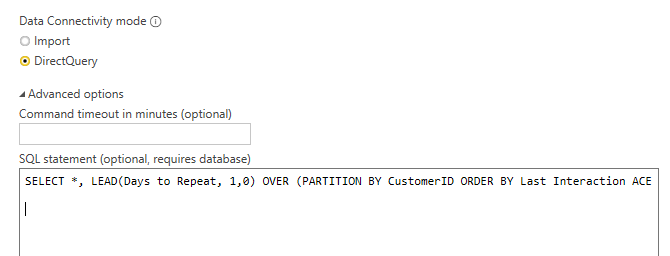
You could use SQL  query like below to get result directly

567.PNG

SELECT *, LEAD(Days to Repeat, 1,0) OVER (PARTITION BY CustomerID ORDER BY Last Interaction ACE ) AS new FROM table
 

Or you could try to use below query to cretae index, then use expression in my first reply to get result

SELECT *, ROW_NUMBER() OVER (PARTITION BY CustomerID ORDER BY Last Interaction ACE ) AS index FROM table
 

Best Regards,
Zoe Zhi

If this post helps, then please consider Accept it as the solution to help the other members find it more quickly.

View solution in original post

4 REPLIES 4
dax
Community Support
Community Support

Hi @Anonymous , 

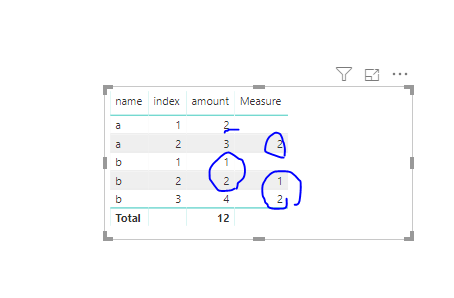
You could try to use SQL query when you connect to dicrect query , or you also could try to add a index column in your table by sql, then you could try to use expression like below

Measure = CALCULATE(SUM('Table (4)'[amount]), FILTER(ALLEXCEPT('Table (4)','Table (4)'[name]), 'Table (4)'[index]=MIN('Table (4)'[index])-1))

563.PNG 

Best Regards,
Zoe Zhi

If this post helps, then please consider Accept it as the solution to help the other members find it more quickly.

Anonymous
Not applicable

Hi ,


I am still not able to get the right information out. The problem is probably the date field being used. 


Thanks

Sud

dax
Community Support
Community Support

Hi @Anonymous , 

You could use SQL  query like below to get result directly

567.PNG

SELECT *, LEAD(Days to Repeat, 1,0) OVER (PARTITION BY CustomerID ORDER BY Last Interaction ACE ) AS new FROM table
 

Or you could try to use below query to cretae index, then use expression in my first reply to get result

SELECT *, ROW_NUMBER() OVER (PARTITION BY CustomerID ORDER BY Last Interaction ACE ) AS index FROM table
 

Best Regards,
Zoe Zhi

If this post helps, then please consider Accept it as the solution to help the other members find it more quickly.

Anonymous
Not applicable

If we use direct query we cannot aggregate, merge or do any operations on the table, A pop up will show to import the entire data set, can you provide any other solution in powerbi using earlier filter.


Thanks

Helpful resources

Announcements
April Power BI Update Carousel

Power BI Monthly Update - April 2026

Check out the April 2026 Power BI update to learn about new features.

Fabric SQL PBI Data Days

Data Days 2026 coming soon!

Sign up to receive a private message when registration opens and key events begin.

New to Fabric survey Carousel

New to Fabric Survey

If you have recently started exploring Fabric, we'd love to hear how it's going. Your feedback can help with product improvements.

Power BI DataViz World Championships carousel

Power BI DataViz World Championships - June 2026

A new Power BI DataViz World Championship is coming this June! Don't miss out on submitting your entry.