Don't miss your chance to take the Fabric Data Engineer (DP-600) exam for FREE! Find out how by watching the DP-600 session on-demand now through April 28th.
Learn moreJoin the FabCon + SQLCon recap series. Up next: Power BI, Real-Time Intelligence, IQ and AI, and Data Factory take center stage. All sessions are available on-demand after the live show. Register now
Hello all we are trying to connect to Impala using Direct query option . We are able to connect but the date /datetime columns (Timestamp) are coming as text . When we try to change the type to Date the same is not allowed . When we try to create a Date table that is also not possible as the New table is disabled.
I there a way to connect to Impala and have Dates represented in PowerBI desktop Or create a Date table .
Hi @hmpatel9,
Have you resolved your issue? If you have, welcome to share your solution or mark the right reply as answer. More people will benefit from here.
Best Regards,
Angelia
Hello Angelia .. Thank you for your inputs but I have not been able to solve this issue . WhenI try to change the data type of compluted column data type it gives a error that "Change type is not supprted for this source"
Is there an answer for this question
Try not to revive old threads, but yes, there is an answer.
As Angelia said, you can only change datatypes, etc. in Import mode; in DirectQuery, you're pulling data directly from the datasource, so if you want anything changed, it needs to be done in the backend (i.e. change the datatype in Impala).
Hi @hmpatel9,
You get data using Direct Qury, which means you connect the database directly instead of importing data into Power BI desktop. So we can't change the data type. The date /datetime columns (Timestamp) are coming as text, which shows the provider "Impala" recognize it as text format.
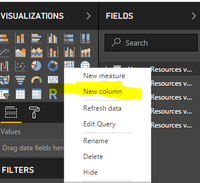
For your scenario, please right click table as follows, create a calculated column which equals to the date column using the formula below. Then set the calculated columns as date type, and check if it works fine.
NewColumn = [Date]
Best Regards,
Angelia
Check out the April 2026 Power BI update to learn about new features.
If you have recently started exploring Fabric, we'd love to hear how it's going. Your feedback can help with product improvements.
A new Power BI DataViz World Championship is coming this June! Don't miss out on submitting your entry.
| User | Count |
|---|---|
| 42 | |
| 35 | |
| 35 | |
| 22 | |
| 15 |
| User | Count |
|---|---|
| 65 | |
| 58 | |
| 28 | |
| 27 | |
| 25 |