Get Fabric or SQL Certified for Free.
Get certified for free when you join Fabric Data Days 2026 and dive into Fabric, Power BI, SQL, AI, and other essential data skills.
Join now- Power BI forums
- Get Help with Power BI
- Desktop
- Service
- Report Server
- Power Query
- Mobile Apps
- Developer
- DAX Commands and Tips
- Custom Visuals Development Discussion
- Health and Life Sciences
- Power BI Spanish forums
- Translated Spanish Desktop
- Training and Consulting
- Instructor Led Training
- Dashboard in a Day for Women, by Women
- Galleries
- Data Stories Gallery
- Themes Gallery
- Contests Gallery
- QuickViz Gallery
- Quick Measures Gallery
- Visual Calculations Gallery
- Notebook Gallery
- Translytical Task Flow Gallery
- TMDL Gallery
- R Script Showcase
- Webinars and Video Gallery
- Ideas
- Custom Visuals Ideas (read-only)
- Issues
- Issues
- Events
- Upcoming Events
Try your skills in the Power BI Dataviz World Championship! Round one ends June 26. Join now
- Power BI forums
- Forums
- Get Help with Power BI
- Desktop
- Re: Images as Column values in Table Visual
- Subscribe to RSS Feed
- Mark Topic as New
- Mark Topic as Read
- Float this Topic for Current User
- Bookmark
- Subscribe
- Printer Friendly Page

- Mark as New
- Bookmark
- Subscribe
- Mute
- Subscribe to RSS Feed
- Permalink
- Report Inappropriate Content
Images as Column values in Table Visual
Can we show some icons images in Table Visual for a column value? I want to show arrow icons if a value in column is between limits etc. Just some up/down/side arrows type basic icons.
Solved! Go to Solution.


- Mark as New
- Bookmark
- Subscribe
- Mute
- Subscribe to RSS Feed
- Permalink
- Report Inappropriate Content
- Mark as New
- Bookmark
- Subscribe
- Mute
- Subscribe to RSS Feed
- Permalink
- Report Inappropriate Content
A simple solution.
Using measures and emojis.

if ([Objetivos]  > 'Medidas Resumen'[Resultados]  ;"📙";"📗")

- Mark as New
- Bookmark
- Subscribe
- Mute
- Subscribe to RSS Feed
- Permalink
- Report Inappropriate Content
Hi @PowerBIGuy1 . Could you please share this solution with me. I have the same requirement. I could not find the solution in the discussions below.
Thanks!

- Mark as New
- Bookmark
- Subscribe
- Mute
- Subscribe to RSS Feed
- Permalink
- Report Inappropriate Content
You can also look at the card with states custom visual
https://app.powerbi.com/visuals/show/PBI_CV_7B952816_A48F_49B4_9E13_15E3BB2C0337
* Matt is an 8 times Microsoft MVP (Power BI) and author of the Power BI Book Supercharge Power BI.
I will not give you bad advice, even if you unknowingly ask for it.
- Mark as New
- Bookmark
- Subscribe
- Mute
- Subscribe to RSS Feed
- Permalink
- Report Inappropriate Content
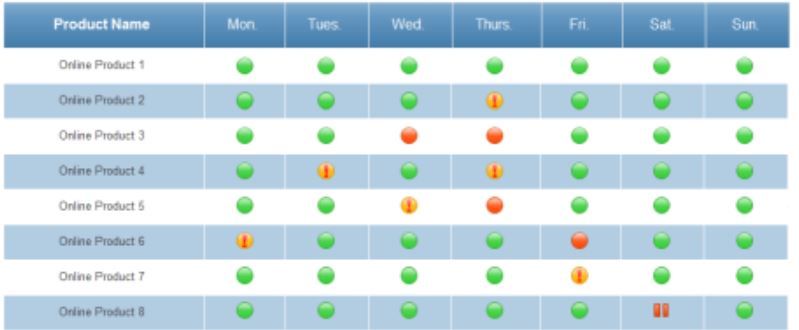
My requirement is to show something like this table. CARD visual or other custom visual info does not work for this case.


- Mark as New
- Bookmark
- Subscribe
- Mute
- Subscribe to RSS Feed
- Permalink
- Report Inappropriate Content
This is possible. You will have to use URLs as the measure/column values, and then select the corresponding measure/column and then go to modelling tab -> Data categor -> Image URL.
Once this is done, if you add the corresponding column/measure to a table, it will display the linked image.

- Mark as New
- Bookmark
- Subscribe
- Mute
- Subscribe to RSS Feed
- Permalink
- Report Inappropriate Content
Hi Sean,
i am having the similar issue. I am trying to display image as the values of the image. however, after applying the settings you mentioned, it doesn't work for the values, it only works for the row header..... Do you know how come it doesn't work for the values in a matrix?
thanks,
Vida
- Mark as New
- Bookmark
- Subscribe
- Mute
- Subscribe to RSS Feed
- Permalink
- Report Inappropriate Content
Hi Sen,
I am looking for this, can you please let me know if you find any solution for this.
Regards,
Naga.
- Mark as New
- Bookmark
- Subscribe
- Mute
- Subscribe to RSS Feed
- Permalink
- Report Inappropriate Content
Hi Naga,
what i found is that you have to use 'TABLE' instead of 'MATRIX' to make the image work. in your dataset, you should have a column containing the HTML of the images you want to apply.
Thanks,
Vida
- Mark as New
- Bookmark
- Subscribe
- Mute
- Subscribe to RSS Feed
- Permalink
- Report Inappropriate Content
@Mi2n @PowerBIGuy1's image is actually a matrix and the images will have to go into the Values!
Can you show us how to do this - without creating an Image Column for each Day of the Week and using a table?
- Mark as New
- Bookmark
- Subscribe
- Mute
- Subscribe to RSS Feed
- Permalink
- Report Inappropriate Content
Oops! My bad. I misunderstood the question. 
- Mark as New
- Bookmark
- Subscribe
- Mute
- Subscribe to RSS Feed
- Permalink
- Report Inappropriate Content

- Mark as New
- Bookmark
- Subscribe
- Mute
- Subscribe to RSS Feed
- Permalink
- Report Inappropriate Content
Probably the closest is the fantastic info-graphic custom visual which you can download from here
https://app.powerbi.com/visuals/show/InfographicDesigner1461802846252
I recommend you download the sample as well so you can follow the useful hints.

Helpful resources

Fabric Data Days 2026
Don't miss out on Data Days, June 15 through August 7. Learn Fabric, Power BI, SQL, AI and more.

Power BI DataViz World Championships - June 2026
A new Power BI DataViz World Championship is coming this June! Don't miss out on submitting your entry.

| User | Count |
|---|---|
| 23 | |
| 20 | |
| 19 | |
| 18 | |
| 10 |


| User | Count |
|---|---|
| 53 | |
| 53 | |
| 40 | |
| 37 | |
| 32 |


