Join us at FabCon Atlanta from March 16 - 20, 2026, for the ultimate Fabric, Power BI, AI and SQL community-led event. Save $200 with code FABCOMM.
Register now!The Power BI Data Visualization World Championships is back! Get ahead of the game and start preparing now! Learn more
Hello guys,
I got some issues by trying a calculate measure "Stock (org)" quantity to ingnore page filters.
I have three tables: Item and Calendar as dimension tables and Item Ledger Entry as fact table.
Stock (org) measure:
Stock (org) = CALCULATE(
SUM('Item Ledger Entry'[Quantity]),
FILTER(ALLSELECTED('Calendar'),
'Calendar'[Date]<=MAX('Calendar'[Date])
))Everything worked fine, till I had a task to create a table where show just purchase operation (Item name/Quantity/ and stock for end date), purchase operations (Item Ledger Entries [Source Type] = 2). I modified formula:
Stock (1) = CALCULATE(
SUM('Item Ledger Entry'[Quantity]), ALLEXCEPT('Item Ledger Entry', 'Item Ledger Entry'[Item No_]),
FILTER(ALLSELECTED('Calendar'),
'Calendar'[Date]<=MAX('Calendar'[Date])
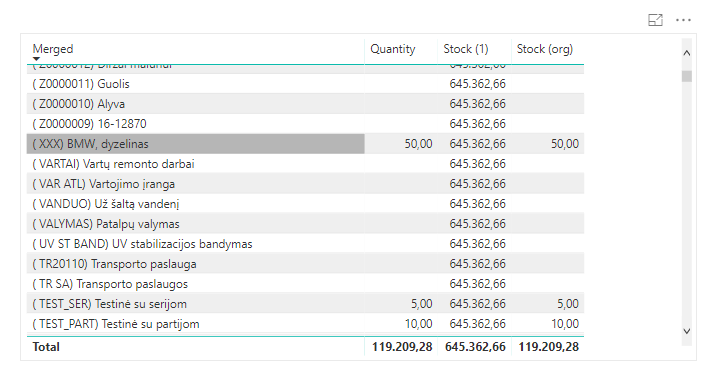
))But result is that it shows total stock amount for every Item.
Do you have any solutions how to modify formula, that fits my needs.
Example:
https://drive.google.com/file/d/18sR4YR79fLkCikuNw6lF_fFkM-VsR-4L/view?usp=sharing
Solved! Go to Solution.
Hi @Anonymous,
It seems you just need to remove the filter 'Item Ledger Entry'[Source Type]. Is it this one?
Stock (1) =
CALCULATE (
SUM ( 'Item Ledger Entry'[Quantity] ),
ALL ( 'Item Ledger Entry'[Source Type] ),
FILTER (
ALLSELECTED ( 'Calendar' ),
'Calendar'[Date] <= MAX ( 'Calendar'[Date] )
)
)
Best Regards,
Dale
Hi @Anonymous,
It seems you just need to remove the filter 'Item Ledger Entry'[Source Type]. Is it this one?
Stock (1) =
CALCULATE (
SUM ( 'Item Ledger Entry'[Quantity] ),
ALL ( 'Item Ledger Entry'[Source Type] ),
FILTER (
ALLSELECTED ( 'Calendar' ),
'Calendar'[Date] <= MAX ( 'Calendar'[Date] )
)
)
Best Regards,
Dale
Hey,
I have to admit that I do not fully understand your requirements, maybe you might consider to explain in more detail what you have to achieve.
But nevertheless, maybe this measure provides what you are looking for:
Stock (1) = CALCULATE(
sum('Item Ledger Entry'[Quantity])
--,ALLEXCEPT('Item Ledger Entry', 'Item Ledger Entry'[Item No_]),
,ALL('Item Ledger Entry')
,'Item Ledger Entry'[Source Type] = 2
,KEEPFILTERS(VALUES('Item'[Merged]))
,FILTER(
ALLSELECTED('Calendar')
,'Calendar'[Date]<=MAX('Calendar'[Date])
)
)
Regards,
Tom
Nope, it's sums just rows where Source Type is 2.
Let me be a little bit more clear.
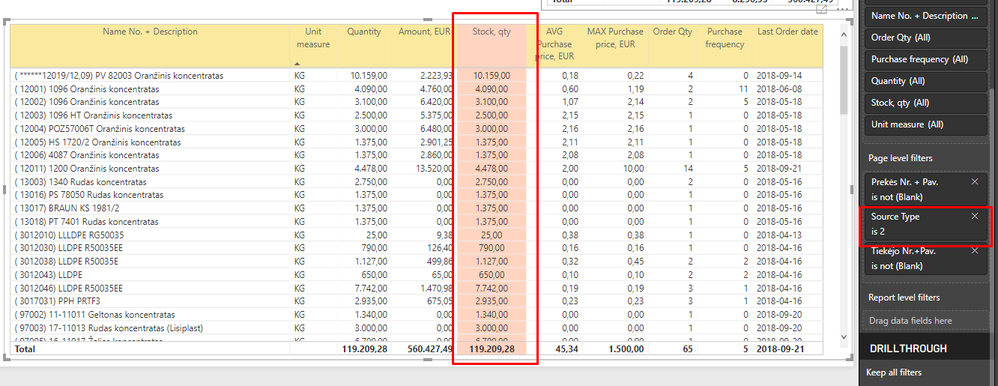
I prepared a table wich has all Purchase info (Page filter set up Source Type = 2) and in this table I need one more column (the red one) wich has to ignore Page filter Source Type =2 (show sum of all transactions for specific date).
Can you help me?
The Power BI Data Visualization World Championships is back! Get ahead of the game and start preparing now!
Check out the November 2025 Power BI update to learn about new features.
| User | Count |
|---|---|
| 59 | |
| 43 | |
| 42 | |
| 23 | |
| 17 |
| User | Count |
|---|---|
| 190 | |
| 122 | |
| 96 | |
| 66 | |
| 47 |