Join us at FabCon Atlanta from March 16 - 20, 2026, for the ultimate Fabric, Power BI, AI and SQL community-led event. Save $200 with code FABCOMM.
Register now!The Power BI Data Visualization World Championships is back! Get ahead of the game and start preparing now! Learn more
I have a huge table with expances on business areas and dates (year and month) and I have a report where I calculate a lot of things using sliders to filter data on certain business area and year and month (example: year 2016, month 6, area Y). Tricky part is that one of the business areas are like support and it should be allocated on other business areas. How I do that? I try to use allexept but it doesn't work like I assume. Does some one have an idea how I can do things what I want?
Example:
BA 1 Month 6 Year 2016 sum 6
BA 2 Month 6 Year 2016 sum 4
BA S Month 6 Year 2016 sum 10
On month 6 and year 2016
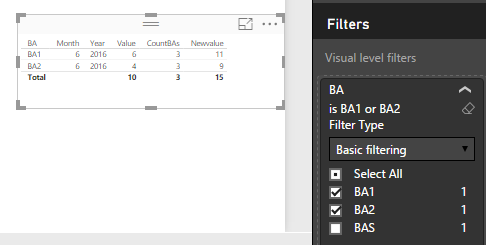
BA1 = 11
BA2 = 9
(BAS splitted 50-50 on BA1 and BA2)
I try to count BAS like calculate(sum(table[sum]);allexepted(table;table[month];table[year])) but it does not give me I right numbers.
Solved! Go to Solution.
hi @Thalian
to solve this follow this steps:
1: Create a measure to distinct count of BA
CountBAs =
CALCULATE (
DISTINCTCOUNT ( Table2[BA] ),
ALLEXCEPT ( Table2, Table2[Year], Table2[Month] )
)2, Made the distribution of BAS
Newvalue =
CALCULATE ( SUM ( Table2[Value] ) )
+ DIVIDE (
CALCULATE (
SUM ( Table2[Value] ),
FILTER ( ALLEXCEPT ( Table2, Table2[Year], Table2[Month] ), Table2[BA] = "BAS" )
),
[CountBAs] - 1
)hi @Thalian
to solve this follow this steps:
1: Create a measure to distinct count of BA
CountBAs =
CALCULATE (
DISTINCTCOUNT ( Table2[BA] ),
ALLEXCEPT ( Table2, Table2[Year], Table2[Month] )
)2, Made the distribution of BAS
Newvalue =
CALCULATE ( SUM ( Table2[Value] ) )
+ DIVIDE (
CALCULATE (
SUM ( Table2[Value] ),
FILTER ( ALLEXCEPT ( Table2, Table2[Year], Table2[Month] ), Table2[BA] = "BAS" )
),
[CountBAs] - 1
)Thanks Vvelarde! I use your code to solve my problem. That allexept is a command, what I can't hande properly.
Check out the November 2025 Power BI update to learn about new features.
Advance your Data & AI career with 50 days of live learning, contests, hands-on challenges, study groups & certifications and more!