Join us at FabCon Atlanta from March 16 - 20, 2026, for the ultimate Fabric, Power BI, AI and SQL community-led event. Save $200 with code FABCOMM.
Register now!The Power BI Data Visualization World Championships is back! Get ahead of the game and start preparing now! Learn more
Is it possible for a table visual to including a column that ignores the row context, while still retaining other visual filters?
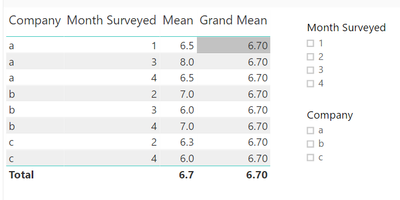
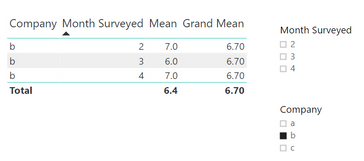
For example, I have the following table with filters for month and company. I also have a column called grand mean, which shows the total mean in every row.
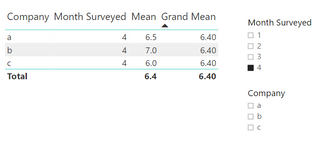
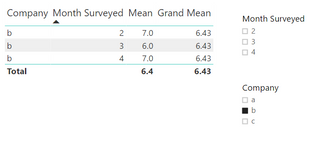
Now, if I filter by either month or company, the grand mean should adjust as well, as shown below.
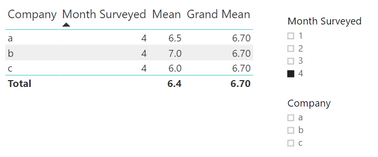
But all I'm getting right now is this:
Here's my function for Grand Mean...
Grand Mean =
CALCULATE(
SUM(Customers[Taste Rating]),
ALL(Customers[Company]),
ALL(Customers[Month Surveyed])
)/
CALCULATE(
COUNT(Customers[Taste Rating]),
ALL(Customers[Company]),
ALL(Customers[Month Surveyed])
)
All help is appreciated. Thank you!
Solved! Go to Solution.
with ALL(Customers[Company]) you are removing filter on the company field.
I guess you want to calculate "Grand mean" on selected records, correcT?
if that is the case then try following
Grand Mean =
CALCULATE(
SUM(Customers[Taste Rating]),
AllSelected(Customers)
)/
CALCULATE(
COUNT(Customers[Taste Rating]),
AllSelected(Customers)
)
Subscribe to the @PowerBIHowTo YT channel for an upcoming video on List and Record functions in Power Query!!
Learn Power BI and Fabric - subscribe to our YT channel - Click here: @PowerBIHowTo
If my solution proved useful, I'd be delighted to receive Kudos. When you put effort into asking a question, it's equally thoughtful to acknowledge and give Kudos to the individual who helped you solve the problem. It's a small gesture that shows appreciation and encouragement! ❤
Did I answer your question? Mark my post as a solution. Proud to be a Super User! Appreciate your Kudos 🙂
Feel free to email me with any of your BI needs.
with ALL(Customers[Company]) you are removing filter on the company field.
I guess you want to calculate "Grand mean" on selected records, correcT?
if that is the case then try following
Grand Mean =
CALCULATE(
SUM(Customers[Taste Rating]),
AllSelected(Customers)
)/
CALCULATE(
COUNT(Customers[Taste Rating]),
AllSelected(Customers)
)
Subscribe to the @PowerBIHowTo YT channel for an upcoming video on List and Record functions in Power Query!!
Learn Power BI and Fabric - subscribe to our YT channel - Click here: @PowerBIHowTo
If my solution proved useful, I'd be delighted to receive Kudos. When you put effort into asking a question, it's equally thoughtful to acknowledge and give Kudos to the individual who helped you solve the problem. It's a small gesture that shows appreciation and encouragement! ❤
Did I answer your question? Mark my post as a solution. Proud to be a Super User! Appreciate your Kudos 🙂
Feel free to email me with any of your BI needs.
Yes!
Thank you!
The Power BI Data Visualization World Championships is back! Get ahead of the game and start preparing now!
| User | Count |
|---|---|
| 37 | |
| 36 | |
| 33 | |
| 31 | |
| 28 |
| User | Count |
|---|---|
| 129 | |
| 88 | |
| 79 | |
| 68 | |
| 63 |