cancel
Showing results for 
Search instead for 
Did you mean: 

Get Fabric Certified for FREE during Fabric Data Days. Don't miss your chance! Request now

Reply
CP_2024
Frequent Visitor

Ignore page filter in Measure but show all values not just the overall total

Hi all,

I am trying to ignore a page filter in one of my measures by using the formula below.


Type2 Cases =
CALCULATE(SUM('Table'[Total Case]),'Table'[Type] = "Type2",  ALL(Table[ColorName]))


The filter I want to ignore is the "color name"


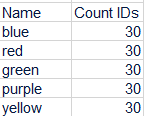
But I get the grand total in all rows not the individual value.

Example of what I get:

CP_2024_0-1704902747337.png


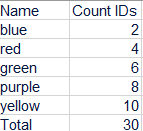
I need to keep that measure static regardless if  the "color filter" changes.

CP_2024_2-1704903168773.png


Can someone please help me with this?


Thank you,


Maria


1 ACCEPTED SOLUTION
Anonymous
Not applicable

Hi  @CP_2024 ,


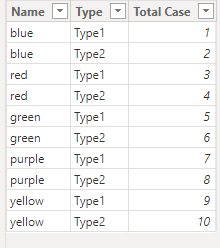
I created some data:

vyangliumsft_0-1706003278457.png


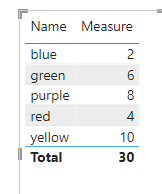
You can try the following dax:

SUMX(
    FILTER('Table','Table'[Type]="Type2"),[Total Case])

vyangliumsft_1-1706003278458.png


Best Regards,

Liu Yang

If this post helps, then please consider Accept it as the solution to help the other members find it more quickly.

View solution in original post

5 REPLIES 5
Anonymous
Not applicable

Hi  @CP_2024 ,


I created some data:

vyangliumsft_0-1706003278457.png


You can try the following dax:

SUMX(
    FILTER('Table','Table'[Type]="Type2"),[Total Case])

vyangliumsft_1-1706003278458.png


Best Regards,

Liu Yang

If this post helps, then please consider Accept it as the solution to help the other members find it more quickly.

PijushRoy
Super User
Super User

Hi @CP_2024 

Please use the REMOVEFILTER function which page level filter you want to remove.
Ref - https://learn.microsoft.com/en-us/dax/removefilters-function-dax
Please find the one example answer
https://community.fabric.microsoft.com/t5/Desktop/Static-and-dynamic-chart-in-same-visual/m-p/362734...


If your requirement is solved, please make sure to MARK AS SOLUTION and help other users find the solution quickly. Please hit the LIKE button if this comment helps you.

Thanks
Pijush
www.MyAccountingTricks.com 
https://www.youtube.com/MyAccountingTricks


Did I answer your question? Mark my post as a solution!
Appreciate your Like/Kudos

Proud to be a Super User!


Hi,

Thank you for your answer but I still get the same result

Type2 Cases =
CALCULATE(SUM('Table'[Total Case]),'Table'[Type] = "Type2"REMOVEFILTERS (Table[ColorName]))

Hi @CP_2024 

Type2 Cases =
CALCULATE(SUM('Table'[Total Case]),'Table'[Type] = "Type2"ALL (Table[ColorName]))
make sure you are using Table[ColorName] filed in page filter

please confirm


Did I answer your question? Mark my post as a solution!
Appreciate your Like/Kudos

Proud to be a Super User!


Yes, using same column for both 

Helpful resources

Announcements
November Power BI Update Carousel

Power BI Monthly Update - November 2025

Check out the November 2025 Power BI update to learn about new features.

Fabric Data Days Carousel

Fabric Data Days

Advance your Data & AI career with 50 days of live learning, contests, hands-on challenges, study groups & certifications and more!

FabCon Atlanta 2026 carousel

FabCon Atlanta 2026

Join us at FabCon Atlanta, March 16-20, for the ultimate Fabric, Power BI, AI and SQL community-led event. Save $200 with code FABCOMM.

Top Solution Authors
Top Kudoed Authors