FabCon is coming to Atlanta
Join us at FabCon Atlanta from March 16 - 20, 2026, for the ultimate Fabric, Power BI, AI and SQL community-led event. Save $200 with code FABCOMM.
Register now!- Power BI forums
- Get Help with Power BI
- Desktop
- Service
- Report Server
- Power Query
- Mobile Apps
- Developer
- DAX Commands and Tips
- Custom Visuals Development Discussion
- Health and Life Sciences
- Power BI Spanish forums
- Translated Spanish Desktop
- Training and Consulting
- Instructor Led Training
- Dashboard in a Day for Women, by Women
- Galleries
- Data Stories Gallery
- Themes Gallery
- Contests Gallery
- QuickViz Gallery
- Quick Measures Gallery
- Visual Calculations Gallery
- Notebook Gallery
- Translytical Task Flow Gallery
- TMDL Gallery
- R Script Showcase
- Webinars and Video Gallery
- Ideas
- Custom Visuals Ideas (read-only)
- Issues
- Issues
- Events
- Upcoming Events
View all the Fabric Data Days sessions on demand. View schedule
- Power BI forums
- Forums
- Get Help with Power BI
- Desktop
- Re: If statement to give value when between two nu...
- Subscribe to RSS Feed
- Mark Topic as New
- Mark Topic as Read
- Float this Topic for Current User
- Bookmark
- Subscribe
- Printer Friendly Page

- Mark as New
- Bookmark
- Subscribe
- Mute
- Subscribe to RSS Feed
- Permalink
- Report Inappropriate Content
If statement to give value when between two numbers.
Hi everyone,
Can someone help me come up with a formula to give a categorised value for between numbers.
Rating Ranges: 1-5, 6-10, 11-15, 16-20, 21-25
Categories: Insignificant, Minimal, Moderate, Significant, Extreme
Im hoping to come up with something like IF [Rating] between(1,5) then "Insignificant" etc
Solved! Go to Solution.


- Mark as New
- Bookmark
- Subscribe
- Mute
- Subscribe to RSS Feed
- Permalink
- Report Inappropriate Content
That formula is to be done in the Designer and not in Power Query.
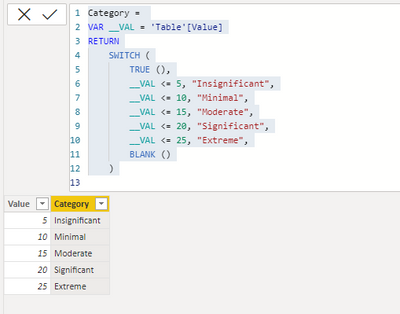
If you want it done in Power Query (which has a different syntax and is a separate language) try this.
let
VAL = [Inherent Risk Rating]
in
if
VAL <= 5 then "Insignificant" else if
VAL <= 10 then "Minimal" else if
VAL <= 15 then "Moderate" else if
VAL <= 20 then "Significant" else if
VAL <= 25 then "Extreme" else
null
Sample PBIX for your reference - https://drive.google.com/file/d/1vjiQ_7xdMf5LupiLWCzu-GvGy7rm2qzF/view?usp=sharing
Dane Belarmino | Microsoft MVP | Proud to be a Super User!
Did I answer your question? Mark my post as a solution!
"Tell me and I’ll forget; show me and I may remember; involve me and I’ll understand."
Need Power BI consultation, get in touch with me on LinkedIn or hire me on UpWork.
Learn with me on YouTube @DAXJutsu or follow my page on Facebook @DAXJutsuPBI.
- Mark as New
- Bookmark
- Subscribe
- Mute
- Subscribe to RSS Feed
- Permalink
- Report Inappropriate Content
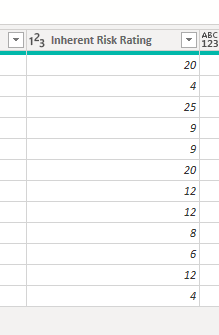
Sorry I'm not sure I've given you enought context. This formula is to look at another column, "Inherent Risk Rating" that is currently a numerical value which I want to group into the categories mentioned above. What I'm trying to do is add a custon column in power query that takes the Inherent Risk Rating and it groups it depending on what range it is in.

- Mark as New
- Bookmark
- Subscribe
- Mute
- Subscribe to RSS Feed
- Permalink
- Report Inappropriate Content
- Mark as New
- Bookmark
- Subscribe
- Mute
- Subscribe to RSS Feed
- Permalink
- Report Inappropriate Content
Can you please mark the correct reply as the solution?
Dane Belarmino | Microsoft MVP | Proud to be a Super User!
Did I answer your question? Mark my post as a solution!
"Tell me and I’ll forget; show me and I may remember; involve me and I’ll understand."
Need Power BI consultation, get in touch with me on LinkedIn or hire me on UpWork.
Learn with me on YouTube @DAXJutsu or follow my page on Facebook @DAXJutsuPBI.
- Mark as New
- Bookmark
- Subscribe
- Mute
- Subscribe to RSS Feed
- Permalink
- Report Inappropriate Content
Hi @Anonymous ,
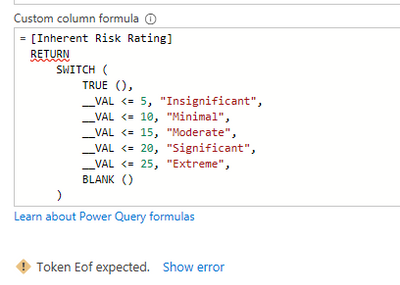
That happens when you're comparing a number against a text (or vice versa( or using < operator against a text. What formula did you input? Have you checked on the PBIX in my other comment?
Dane Belarmino | Microsoft MVP | Proud to be a Super User!
Did I answer your question? Mark my post as a solution!
"Tell me and I’ll forget; show me and I may remember; involve me and I’ll understand."
Need Power BI consultation, get in touch with me on LinkedIn or hire me on UpWork.
Learn with me on YouTube @DAXJutsu or follow my page on Facebook @DAXJutsuPBI.
- Mark as New
- Bookmark
- Subscribe
- Mute
- Subscribe to RSS Feed
- Permalink
- Report Inappropriate Content
Sorry I'm not sure I've given you enought context. This formula is to look at another column, "Inherent Risk Rating" that is currently a numerical value which I want to group into the categories mentioned above. What I'm trying to do is add a custon column in power query that takes the Inherent Risk Rating and it groups it depending on what range it is in.
- Mark as New
- Bookmark
- Subscribe
- Mute
- Subscribe to RSS Feed
- Permalink
- Report Inappropriate Content
Please see my other reply.
Dane Belarmino | Microsoft MVP | Proud to be a Super User!
Did I answer your question? Mark my post as a solution!
"Tell me and I’ll forget; show me and I may remember; involve me and I’ll understand."
Need Power BI consultation, get in touch with me on LinkedIn or hire me on UpWork.
Learn with me on YouTube @DAXJutsu or follow my page on Facebook @DAXJutsuPBI.
- Mark as New
- Bookmark
- Subscribe
- Mute
- Subscribe to RSS Feed
- Permalink
- Report Inappropriate Content
Hi @Anonymous ,
Try this as a calculated column:
Category =
VAR __VAL = 'Table'[Value]
RETURN
    SWITCH (
        TRUE (),
        __VAL <= 5, "Insignificant",
        __VAL <= 10, "Minimal",
        __VAL <= 15, "Moderate",
        __VAL <= 20, "Significant",
        __VAL <= 25, "Extreme",
        BLANK ()
    )
Dane Belarmino | Microsoft MVP | Proud to be a Super User!
Did I answer your question? Mark my post as a solution!
"Tell me and I’ll forget; show me and I may remember; involve me and I’ll understand."
Need Power BI consultation, get in touch with me on LinkedIn or hire me on UpWork.
Learn with me on YouTube @DAXJutsu or follow my page on Facebook @DAXJutsuPBI.
- Mark as New
- Bookmark
- Subscribe
- Mute
- Subscribe to RSS Feed
- Permalink
- Report Inappropriate Content
- Mark as New
- Bookmark
- Subscribe
- Mute
- Subscribe to RSS Feed
- Permalink
- Report Inappropriate Content
That formula is to be done in the Designer and not in Power Query.
If you want it done in Power Query (which has a different syntax and is a separate language) try this.
let
VAL = [Inherent Risk Rating]
in
if
VAL <= 5 then "Insignificant" else if
VAL <= 10 then "Minimal" else if
VAL <= 15 then "Moderate" else if
VAL <= 20 then "Significant" else if
VAL <= 25 then "Extreme" else
null
Sample PBIX for your reference - https://drive.google.com/file/d/1vjiQ_7xdMf5LupiLWCzu-GvGy7rm2qzF/view?usp=sharing
Dane Belarmino | Microsoft MVP | Proud to be a Super User!
Did I answer your question? Mark my post as a solution!
"Tell me and I’ll forget; show me and I may remember; involve me and I’ll understand."
Need Power BI consultation, get in touch with me on LinkedIn or hire me on UpWork.
Learn with me on YouTube @DAXJutsu or follow my page on Facebook @DAXJutsuPBI.
Helpful resources

Power BI Monthly Update - November 2025
Check out the November 2025 Power BI update to learn about new features.

Fabric Data Days
Advance your Data & AI career with 50 days of live learning, contests, hands-on challenges, study groups & certifications and more!

FabCon Atlanta 2026
Join us at FabCon Atlanta, March 16-20, for the ultimate Fabric, Power BI, AI and SQL community-led event. Save $200 with code FABCOMM.


