FabCon is coming to Atlanta
Join us at FabCon Atlanta from March 16 - 20, 2026, for the ultimate Fabric, Power BI, AI and SQL community-led event. Save $200 with code FABCOMM.
Register now!- Power BI forums
- Get Help with Power BI
- Desktop
- Service
- Report Server
- Power Query
- Mobile Apps
- Developer
- DAX Commands and Tips
- Custom Visuals Development Discussion
- Health and Life Sciences
- Power BI Spanish forums
- Translated Spanish Desktop
- Training and Consulting
- Instructor Led Training
- Dashboard in a Day for Women, by Women
- Galleries
- Data Stories Gallery
- Themes Gallery
- Contests Gallery
- QuickViz Gallery
- Quick Measures Gallery
- Visual Calculations Gallery
- Notebook Gallery
- Translytical Task Flow Gallery
- TMDL Gallery
- R Script Showcase
- Webinars and Video Gallery
- Ideas
- Custom Visuals Ideas (read-only)
- Issues
- Issues
- Events
- Upcoming Events
The Power BI Data Visualization World Championships is back! Get ahead of the game and start preparing now! Learn more
- Power BI forums
- Forums
- Get Help with Power BI
- Desktop
- Re: If statement to check if a value is between tw...
- Subscribe to RSS Feed
- Mark Topic as New
- Mark Topic as Read
- Float this Topic for Current User
- Bookmark
- Subscribe
- Printer Friendly Page


- Mark as New
- Bookmark
- Subscribe
- Mute
- Subscribe to RSS Feed
- Permalink
- Report Inappropriate Content
If statement to check if a value is between two values and return text
Hi All,
Probably really simple but I am trying to return text if a number falls between two values as follows:
| Difference |
| 3 |
| 100 |
| 500 |
| 320 |
| 410 |
| 210 |
If one of the above falls between 0 - 365 return "Active"
I tried using the following DAX statement, but it wont return a text
IF(AND([Difference] > 0 , [difference] < 365 ), "Active" )
TIA
Solved! Go to Solution.

- Mark as New
- Bookmark
- Subscribe
- Mute
- Subscribe to RSS Feed
- Permalink
- Report Inappropriate Content
Result = IF(and(Table1[Difference]>0 , Table1[Difference]<365),"Active",BLANK())


- Mark as New
- Bookmark
- Subscribe
- Mute
- Subscribe to RSS Feed
- Permalink
- Report Inappropriate Content
Is there a way to nest all these so the string can continue - with ||
IF(and(Table1[Difference]>0 , Table1[Difference]<365),"Active",BLANK())
IF(and(Table1[Difference]>365 , Table1[Difference]<500),"Active2nd",BLANK())
IF(and(Table1[Difference]>500 , Table1[Difference]<726),"Active3rd",BLANK())
think from reading switch would only work if true/false Boolean and here I'd want some text returned, not sure if its the > causing additional problems on multi lines or need some form of array


- Mark as New
- Bookmark
- Subscribe
- Mute
- Subscribe to RSS Feed
- Permalink
- Report Inappropriate Content
Would a measure like this help?
Result =
	SWITCH(
		TRUE(),
		AND( 'Table1'[Difference] > 0 , 'Table1'[Difference] <= 365 ),
			"Active",
		AND( 'Table1'[Difference] > 365 , 'Table1'[Difference] <= 500 ),
			"Active2nd",
		AND( 'Table1'[Difference] > 500 , 'Table1'[Difference] <= 726 ),
			"Active3rd",
		BLANK()
	)
Let me know if you have any questions.
Proud to be a Super User!
daxformatter.com makes life EASIER!
- Mark as New
- Bookmark
- Subscribe
- Mute
- Subscribe to RSS Feed
- Permalink
- Report Inappropriate Content
Thank you so much, very helpful!
{in separate query} again using the IF / OR where there is only going to be 2 choices would the below work as an IF?
Result = IF(OR(Table1[Name]="Toni", Table1[Name]="Terry"),"12","7") these obviously would return 12 for both Toni and Terry in a true match, and 7 for any others, as false
but how could I write this to be: if Toni assign 12, OR if Terry assign 7 .. would it need to be split across an IN {list} query / containsstring? Just having difficulty assigning between the 2
- Mark as New
- Bookmark
- Subscribe
- Mute
- Subscribe to RSS Feed
- Permalink
- Report Inappropriate Content
Hi @JK-1
The following 2 measures return identical results. Additional names can be added between the braces{}.
(I added a 3rd level for demonstration purposes.)
Result =
VAR _Name = MAX( 'Table1'[Name] )
RETURN
	IF(
		_Name IN { "Toni" },
		12,
		IF(
			_Name IN { "Terry" },
			7,
			IF(
				_Name IN { "Tommy" },
				6,
				0
			)
		)
	)
Result =
VAR _Name = MAX( 'Table1'[Name] )
RETURN
	SWITCH(
		TRUE(),
		_Name IN { "Toni" },
			12,
		_Name IN { "Terry" },
			7,
		_Name IN { "Tommy" },
			6,
		0
	)
I hope this helps.
Proud to be a Super User!
daxformatter.com makes life EASIER!
- Mark as New
- Bookmark
- Subscribe
- Mute
- Subscribe to RSS Feed
- Permalink
- Report Inappropriate Content
Thanks for both examples. Not been on for a few days but these are great. Cheers
- Mark as New
- Bookmark
- Subscribe
- Mute
- Subscribe to RSS Feed
- Permalink
- Report Inappropriate Content
- Mark as New
- Bookmark
- Subscribe
- Mute
- Subscribe to RSS Feed
- Permalink
- Report Inappropriate Content
Result = IF(and(Table1[Difference]>0 , Table1[Difference]<365),"Active",BLANK())

- Mark as New
- Bookmark
- Subscribe
- Mute
- Subscribe to RSS Feed
- Permalink
- Report Inappropriate Content
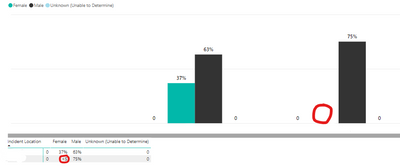
This works great! I am wondering if it is possible to show the text as a label on a bar chart. It appears when you select "show as a table" but not on the actual bar chart. Any thoughts?
Helpful resources

Power BI Monthly Update - November 2025
Check out the November 2025 Power BI update to learn about new features.

Fabric Data Days
Advance your Data & AI career with 50 days of live learning, contests, hands-on challenges, study groups & certifications and more!

FabCon Atlanta 2026
Join us at FabCon Atlanta, March 16-20, for the ultimate Fabric, Power BI, AI and SQL community-led event. Save $200 with code FABCOMM.

| User | Count |
|---|---|
| 57 | |
| 45 | |
| 42 | |
| 20 | |
| 18 |


