
cancel
Showing results for 
Search instead for 
Did you mean: 

View all the Fabric Data Days sessions on demand. View schedule

Reply
o59393
Post Prodigy
Post Prodigy

If selected filter on slicer then assign target

Hi all


I have a slicer containing 9 different categories.


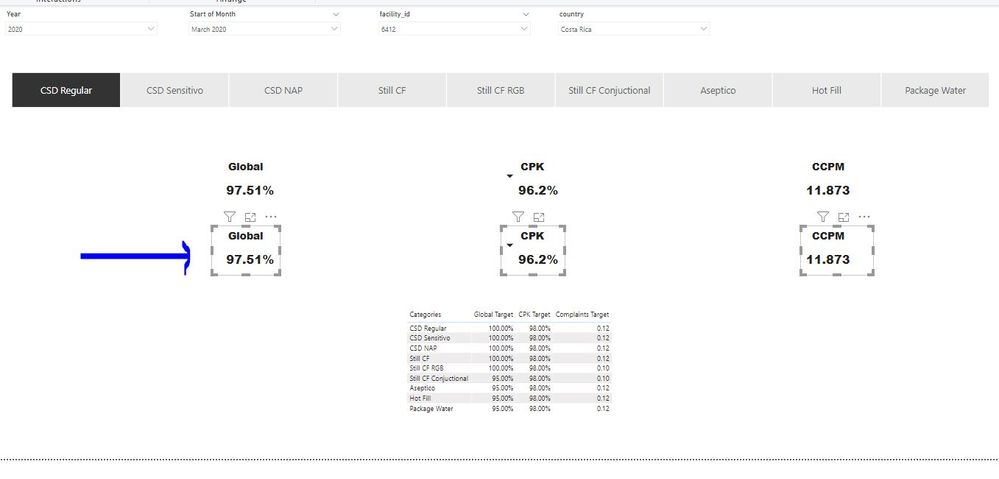
My intentntion is to have a measure that shows up the target (of the table shown in the image below) depending on the category selected above.


For example if i select "CSD Regular" for the KPI global then I should get a 100%, and if I select "Hot Fill" for same KPI global then I should get a 95%


The expected result is shown in blue next to each KPI:

sadsadasdsadsasd.JPG


The targets are in the lower right corner.


I often get confused with SelectedValue, hasonvalue, hasonfilter and the function switch. One of these might be required I guess.


I attach PBix


https://1drv.ms/u/s!ApgeWwGTKtFdhmc6hMVmmqyeKKwZ?e=jjSokR


Thanks all.


3 REPLIES 3
Anonymous
Not applicable

@o59393 

This pbix has way many columns and measure included, it is way too complex for us to track the measures within measures, can you create a sample pbix that illustrates your problem in a neat way and post back. Thank you.


Paul Zheng _ Community Support Team
If this post helps, then please consider Accept it as the solution to help the other members find it more quickly.
  

Hi @Anonymous 


I did an excel with what Im looking for, the only way I could think of it to solve it was with vlookups.


Cell B1 is a dropdwon menu and green cells are the expected result:


https://1drv.ms/x/s!ApgeWwGTKtFdhmmvO41AZwAVZ82x?e=oK3rHV


I re arranged the sheet of the pbix. The expected result (green cells in the excel) should go here were the blue arrow points:


expected.JPG

PBI: https://1drv.ms/u/s!ApgeWwGTKtFdhmc6hMVmmqyeKKwZ?e=PADVuO


All I want is to have the target value from the table depending on the category you select in the slicer.


Let me know if it's ok the example.


Thanks!


Hi @Anonymous 


I created 3 measures and they worked:


global tgt = 

var _GlobalTarget = SELECTEDVALUE(QID[Categories])
return
CALCULATE(AVERAGE(QID[Global QID]),
FILTER(QID,QID[Categories]=_GlobalTarget))


cpk tgt = 

var _CPKTarget = SELECTEDVALUE(QID[Categories])
return
CALCULATE(AVERAGE(QID[CPK QID]),
FILTER(QID,QID[Categories]=_CPKTarget))


complaints tgt = 

var _CCPMTarget = SELECTEDVALUE(QID[Categories])
return
CALCULATE(AVERAGE(QID[Complaints QID]),
FILTER(QID,QID[Categories]=_CCPMTarget))


sadasdads.JPG


If you know an optimized dax measure of the above, please let me know 😄


Thanks!

Helpful resources

Announcements
November Power BI Update Carousel

Power BI Monthly Update - November 2025

Check out the November 2025 Power BI update to learn about new features.

Fabric Data Days Carousel

Fabric Data Days

Advance your Data & AI career with 50 days of live learning, contests, hands-on challenges, study groups & certifications and more!

FabCon Atlanta 2026 carousel

FabCon Atlanta 2026

Join us at FabCon Atlanta, March 16-20, for the ultimate Fabric, Power BI, AI and SQL community-led event. Save $200 with code FABCOMM.

Top Solution Authors
Top Kudoed Authors