
cancel
Showing results for 
Search instead for 
Did you mean: 

The Power BI Data Visualization World Championships is back! Get ahead of the game and start preparing now! Learn more

Reply
LamSar
Helper III
Helper III

If previous day value is blank, then take lastnonblankvalue before current date

Hello, 


I have a question. I'm creating a stock report. The end stock of the previous day, is the opening stock of the current day. However, on some days there is no end stock. 


This is an example of the table visual:

LamSar_0-1654594516854.png

On 03/06/222 there are no stock calculations. 

So therefore the beginstock of 04/06/2022 is empty.  But I would like to see the endstock of 02/06/2022 (which is 20) as begin stock of 04/06/2022.


What I would like to achieve is the following:

If previous day value is blank, then take lastnonblankvalue before current date


This is the calculation of begin stock:

Begin stock =
VAR beginstock = CALCULATE(SUM(RetailStock[StockHoeveelheid]), PREVIOUSDAY('Datum'[Datum]))
Var Result = IF(
not(
ISBLANK(
SUM(RetailStock[StockHoeveelheid]))),
beginstock, blank())
Return
Result
 
How can I achieve this?


4 REPLIES 4
onurbmiguel_
Power Participant
Power Participant

Hello LamSar


Try this measure: 


Begin stock =

var _day = max('Datum'[Datum])

Var _daybefore = 
	calculate( 
		MAX(RetailStock[Datum]),
		Filter ( ALL(RetailStock),RetailStock[Datum]<_day)

VAR beginstock = 
	CALCULATE(
		SUM(RetailStock[StockHoeveelheid]), 
		Filter ( ALL(RetailStock),RetailStock[Datum]=_daybefore)

Var Result = 
IF(
not( ISBLANK(
SUM(RetailStock[StockHoeveelheid]))),
beginstock, blank())
Return
Result


Did I answer your question? Mark my post as a solution! Appreciate your Kudos!! ;-
Best Regards
BC


Best regards


Bruno Costa | Super User


Did I help you to answer your question? Accepted my post as a solution! Appreciate your Kudos!! 


Take a look at the blog: PBI Portugal 


Thank you for your answer. 

Sadly this will not work, because the RetailStock table does not hold a column with a date column. It only holds a column that holds a surrogate key (datatype int) that refers to the date dimension. 


I can't add a column because I'm using a tabular modal. 

Hi again, 

So use the id 

Begin stock =

var _dayID = max('Datum'[DatumID])

Var _daybeforeID = 
	calculate( 
		MAX(RetailStock[DatumID]),
		Filter ( ALL(RetailStock),RetailStock[DatumID]<_dayID)

VAR beginstock = 
	CALCULATE(
		SUM(RetailStock[StockHoeveelheid]), 
		Filter ( ALL(RetailStock),RetailStock[DatumID]=_daybeforeID)

Var Result = 
IF(
not( ISBLANK(
SUM(RetailStock[StockHoeveelheid]))),
beginstock, blank())
Return
Result


Did I answer your question? Mark my post as a solution! Appreciate your Kudos!! ;-
Best Regards
BC


Best regards


Bruno Costa | Super User


Did I help you to answer your question? Accepted my post as a solution! Appreciate your Kudos!! 


Take a look at the blog: PBI Portugal 


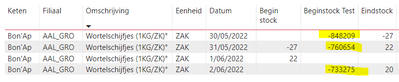
I already tried that. But then I get the wrong values: 

LamSar_0-1654606403688.png


Helpful resources

Announcements
Power BI DataViz World Championships

Power BI Dataviz World Championships

The Power BI Data Visualization World Championships is back! Get ahead of the game and start preparing now!

December 2025 Power BI Update Carousel

Power BI Monthly Update - December 2025

Check out the December 2025 Power BI Holiday Recap!

FabCon Atlanta 2026 carousel

FabCon Atlanta 2026

Join us at FabCon Atlanta, March 16-20, for the ultimate Fabric, Power BI, AI and SQL community-led event. Save $200 with code FABCOMM.