Join us at FabCon Atlanta from March 16 - 20, 2026, for the ultimate Fabric, Power BI, AI and SQL community-led event. Save $200 with code FABCOMM.
Register now!The Power BI Data Visualization World Championships is back! Get ahead of the game and start preparing now! Learn more
Here is the raw data
| Client | Market | Ordered | Shipped | TM |
| Client1 | Market1 | 50 | 10 | TM1 |
| Client2 | Market1 | 10 | 10 | TM1 |
| Client1 | Market2 | 30 | 15 | TM2 |
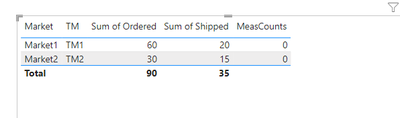
One measure as
Shouldn't TM2 get 1 since their sum of shipped is less than 18 .
Solved! Go to Solution.
Hi @PBI5851
Your formula is correct.
I prepared PBIX with your data and the same formula, please download and check what did you differently.
If this post helps, then please consider Accepting it as the solution to help the other members find it more quickly.
i am so dumb. i had the formula created for a column , rather than a measure.
All of us make these mistakes sometimes 🙂
Glad to help 🙂
Hi @PBI5851
Your formula is correct.
I prepared PBIX with your data and the same formula, please download and check what did you differently.
If this post helps, then please consider Accepting it as the solution to help the other members find it more quickly.
The Power BI Data Visualization World Championships is back! Get ahead of the game and start preparing now!
Check out the November 2025 Power BI update to learn about new features.
| User | Count |
|---|---|
| 59 | |
| 46 | |
| 42 | |
| 23 | |
| 17 |
| User | Count |
|---|---|
| 190 | |
| 122 | |
| 96 | |
| 66 | |
| 47 |