Join us at FabCon Atlanta from March 16 - 20, 2026, for the ultimate Fabric, Power BI, AI and SQL community-led event. Save $200 with code FABCOMM.
Register now!The Power BI Data Visualization World Championships is back! Get ahead of the game and start preparing now! Learn more
Hey guys,
Trying to find a function which would allow me to count only rows which contain in a string of text 2 specific words:
Cancelled or Expired. Cancelled could be found in "Closed_Cancelled","Booked_Cancelled", "Cancelled_Quote_Provided"
Expired in "Quote_Expired","Booked_Expired"
What would be the formula?
True Cancelled = Calculate( Disctinctcount (Jobs[Jobs ID] ), Filter ( Jobs, Jobs[Jobs Status] Contains?"Cancelled" || Jobs[Jobs Status] Contains?"Expired")
Many Thanks in advance.
Solved! Go to Solution.
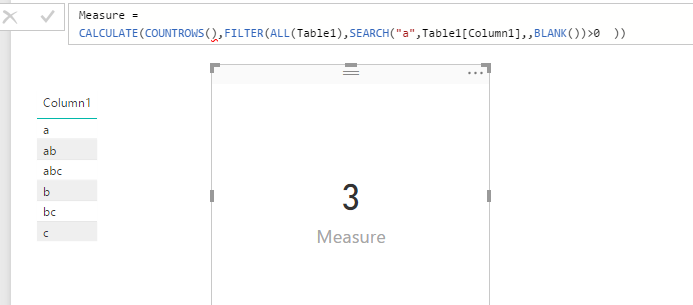
You can use SEARCH() in FILTER to achieve this kind of "instring" requirement. You can write your measure like below:
True Cancelled =
CALCULATE (
DISTINCTCOUNT ( Jobs[Jobs ID] ),
FILTER (
ALL ( Jobs ),
SEARCH ( "Cancelled", Jobs[Jobs Status],, BLANK () ) > 0
|| SEARCH ( "Expired", Jobs[Jobs Status],, BLANK () ) > 0
)
)
See my sample:
Regards,
You can use SEARCH() in FILTER to achieve this kind of "instring" requirement. You can write your measure like below:
True Cancelled =
CALCULATE (
DISTINCTCOUNT ( Jobs[Jobs ID] ),
FILTER (
ALL ( Jobs ),
SEARCH ( "Cancelled", Jobs[Jobs Status],, BLANK () ) > 0
|| SEARCH ( "Expired", Jobs[Jobs Status],, BLANK () ) > 0
)
)
See my sample:
Regards,
Probably SEARCH or FIND
The Power BI Data Visualization World Championships is back! Get ahead of the game and start preparing now!
| User | Count |
|---|---|
| 38 | |
| 36 | |
| 33 | |
| 32 | |
| 29 |
| User | Count |
|---|---|
| 129 | |
| 88 | |
| 79 | |
| 68 | |
| 63 |