FabCon is coming to Atlanta
Join us at FabCon Atlanta from March 16 - 20, 2026, for the ultimate Fabric, Power BI, AI and SQL community-led event. Save $200 with code FABCOMM.
Register now!- Power BI forums
- Get Help with Power BI
- Desktop
- Service
- Report Server
- Power Query
- Mobile Apps
- Developer
- DAX Commands and Tips
- Custom Visuals Development Discussion
- Health and Life Sciences
- Power BI Spanish forums
- Translated Spanish Desktop
- Training and Consulting
- Instructor Led Training
- Dashboard in a Day for Women, by Women
- Galleries
- Data Stories Gallery
- Themes Gallery
- Contests Gallery
- Quick Measures Gallery
- Notebook Gallery
- Translytical Task Flow Gallery
- TMDL Gallery
- R Script Showcase
- Webinars and Video Gallery
- Ideas
- Custom Visuals Ideas (read-only)
- Issues
- Issues
- Events
- Upcoming Events
To celebrate FabCon Vienna, we are offering 50% off select exams. Ends October 3rd. Request your discount now.
- Power BI forums
- Forums
- Get Help with Power BI
- Desktop
- If Values in column A are equal to any non blank v...
- Subscribe to RSS Feed
- Mark Topic as New
- Mark Topic as Read
- Float this Topic for Current User
- Bookmark
- Subscribe
- Printer Friendly Page

- Mark as New
- Bookmark
- Subscribe
- Mute
- Subscribe to RSS Feed
- Permalink
- Report Inappropriate Content
If Values in column A are equal to any non blank values of Column B, return "1"
Dear All,
I am not sure this is feasible this way
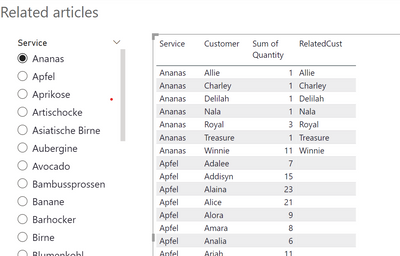
I wish to find all the match between two columns by comparing each line of "Customer" to the entire column "RelatatedCust":
if any non blanks value from column "RelatedCust" is found in column "Customer" then return 1 in new column "Related Articles"
What I am triing to achieve overall is to find all related "Service":
By selcting one service (ex: "Ananas") you could see all the associated services from all the customer taking that specific service "Ananas"
If I can answer the above issue, I can then put a fitler in the new column "Related Articles"
I am happy if you have another way,
Thanks a lot for your help
NAD
Link to the file: https://www.dropbox.com/s/u0n8heaxvgltz32/Articles%20Analysis%20-%20shared.pbix?dl=0
Solved! Go to Solution.


- Mark as New
- Bookmark
- Subscribe
- Mute
- Subscribe to RSS Feed
- Permalink
- Report Inappropriate Content
pls try this
Related Articles =
VAR _t1 = MAX('SelectService'[Service])
VAR _tbl = SELECTCOLUMNS(FILTER(ALL(Data),'Data'[Service]=_t1),"dd",[Customer])
RETURN IF(INT(
MAX('Data'[Customer]) in _tbl) ,MAX('Data'[Customer]))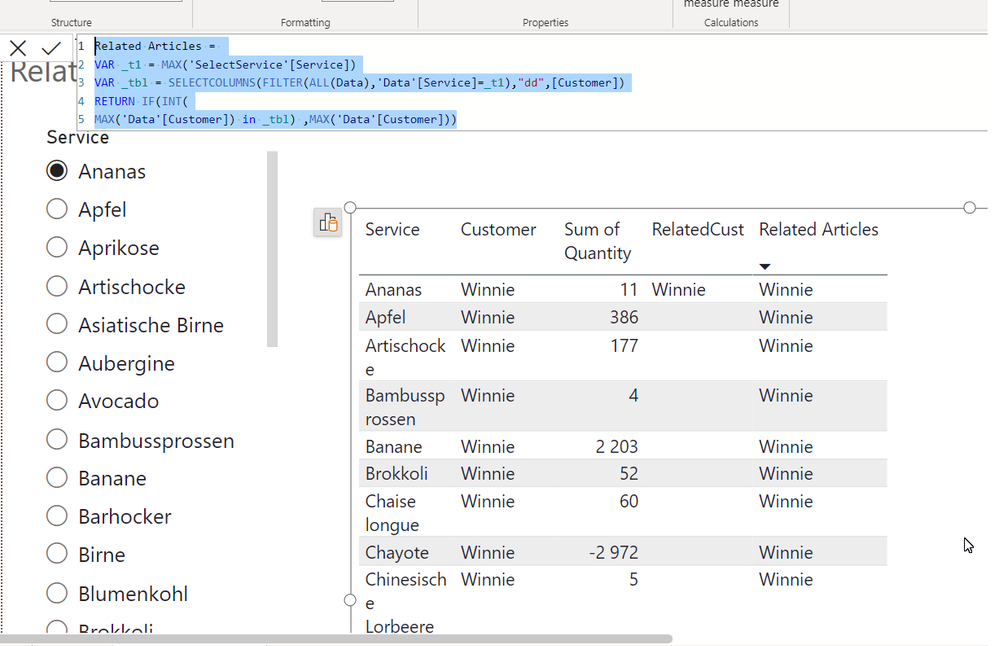
- Mark as New
- Bookmark
- Subscribe
- Mute
- Subscribe to RSS Feed
- Permalink
- Report Inappropriate Content
honestly, I didn't understand you.
My measure works without yours and it will show all the match. why obyadit her with your measure, I do not understand
- Mark as New
- Bookmark
- Subscribe
- Mute
- Subscribe to RSS Feed
- Permalink
- Report Inappropriate Content
- Mark as New
- Bookmark
- Subscribe
- Mute
- Subscribe to RSS Feed
- Permalink
- Report Inappropriate Content
pls try this for multi select from the slicer
Related Articles =
VAR _t1 = VALUES('SelectService'[Service])
VAR _tbl = SELECTCOLUMNS(FILTER(ALL(Data),'Data'[Service] in _t1),"dd",[Customer])
RETURN IF(INT(
MAX('Data'[Customer]) in _tbl) ,MAX('Data'[Customer]))
- Mark as New
- Bookmark
- Subscribe
- Mute
- Subscribe to RSS Feed
- Permalink
- Report Inappropriate Content
pls try this
Related Articles =
VAR _t1 = MAX('SelectService'[Service])
VAR _tbl = SELECTCOLUMNS(FILTER(ALL(Data),'Data'[Service]=_t1),"dd",[Customer])
RETURN IF(INT(
MAX('Data'[Customer]) in _tbl) ,MAX('Data'[Customer]))- Mark as New
- Bookmark
- Subscribe
- Mute
- Subscribe to RSS Feed
- Permalink
- Report Inappropriate Content
Great it works !! thanks a lot @Ahmedx
Would you see a way to merge my 2 meaures into one, the idea is to have a table that looks like this : where I could rank the "related articles" (ideally the columns of the mesure should not be visible
Thank you very much
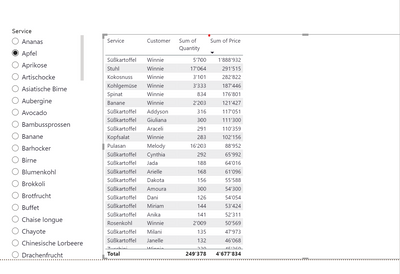
Here are the 2 measures:
- Mark as New
- Bookmark
- Subscribe
- Mute
- Subscribe to RSS Feed
- Permalink
- Report Inappropriate Content
honestly, I didn't understand you.
My measure works without yours and it will show all the match. why obyadit her with your measure, I do not understand
- Mark as New
- Bookmark
- Subscribe
- Mute
- Subscribe to RSS Feed
- Permalink
- Report Inappropriate Content
Last questions and thank you for your time
- Would you see a way to have multi select from the slicer
- Could the measure works with filter on the page : exemple date: Year (when I tested it, seems that the results where a not right)
- Mark as New
- Bookmark
- Subscribe
- Mute
- Subscribe to RSS Feed
- Permalink
- Report Inappropriate Content
pls try this for multi select from the slicer
Related Articles =
VAR _t1 = VALUES('SelectService'[Service])
VAR _tbl = SELECTCOLUMNS(FILTER(ALL(Data),'Data'[Service] in _t1),"dd",[Customer])
RETURN IF(INT(
MAX('Data'[Customer]) in _tbl) ,MAX('Data'[Customer]))
- Mark as New
- Bookmark
- Subscribe
- Mute
- Subscribe to RSS Feed
- Permalink
- Report Inappropriate Content
All good, thank you very much !
- Mark as New
- Bookmark
- Subscribe
- Mute
- Subscribe to RSS Feed
- Permalink
- Report Inappropriate Content

Helpful resources

Power BI Monthly Update - September 2025
Check out the September 2025 Power BI update to learn about new features.

Fabric Community Update - August 2025
Find out what's new and trending in the Fabric community.


