FabCon is coming to Atlanta
Join us at FabCon Atlanta from March 16 - 20, 2026, for the ultimate Fabric, Power BI, AI and SQL community-led event. Save $200 with code FABCOMM.
Register now!- Power BI forums
- Get Help with Power BI
- Desktop
- Service
- Report Server
- Power Query
- Mobile Apps
- Developer
- DAX Commands and Tips
- Custom Visuals Development Discussion
- Health and Life Sciences
- Power BI Spanish forums
- Translated Spanish Desktop
- Training and Consulting
- Instructor Led Training
- Dashboard in a Day for Women, by Women
- Galleries
- Data Stories Gallery
- Themes Gallery
- Contests Gallery
- QuickViz Gallery
- Quick Measures Gallery
- Visual Calculations Gallery
- Notebook Gallery
- Translytical Task Flow Gallery
- TMDL Gallery
- R Script Showcase
- Webinars and Video Gallery
- Ideas
- Custom Visuals Ideas (read-only)
- Issues
- Issues
- Events
- Upcoming Events
The Power BI Data Visualization World Championships is back! Get ahead of the game and start preparing now! Learn more
- Power BI forums
- Forums
- Get Help with Power BI
- Desktop
- Re: If Conditions in a measure
- Subscribe to RSS Feed
- Mark Topic as New
- Mark Topic as Read
- Float this Topic for Current User
- Bookmark
- Subscribe
- Printer Friendly Page

- Mark as New
- Bookmark
- Subscribe
- Mute
- Subscribe to RSS Feed
- Permalink
- Report Inappropriate Content
If Conditions in a measure
Need assistance with creating a calculated measure using IF accross two tables that have a relationship.
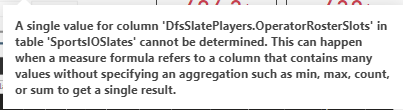
Solved! Go to Solution.


- Mark as New
- Bookmark
- Subscribe
- Mute
- Subscribe to RSS Feed
- Permalink
- Report Inappropriate Content
Hi , @dfsadvantage
Please check if these formula help.
FantasyPointsDraftKings = CALCULATE( SUM(SportsIOSlatePlayerProj[FantasyPointsDraftKings]),ALLEXCEPT(SportsIOSlates,SportsIOSlatePlayerProj[UniqueID]))ProjPoints =
var FantasyPointsDraftKings1=CALCULATE(SUM(SportsIOSlates[FantasyPointsDraftKings]),ALLEXCEPT(SportsIOSlates,SportsIOSlates[DfsSlatePlayers.OperatorRosterSlots]))
return IF('SportsIOSlates'[DfsSlatePlayers.OperatorRosterSlots] = "CPT", FantasyPointsDraftKings1 * 1.5, FantasyPointsDraftKings1)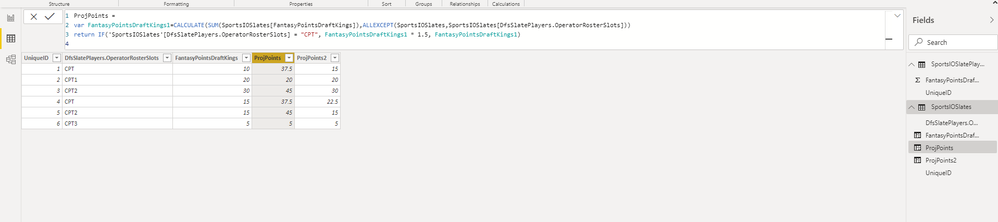
If it doesn't meet your requirement,please share your sample data and expected result.
Best Regards,
Community Support Team _ Eason
If this post helps, then please consider Accept it as the solution to help the other members find it more quickly.


- Mark as New
- Bookmark
- Subscribe
- Mute
- Subscribe to RSS Feed
- Permalink
- Report Inappropriate Content
ProjPoints =
VAR Something =
    SELECTEDVALUE ( 'SportsIOSlates'[DfsSlatePlayers.OperatorRosterSlots], "CPT" )
VAR TotalSalary =
    SUM ( SportsIOSlates[Salary] )
VAR Result =
    IF ( Something = "CPT", TotalSalary * 1.5, TotalSalary )
RETURN
Result- Mark as New
- Bookmark
- Subscribe
- Mute
- Subscribe to RSS Feed
- Permalink
- Report Inappropriate Content
Hi , @dfsadvantage
It looks like a formula of calculated column rather than a measure.

Best Regards,
Community Support Team _ Eason
If this post helps, then please consider Accept it as the solution to help the other members find it more quickly.
- Mark as New
- Bookmark
- Subscribe
- Mute
- Subscribe to RSS Feed
- Permalink
- Report Inappropriate Content
I think a column is the right approach. My Original post was slightly off.....I made adjustments as follows, and instead of a measure (Measures were way too slow as there are many records) so I am trying to introduce it as a column. The formula spans 2 tables, and now I am getting the same resulting value for every row.
I have a relationship between these two tables called UniqueID
ProjPoints = IF(VALUES('SportsIOSlates'[DfsSlatePlayers.OperatorRosterSlots]) = "CPT", SUM(SportsIOSlates[Salary]) * 1.5, SUM(SportsIOSlates[Salary])
- Mark as New
- Bookmark
- Subscribe
- Mute
- Subscribe to RSS Feed
- Permalink
- Report Inappropriate Content
Hi , @dfsadvantage
Please check if these formula help.
FantasyPointsDraftKings = CALCULATE( SUM(SportsIOSlatePlayerProj[FantasyPointsDraftKings]),ALLEXCEPT(SportsIOSlates,SportsIOSlatePlayerProj[UniqueID]))ProjPoints =
var FantasyPointsDraftKings1=CALCULATE(SUM(SportsIOSlates[FantasyPointsDraftKings]),ALLEXCEPT(SportsIOSlates,SportsIOSlates[DfsSlatePlayers.OperatorRosterSlots]))
return IF('SportsIOSlates'[DfsSlatePlayers.OperatorRosterSlots] = "CPT", FantasyPointsDraftKings1 * 1.5, FantasyPointsDraftKings1)
If it doesn't meet your requirement,please share your sample data and expected result.
Best Regards,
Community Support Team _ Eason
If this post helps, then please consider Accept it as the solution to help the other members find it more quickly.
- Mark as New
- Bookmark
- Subscribe
- Mute
- Subscribe to RSS Feed
- Permalink
- Report Inappropriate Content
Hi , @dfsadvantage
Could you please tell me whether your problem has been solved?
If yes, you could accept the helpful answer as solution. You also could share your own solution here. For now, there is no content of description in the thread. If you still need help, please share more details to us.
Best Regards,
Community Support Team _ Eason
If this post helps, then please consider Accept it as the solution to help the other members find it more quickly.

- Mark as New
- Bookmark
- Subscribe
- Mute
- Subscribe to RSS Feed
- Permalink
- Report Inappropriate Content
Hi,
Share the link from where i can download your PBI file.
Regards,
Ashish Mathur
http://www.ashishmathur.com
https://www.linkedin.com/in/excelenthusiasts/

- Mark as New
- Bookmark
- Subscribe
- Mute
- Subscribe to RSS Feed
- Permalink
- Report Inappropriate Content
@dfsadvantage , measure can only take measure
ProjPoints = IF(max('SportsIOSlates'[DfsSlatePlayers.OperatorRosterSlots]) = "CPT", SUM(SportsIOSlates[Salary]) * 1.5, SUM(SportsIOSlates[Salary]))
or
ProjPoints = calculate( SUM(SportsIOSlates[Salary]) * 1.5,'SportsIOSlates'[DfsSlatePlayers.OperatorRosterSlots] = "CPT") +calculate( SUM(SportsIOSlates[Salary]) * 1.5,'SportsIOSlates'[DfsSlatePlayers.OperatorRosterSlots] <> "CPT")
- Mark as New
- Bookmark
- Subscribe
- Mute
- Subscribe to RSS Feed
- Permalink
- Report Inappropriate Content
Hi,
Does any of these measures work?
ProjPoints = IF(VALUES('SportsIOSlates'[DfsSlatePlayers.OperatorRosterSlots]) = "CPT", SUM(SportsIOSlates[Salary]) * 1.5, SUM(SportsIOSlates[Salary])
ProjPoints = IF(HASONEVALUE('SportsIOSlates'[DfsSlatePlayers.OperatorRosterSlots]),IF(VALUES('SportsIOSlates'[DfsSlatePlayers.OperatorRosterSlots]) = "CPT", SUM(SportsIOSlates[Salary]) * 1.5, SUM(SportsIOSlates[Salary])),BLANK())
Regards,
Ashish Mathur
http://www.ashishmathur.com
https://www.linkedin.com/in/excelenthusiasts/
- Mark as New
- Bookmark
- Subscribe
- Mute
- Subscribe to RSS Feed
- Permalink
- Report Inappropriate Content
My Original post was slightly off.....I made adjustments as follows, and instead of a measure (Measures were way too slow as there are many records) so I am trying to introduce it as a column. The formula spans 2 tables, and now I am getting the same resulting value for every row.
As measures - perfrmance was a issue:
ProjPoints = IF(VALUES('SportsIOSlates'[DfsSlatePlayers.OperatorRosterSlots]) = "CPT", SUM(SportsIOSlates[Salary]) * 1.5, SUM(SportsIOSlates[Salary])
ProjPoints = IF(HASONEVALUE('SportsIOSlates'[DfsSlatePlayers.OperatorRosterSlots]),IF(VALUES('SportsIOSlates'[DfsSlatePlayers.OperatorRosterSlots]) = "CPT", SUM(SportsIOSlatePlayerProj[FantasyPointsDraftKings]) * 1.5, SUM(SportsIOSlatePlayerProj[FantasyPointsDraftKings]))
,BLANK())

- Mark as New
- Bookmark
- Subscribe
- Mute
- Subscribe to RSS Feed
- Permalink
- Report Inappropriate Content
Many ways to do that . here is an example
ProjPoints =
var s=selectedvalue(SportsIOSlates[DfsSlatePlayers.OperatorRosterSlots])
return IF(s = "CPT", SUM(SportsIOSlates[Salary]) * 1.5, SUM(SportsIOSlates[Salary])
But - this measure probably won't work as it has a single line filter context.
- Mark as New
- Bookmark
- Subscribe
- Mute
- Subscribe to RSS Feed
- Permalink
- Report Inappropriate Content
My Original post was slightly off.....I made adjustments as follows, and instead of a measure (Measures were way too slow as there are many records) so I am trying to introduce it as a column. The formula spans 2 tables, and now I am getting the same resulting value for every row.
ProjPoints =
var s=selectedvalue(SportsIOSlates[DfsSlatePlayers.OperatorRosterSlots])
return IF(s = "CPT", SUM(SportsIOSlatePlayerProj[FantasyPointsDraftKings]) * 1.5, SUM(SportsIOSlatePlayerProj[FantasyPointsDraftKings])

Helpful resources

Power BI Dataviz World Championships
The Power BI Data Visualization World Championships is back! Get ahead of the game and start preparing now!

Power BI Monthly Update - December 2025
Check out the December 2025 Power BI Holiday Recap!

FabCon Atlanta 2026
Join us at FabCon Atlanta, March 16-20, for the ultimate Fabric, Power BI, AI and SQL community-led event. Save $200 with code FABCOMM.

| User | Count |
|---|---|
| 41 | |
| 38 | |
| 36 | |
| 30 | |
| 28 |


| User | Count |
|---|---|
| 129 | |
| 88 | |
| 79 | |
| 68 | |
| 63 |


