Hi @Anonymous ,
Please new measures as below:
check1 =
IF (
    SUM ( Data_4[Datapoint] )
        > CALCULATE (
            SUM ( Data_4[Datapoint] ),
            FILTER ( ALLSELECTED ( Data_4 ), Data_4[Index] = MAX ( Data_4[Index] ) - 1 )
        ),
    1,
    0
)

check2 =
VAR start_index =
    CALCULATE (
        MAX ( Data_4[Index] ),
        FILTER (
            ALLSELECTED ( Data_4 ),
            [check1] = 0
                && Data_4[Index] <= MAX ( Data_4[Index] )
        )
    )
VAR end_index =
    CALCULATE (
        MIN ( Data_4[Index] ),
        FILTER (
            ALLSELECTED ( Data_4 ),
            [check1] = 0
                && Data_4[Index] >= MAX ( Data_4[Index] )
        )
    )
RETURN
    IF (
        [check1] = 1,
        IF (
            end_index <> BLANK (),
            SUMX (
                FILTER (
                    ALLSELECTED ( Data_4 ),
                    Data_4[Index] <= end_index
                        && Data_4[Index] > start_index
                ),
                [check1]
            ),
            SUMX (
                FILTER (
                    ALLSELECTED ( Data_4 ),
                    Data_4[Index] <= MAX ( Data_4[Index] )
                        && Data_4[Index] > start_index
                ),
                [check1]
            )
        )
    )
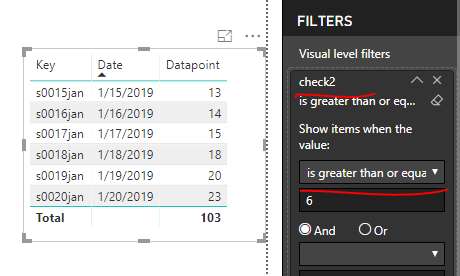
Add [Check2] into visual level filter to highlight dates having 6 consecutive data points which are greater than previous.
Best regards,
Yuliana Gu
Community Support Team _ Yuliana Gu
If this post helps, then please consider Accept it as the solution to help the other members find it more quickly.


