Don't miss your chance to take exam DP-600 or DP-700 on us!
Request nowLearn from the best! Meet the four finalists headed to the FINALS of the Power BI Dataviz World Championships! Register now
Hi all, here is my scenario. It is quite complicated. I cant show you the real table, however i made another similar tables.
Table 1 (Receive Item):
ReceiveID Item Payment
1 Car A $50
2 Car B $50
3 Car C $50
4 Car D $50
5 Car E $50
6 Car F $50
etc...
Table 2 (Invoice Item):
ReceiveID Item Payment
1 Car A $50
2 Car B $50
3 Car C $50
4 Car D $50
5 Car E $50
6 Car F $50
etc...
So my question is i would like to find out what are the data from table 1 are appearing in table 2. I'm sure that there is a lot of ways to do it. I had failed to link the tables together (i created another new table for ID as a middle key). I tried the IF function however it doesnt support cross table. I need help. Thanks.
Solved! Go to Solution.
@CTan42,
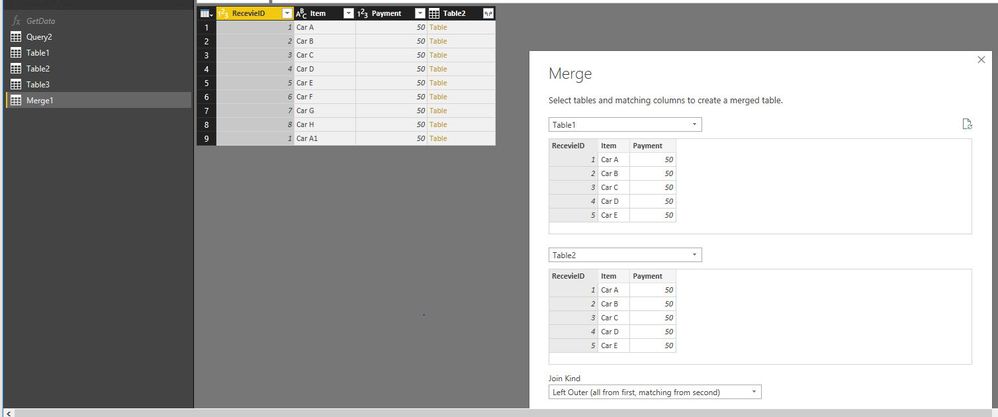
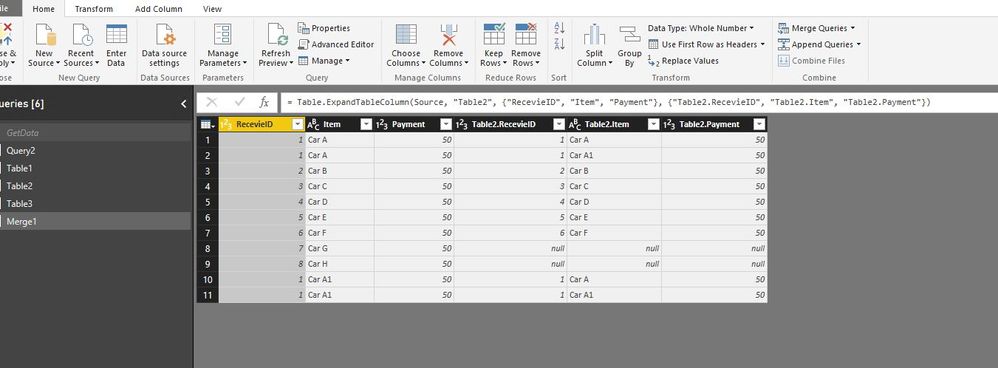
Merge the two tables in Query Editor as shown in the following screenshots.
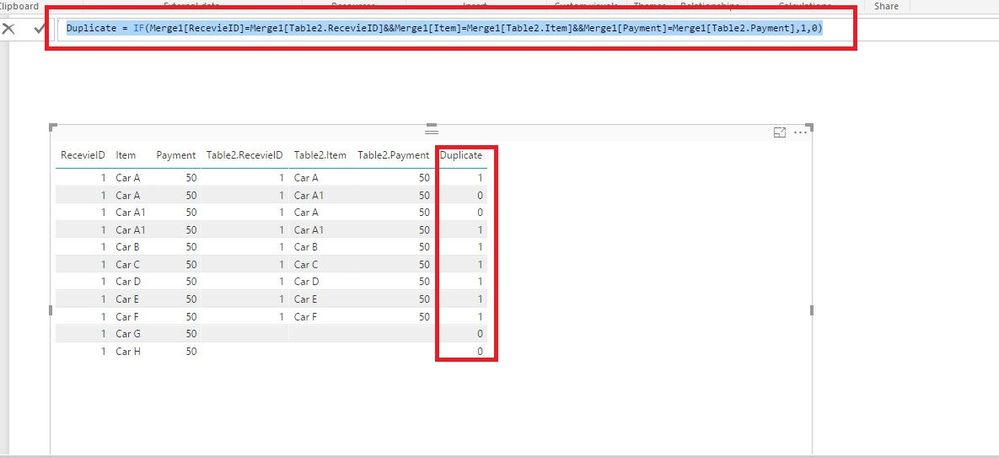
Then create a column in the merged table.
Duplicate = IF(Merge1[RecevieID]=Merge1[Table2.RecevieID]&&Merge1[Item]=Merge1[Table2.Item]&&Merge1[Payment]=Merge1[Table2.Payment],1,0)
If the above steps don't help, please post more sample data and post your expected result here.
Regards,
Lydia
@CTan42,
Merge the two tables in Query Editor as shown in the following screenshots.
Then create a column in the merged table.
Duplicate = IF(Merge1[RecevieID]=Merge1[Table2.RecevieID]&&Merge1[Item]=Merge1[Table2.Item]&&Merge1[Payment]=Merge1[Table2.Payment],1,0)
If the above steps don't help, please post more sample data and post your expected result here.
Regards,
Lydia
Share feedback directly with Fabric product managers, participate in targeted research studies and influence the Fabric roadmap.
Check out the February 2026 Power BI update to learn about new features.
| User | Count |
|---|---|
| 55 | |
| 45 | |
| 38 | |
| 16 | |
| 14 |
| User | Count |
|---|---|
| 87 | |
| 69 | |
| 38 | |
| 29 | |
| 26 |