FabCon is coming to Atlanta
Join us at FabCon Atlanta from March 16 - 20, 2026, for the ultimate Fabric, Power BI, AI and SQL community-led event. Save $200 with code FABCOMM.
Register now!- Power BI forums
- Get Help with Power BI
- Desktop
- Service
- Report Server
- Power Query
- Mobile Apps
- Developer
- DAX Commands and Tips
- Custom Visuals Development Discussion
- Health and Life Sciences
- Power BI Spanish forums
- Translated Spanish Desktop
- Training and Consulting
- Instructor Led Training
- Dashboard in a Day for Women, by Women
- Galleries
- Data Stories Gallery
- Themes Gallery
- Contests Gallery
- QuickViz Gallery
- Quick Measures Gallery
- Visual Calculations Gallery
- Notebook Gallery
- Translytical Task Flow Gallery
- TMDL Gallery
- R Script Showcase
- Webinars and Video Gallery
- Ideas
- Custom Visuals Ideas (read-only)
- Issues
- Issues
- Events
- Upcoming Events
The Power BI Data Visualization World Championships is back! Get ahead of the game and start preparing now! Learn more
- Power BI forums
- Forums
- Get Help with Power BI
- Desktop
- Identify Duplicates before and after 30 days of a ...
- Subscribe to RSS Feed
- Mark Topic as New
- Mark Topic as Read
- Float this Topic for Current User
- Bookmark
- Subscribe
- Printer Friendly Page

- Mark as New
- Bookmark
- Subscribe
- Mute
- Subscribe to RSS Feed
- Permalink
- Report Inappropriate Content
Identify Duplicates before and after 30 days of a record
Hey everyone,
I need to identify duplicates in a tabe chart. The criteria for duplicates is:
-Same Vendor
-Same Reference No
-Same Invoice Amount
-Within 30 days of a record (before and after)
For e.g.
| Vendor | Reference No | Invoice Amount | Date |
| ABC | 123 | 100 | 01/23/2020 |
| XYZ | 111 | 590 | 02/01/2020 |
| ABC | 123 | 230 | 01/01/2020 |
| XYZ | 191 | 590 | 02/01/2020 |
| ABC | 123 | 100 | 12/01/2019 |
Result:
| Vendor | Reference No | Invoice Amount | Date |
| ABC | 123 | 100 | 01/23/2020 |
| ABC | 123 | 100 | 12/01/2019 |
Would greatly appreciate the help.
Solved! Go to Solution.


- Mark as New
- Bookmark
- Subscribe
- Mute
- Subscribe to RSS Feed
- Permalink
- Report Inappropriate Content
Hi @Anonymous ,
Create a measure as below:
Measure =
var _previousdate=CALCULATE(MAX('Table'[Date]),FILTER(ALL('Table'),'Table'[Vendor]=MAX('Table'[Vendor])&&'Table'[Reference No]=MAX('Table'[Reference No])&&'Table'[Invoice Amount]=MAX('Table'[Invoice Amount])&&'Table'[Date]<MAX('Table'[Date])))
var _afterdate=CALCULATE(MAX('Table'[Date]),FILTER(ALL('Table'),'Table'[Vendor]=MAX('Table'[Vendor])&&'Table'[Reference No]=MAX('Table'[Reference No])&&'Table'[Invoice Amount]=MAX('Table'[Invoice Amount])&&'Table'[Date]>MAX('Table'[Date])))
var _datediff1=DATEDIFF(_previousdate,MAX('Table'[Date]),DAY)
var _datediff2=DATEDIFF(MAX('Table'[Date]),_afterdate,DAY)
Return
IF(_previousdate=BLANK()||_afterdate=BLANK(),0,IF(_datediff1<30||_datediff2<30,1,0))
As the datediff between "01/23/2020" and "12/01/2019" is 53,not within 30,so my result returns as below:
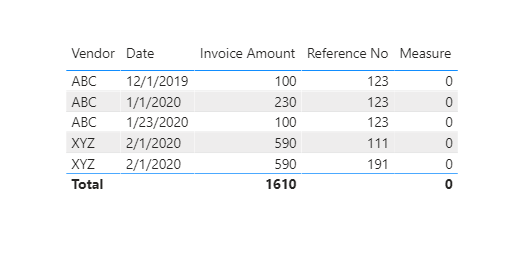
If you get the 1 returned,just go to filter pane,choose measure =1,then you will get what you request.
Kelly


- Mark as New
- Bookmark
- Subscribe
- Mute
- Subscribe to RSS Feed
- Permalink
- Report Inappropriate Content
@Anonymous , Create a new column like
if(countx(filter(Table,[Vendor] =earlier([Vendor]) && [Reference No] =earlier([Reference No]) && [Invoice Amount ] =earlier([Invoice Amount])
&& [date] >=earlier([Date])-30 && [date] <=earlier([Date])+30 ),[Reference No])+0>=2, "Duplicate", "Not Duplicate")
and filter Duplicate
- Mark as New
- Bookmark
- Subscribe
- Mute
- Subscribe to RSS Feed
- Permalink
- Report Inappropriate Content
Hi @Anonymous ,
Create a measure as below:
Measure =
var _previousdate=CALCULATE(MAX('Table'[Date]),FILTER(ALL('Table'),'Table'[Vendor]=MAX('Table'[Vendor])&&'Table'[Reference No]=MAX('Table'[Reference No])&&'Table'[Invoice Amount]=MAX('Table'[Invoice Amount])&&'Table'[Date]<MAX('Table'[Date])))
var _afterdate=CALCULATE(MAX('Table'[Date]),FILTER(ALL('Table'),'Table'[Vendor]=MAX('Table'[Vendor])&&'Table'[Reference No]=MAX('Table'[Reference No])&&'Table'[Invoice Amount]=MAX('Table'[Invoice Amount])&&'Table'[Date]>MAX('Table'[Date])))
var _datediff1=DATEDIFF(_previousdate,MAX('Table'[Date]),DAY)
var _datediff2=DATEDIFF(MAX('Table'[Date]),_afterdate,DAY)
Return
IF(_previousdate=BLANK()||_afterdate=BLANK(),0,IF(_datediff1<30||_datediff2<30,1,0))
As the datediff between "01/23/2020" and "12/01/2019" is 53,not within 30,so my result returns as below:
If you get the 1 returned,just go to filter pane,choose measure =1,then you will get what you request.
Kelly


- Mark as New
- Bookmark
- Subscribe
- Mute
- Subscribe to RSS Feed
- Permalink
- Report Inappropriate Content
You can try this measure expression, in a table visual with the Vendor, Reference No, and Date columns. It will return blank for rows that have a duplicate within 30 days (and filter them from the visual). Note that the xyz rows in your sample data have different Reference #. Should those have been filtered out from your example desired output?
Invoice Amount if No Duplicates =
VAR thisamount =
    SUM ( Invoices[Invoice Amount] )
VAR thisdate =
    MIN ( Invoices[Date] )
VAR dupecount =
    CALCULATE (
        COUNTROWS ( Invoices ),
        ALL ( Invoices[Date] ),
        Invoices[Date] >= thisdate,
        Invoices[Date] <= thisdate + 30
    )
RETURN
    IF ( dupecount = 1, thisamount )
If this works for you, please mark it as the solution. Kudos are appreciated too. Please let me know if not.
Regards,
Pat
Did I answer your question? Mark my post as a solution! Kudos are also appreciated!
To learn more about Power BI, follow me on Twitter or subscribe on YouTube.
@mahoneypa HoosierBI on YouTube
- Mark as New
- Bookmark
- Subscribe
- Mute
- Subscribe to RSS Feed
- Permalink
- Report Inappropriate Content
@mahoneypat Hello! Yes, the xyz rows in mysample data have different Reference # so they should be filtered out from the example desired output.
- Mark as New
- Bookmark
- Subscribe
- Mute
- Subscribe to RSS Feed
- Permalink
- Report Inappropriate Content
Hi @Anonymous ,
Have you checked my reply?Is my solution what you need?If not,pls correct me.
Kelly
- Mark as New
- Bookmark
- Subscribe
- Mute
- Subscribe to RSS Feed
- Permalink
- Report Inappropriate Content
I thought you were trying to keep the ones that weren't duplicates. Please try this expression instead. I noticed in your example however that the two rows retained were >30 days apart (so wouldn't satisfy the criteria). So I adapted this to look +/-60 days for duplicates. If I have it backwards, you can replace with 30 and adjust the > and < to your desired logic.
Invoice Amount Duplicates =
VAR thisamount =
    SUM ( Invoices[Invoice Amount] )
VAR thisdate =
    MIN ( Invoices[Date] )
VAR dupecount =
    CALCULATE (
        COUNTROWS ( Invoices ),
        ALLEXCEPT ( Invoices, Invoices[Vendor], Invoices[Reference No] ),
        Invoices[Invoice Amount] = thisamount,
        Invoices[Date] >= thisdate - 60,
        Invoices[Date] <= thisdate + 60
    )
RETURN
    IF ( dupecount > 1, thisamount )
Note that this measure returns the Amount, so I didn't have that column in the Table visual.
If this works for you, please mark it as the solution. Kudos are appreciated too. Please let me know if not.
Regards,
Pat
Did I answer your question? Mark my post as a solution! Kudos are also appreciated!
To learn more about Power BI, follow me on Twitter or subscribe on YouTube.
@mahoneypa HoosierBI on YouTube
- Mark as New
- Bookmark
- Subscribe
- Mute
- Subscribe to RSS Feed
- Permalink
- Report Inappropriate Content
Hello! Yes, the xyz rows in mysample data have different Reference # so they should be filtered out from the example desired output.
Helpful resources

Power BI Dataviz World Championships
The Power BI Data Visualization World Championships is back! Get ahead of the game and start preparing now!

Power BI Monthly Update - December 2025
Check out the December 2025 Power BI Holiday Recap!

FabCon Atlanta 2026
Join us at FabCon Atlanta, March 16-20, for the ultimate Fabric, Power BI, AI and SQL community-led event. Save $200 with code FABCOMM.

| User | Count |
|---|---|
| 41 | |
| 38 | |
| 36 | |
| 30 | |
| 28 |


| User | Count |
|---|---|
| 128 | |
| 88 | |
| 79 | |
| 67 | |
| 62 |


