Hello All -
I am attempting to use a calculated column to identify the duplicate rows with the highest value. I know how to do this in Excel, using the COUNTIFS function, however, I have been struggling to do this in DAX/Power BI.
My sample data looks like,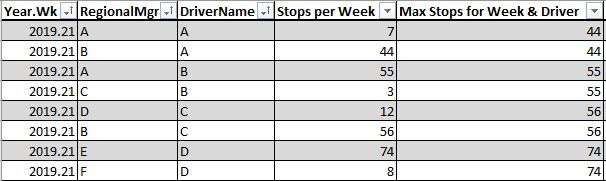
In another column, I would like to identify the rows that are the duplicates, based on Year.Wk, DriverName, with the highest value in Stops per Week.
The result would look as follows,
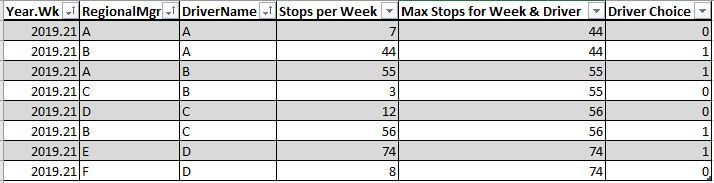
Currently, I have the following Calculated Column, which is providing the wrong answer;
Driver Choice = CALCULATE (
COUNTROWS('Driver Relationship Table'),
FILTER (
'Driver Relationship Table',
'Driver Relationship Table'[Year.Wk] = EARLIER('Driver Relationship Table'[Year.Wk]) &&
'Driver Relationship Table'[DriverName] = EARLIER('Driver Relationship Table'[DriverName])&&
'Driver Relationship Table'[Num of Services] = CALCULATE(MAX('Driver Relationship Table'[Max Stops for Week & Driver]),FILTER('Driver Relationship Table','Driver Relationship Table'[Year.Wk]=EARLIER('Driver Relationship Table'[Year.Wk]) && 'Driver Relationship Table'[DriverName]=EARLIER('Driver Relationship Table'[DriverName])))
)
)
Any assistance on this would be helpful.
Thank you!


