cancel
Showing results for 
Search instead for 
Did you mean: 

The Power BI Data Visualization World Championships is back! Get ahead of the game and start preparing now! Learn more

Reply
MarvinGallo
Frequent Visitor

Identify Blank Cells in RELATED column

Hi Everyone, 


I created a RELATED column on the DATA section of my report to return a value matching my column. As it was expected, the column contains Blank values as well as zero values as Decimal (e.g. 0.00). I would like to create another column that compares the new column with an existing column. But I'm having trouble returning a value where there is a blank cell. 


Example:


 Column # | Value 1 | Value 2 | Desired Third Column

        1        | 0.50      | 1.25      | Value 2 = "Higher"

        2        | 1.50      | 0.554    | Value 2 = "Lower"

        3        | 0.00      | 0.00      | Value 2 = "Same"

        4        | 0.00      |              | Value 2 = "Not Available"


The problem I'm having is that it appears the blanks are generating the same values as a 0.00 - So the IF formula I created does not recognize blanks. 


Here is the formula syntax I'm using:


KPIValueFY18 = IF( Value 2 = Value 1, "Same", Value 2 = [BlankValue], "N/A", IF Value 2 > Value 1, "Higher", IF(Value 2 < Value 1,"Lower"))))
 
I appreciate the help!
1 ACCEPTED SOLUTION
TeigeGao
Solution Sage
Solution Sage

Hi @MarvinGallo ,

We can use the ISBLANK() function to judge if it is a blank value, please refer to the following DAX query:

KPIValueFY18 =
IF (
    ISBLANK ( Table1[Value2] ),
    "N/A",
    IF (
        Table1[Value1] = Table1[Value2],
        "Same",
        IF ( Table1[Value1] < Table1[Value2], "Higher", "Lower" )
    )
)

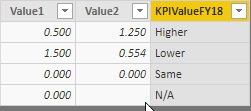
The result will like below:

PBIDesktop_3ekv9u3gwL.png

Best Regards,

Teige

View solution in original post

1 REPLY 1
TeigeGao
Solution Sage
Solution Sage

Hi @MarvinGallo ,

We can use the ISBLANK() function to judge if it is a blank value, please refer to the following DAX query:

KPIValueFY18 =
IF (
    ISBLANK ( Table1[Value2] ),
    "N/A",
    IF (
        Table1[Value1] = Table1[Value2],
        "Same",
        IF ( Table1[Value1] < Table1[Value2], "Higher", "Lower" )
    )
)

The result will like below:

PBIDesktop_3ekv9u3gwL.png

Best Regards,

Teige

Helpful resources

Announcements
Power BI DataViz World Championships

Power BI Dataviz World Championships

The Power BI Data Visualization World Championships is back! Get ahead of the game and start preparing now!

November Power BI Update Carousel

Power BI Monthly Update - November 2025

Check out the November 2025 Power BI update to learn about new features.

FabCon Atlanta 2026 carousel

FabCon Atlanta 2026

Join us at FabCon Atlanta, March 16-20, for the ultimate Fabric, Power BI, AI and SQL community-led event. Save $200 with code FABCOMM.