Get certified for free when you join Fabric Data Days 2026 and dive into Fabric, Power BI, SQL, AI, and other essential data skills.
Join nowJuly 7 - July 17 | Round 2 of the Power BI Dataviz World Championships. Don't miss your chance! Learn more
The new July 2019 release has this amazing feature where we can use icons directly in tables and matrix based on the column values. However i'm struggling a bit with the colors in those icons.
Is there a way to change the colors of those icons in the table?
Ex : Check mark in green circle is a good icon for KPI in table. But i want a darker green shade. Is it possible?
Note : I'm using SSAS tabular as backend source, so can't use unichars (for conditional formatting using DAX) and can't use advanced editor.
Solved! Go to Solution.
Hi SBELANIX,
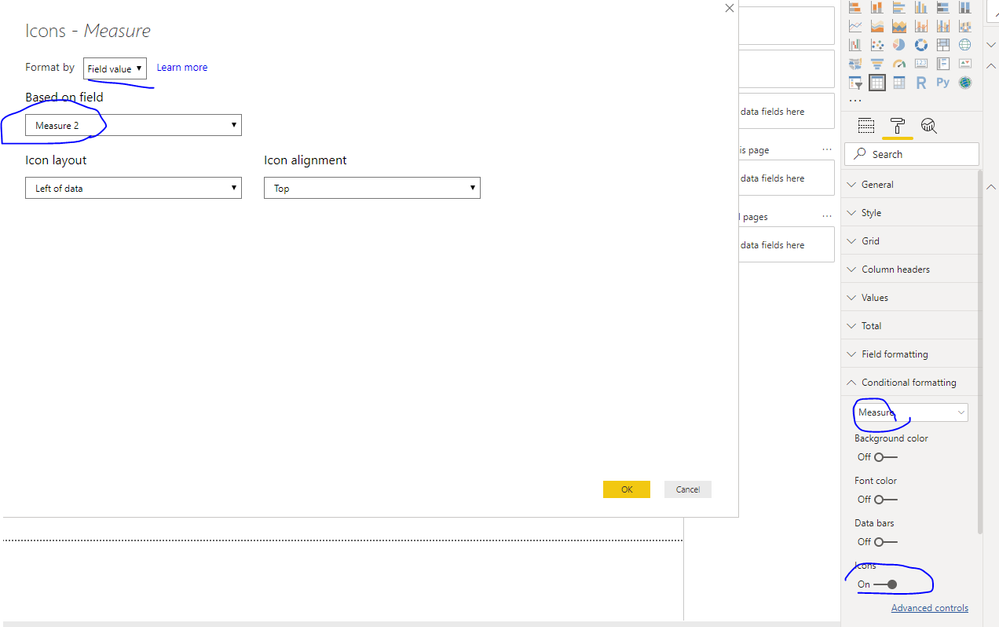
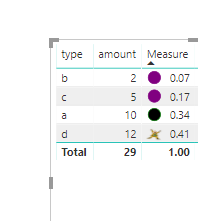
You could try to create measure to define icon color like below
Measure 2 =
SWITCH (
TRUE (),
[Measure] < 0.2, "data:image/svg+xml;utf8, <svg xmlns='http://www.w3.org/2000/svg' x='0px' y='0px' width='100' height='100' viewBox='0 0 100 100'> <circle cx='50' cy='50' r='40' stroke='purple' stroke-width='4' fill='purple' /> </svg>",
[Measure] < 0.4, "data:image/svg+xml;utf8, <svg xmlns='http://www.w3.org/2000/svg' x='0px' y='0px' width='100' height='100' viewBox='0 0 100 100'> <circle cx='50' cy='50' r='40' stroke='green' stroke-width='4' fill='dark green' />
</svg>",
"https://i.gifer.com/4Ym4.gif"
-- "https://i.gifer.com/Omjx.gif"
)Then use this in conditional format like below
You could refer to Conditional Formatting Using Icons In Power BI for details
Best Regards,
Zoe Zhi
If this post helps, then please consider Accept it as the solution to help the other members find it more quickly.
Hi SBELANIX,
You could try to create measure to define icon color like below
Measure 2 =
SWITCH (
TRUE (),
[Measure] < 0.2, "data:image/svg+xml;utf8, <svg xmlns='http://www.w3.org/2000/svg' x='0px' y='0px' width='100' height='100' viewBox='0 0 100 100'> <circle cx='50' cy='50' r='40' stroke='purple' stroke-width='4' fill='purple' /> </svg>",
[Measure] < 0.4, "data:image/svg+xml;utf8, <svg xmlns='http://www.w3.org/2000/svg' x='0px' y='0px' width='100' height='100' viewBox='0 0 100 100'> <circle cx='50' cy='50' r='40' stroke='green' stroke-width='4' fill='dark green' />
</svg>",
"https://i.gifer.com/4Ym4.gif"
-- "https://i.gifer.com/Omjx.gif"
)Then use this in conditional format like below
You could refer to Conditional Formatting Using Icons In Power BI for details
Best Regards,
Zoe Zhi
If this post helps, then please consider Accept it as the solution to help the other members find it more quickly.
This is another case in PBI where the solution that should be out of the box, and/or easy to implement requires an incredibly complex DAX expression. Why does everything in PBI require the most over engineered solution for the most simple and minor ask?
Well actually the field value on conditional formatting doesn't work while connecting through SSAS cubes. But found a solution in the link you shared. We can change the color codes from JSON files. Thanks!
Join us in Barcelona for FabCon and SQLCon, the Fabric, Power BI, SQL, and AI community event. Save €200 with code FABCMTY200.
Join Fabric Data Days 2026: 60 days of free live/on-demand sessions, challenges, study groups, and certification opportunities.
| User | Count |
|---|---|
| 23 | |
| 22 | |
| 18 | |
| 17 | |
| 13 |
| User | Count |
|---|---|
| 67 | |
| 50 | |
| 46 | |
| 41 | |
| 39 |