Join us at FabCon Atlanta from March 16 - 20, 2026, for the ultimate Fabric, Power BI, AI and SQL community-led event. Save $200 with code FABCOMM.
Register now!Vote for your favorite vizzies from the Power BI Dataviz World Championship submissions. Vote now!
Hi Team,
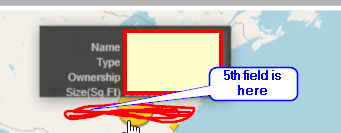
I was able to add custom icon using url and wanted to add more fields to tooltip , achieved by creating hierarchy and added into category field after clicking on expand button below i was able to see the fields but the issue is background color of the tooltip is not getting expanded for more fields ( added 5 fields in hirerachy to achieve my requirement) ...
if i hover over for some cases background shows only for 3 fields because the text size is longer and tooltip background is not getting highlighted ( values in white color text goes below , backgroud color is fixed not auto adjusting )
is this can be fixed ? pls help.
Solved! Go to Solution.
Hello Team
I Just come across that there is a beta version is available which provides customaizing tool tips. What is available in appsource is too old.
Please use the link http://www.icon-map.com/ to download.
There are also examples for drilldown on the site.
http://icon-map.com/usage_circles.html
Thank you so much @jamesdales
@Anonymous , have you explored? Can it help?
Yes I have tried... Icon map currently not allowing report page tooltip .. so I tried the other workarround like creating hierarchy n adding into category field of icon map ... It works but tooltip background (hieght ) is not getting adjusted .. text in white colour is not getting highlited ( background black)
Hello Team
I Just come across that there is a beta version is available which provides customaizing tool tips. What is available in appsource is too old.
Please use the link http://www.icon-map.com/ to download.
There are also examples for drilldown on the site.
http://icon-map.com/usage_circles.html
Thank you so much @jamesdales
Vote for your favorite vizzies from the Power BI World Championship submissions!
If you love stickers, then you will definitely want to check out our Community Sticker Challenge!
Check out the January 2026 Power BI update to learn about new features.
| User | Count |
|---|---|
| 64 | |
| 51 | |
| 46 | |
| 23 | |
| 19 |
| User | Count |
|---|---|
| 136 | |
| 110 | |
| 50 | |
| 32 | |
| 29 |