cancel
Showing results for 
Search instead for 
Did you mean: 

July 7 - July 17 | Round 2 of the Power BI Dataviz World Championships. Don't miss your chance! Learn more

Reply
quantfinRguy
Frequent Visitor

IN function?

Is there a DAX function that test whether or not the target is in a column?


For example, ....(x, DATA) returns TRUE() or FALSE() whether or not x is in the column


DATA

1

2

3

4

5

6

...


2 ACCEPTED SOLUTIONS
TomMartens
Super User
Super User

Hey,


there are two functions I would start with. The 1st function is IN (actually IN is more like an operator then a function but nevertheless ...

You can use something like this

IF(15 IN
    VALUES('Calendar'[MonthNoIndex])
    ,"Yes"
    ,"No"
    )

This little statement checks if 15 is contained in the table returned by VALUES(). Be aware that IN checks if something in a table.


This would also work

IF(15 IN
    {13, 14, 15}
    ,"Yes"
    ,"No"
    )

The 2nd function that can be of interest, could be CONTAINS().


I hope this gets you started.


Regards

Tom 


Did I answer your question? Mark my post as a solution, this will help others!

Proud to be a Super User!
I accept Kudos 😉
Hamburg, Germany

View solution in original post

v-huizhn-msft
Microsoft Employee
Microsoft Employee

Hi @quantfinRguy,

As @TomMartens posted, you you can create measure using IN function.

This is my sample table, please a measure using the formula below.

1.PNG

Measure = IF(4 IN VALUES(Test[Date]),"Yes","No")

Create a table visual to display the result.

2.PNG

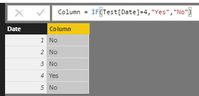
For another thing, you can create a calculated column using the formula below to get expected result.

Column = IF(Test[Date]=4,"Yes","No")

4.PNG

Best Regards,
Angelia

View solution in original post

2 REPLIES 2
v-huizhn-msft
Microsoft Employee
Microsoft Employee

Hi @quantfinRguy,

As @TomMartens posted, you you can create measure using IN function.

This is my sample table, please a measure using the formula below.

1.PNG

Measure = IF(4 IN VALUES(Test[Date]),"Yes","No")

Create a table visual to display the result.

2.PNG

For another thing, you can create a calculated column using the formula below to get expected result.

Column = IF(Test[Date]=4,"Yes","No")

4.PNG

Best Regards,
Angelia

TomMartens
Super User
Super User

Hey,


there are two functions I would start with. The 1st function is IN (actually IN is more like an operator then a function but nevertheless ...

You can use something like this

IF(15 IN
    VALUES('Calendar'[MonthNoIndex])
    ,"Yes"
    ,"No"
    )

This little statement checks if 15 is contained in the table returned by VALUES(). Be aware that IN checks if something in a table.


This would also work

IF(15 IN
    {13, 14, 15}
    ,"Yes"
    ,"No"
    )

The 2nd function that can be of interest, could be CONTAINS().


I hope this gets you started.


Regards

Tom 


Did I answer your question? Mark my post as a solution, this will help others!

Proud to be a Super User!
I accept Kudos 😉
Hamburg, Germany

Helpful resources

Announcements
FabCon and SQLCon Barcelona 2026

FabCon & SQLCon – Barcelona 2026

Join us in Barcelona for FabCon and SQLCon, the Fabric, Power BI, SQL, and AI community event. Save €200 with code FABCMTY200.

60 days of Data Days Carousel

Data Days 2026

Join Fabric Data Days 2026: 60 days of free live/on-demand sessions, challenges, study groups, and certification opportunities.

Power BI DataViz World Championships carousel

Power BI DataViz World Championships - June 2026

A new Power BI DataViz World Championship is coming this June! Don't miss out on submitting your entry.