cancel
Showing results for 
Search instead for 
Did you mean: 

The Power BI Data Visualization World Championships is back! Get ahead of the game and start preparing now! Learn more

Reply
Anonymous
Not applicable

IF condition in New Measure. Unable to view all the tables.

Our requirement is to display refresh date from the table when column1="ABC". We are trying to usea measure for this..

we have a table where columns are names and refresh_date (with timestamp values) that is not join with other tables in relationships. Not required as well.

Need to use a IF condition  like below:


Refreshed Date = IF('TABLE'[column1]="ABC",'TABLE'[REFRESH DATE])

However, I am unable to see this specific tables which is not joined in the relationships.. there is no key where we could join with other tables..


Please help.

1 ACCEPTED SOLUTION
VasTg
Memorable Member
Memorable Member

@Anonymous 


Where do you use the refreshed date? Do you have a calender table or fact based on which you pull the data? Or is it something you want to keep it as a slicer/filter in the visual?


Or simply bring in the two columns and use the Column1 in Visual filter and filter for value ABC


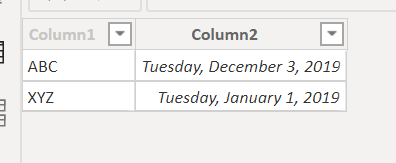
Sample Data:

Capture1.PNG


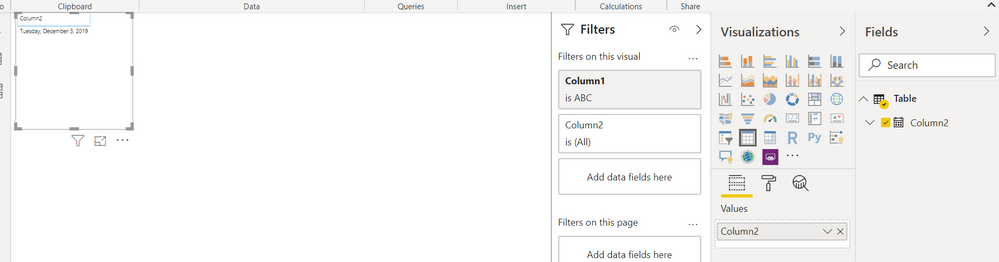
Filter Column1 for "ABC". You could hide the column1 and filter later.


Capture2.PNG


If this helps, Mark it as a solution.

Kudos are nice too.

Connect on LinkedIn

View solution in original post

4 REPLIES 4
v-frfei-msft
Community Support
Community Support

Hi @Anonymous ,


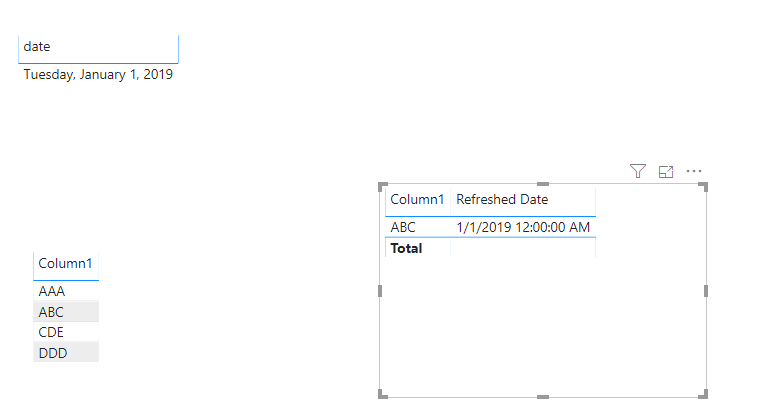
I have created a sample for your reference, please have a check as below.

Refreshed Date = IF(MAX('TABLE'[Column1]) = "ABC", MAX('date'[date]))

Capture.PNG

If it doesn't meet your requirement, kindly share your sample data and excepted result to me if you don't have any Confidential Information. Please upload your files to One Drive and share the link here.


Community Support Team _ Frank
If this post helps, then please consider Accept it as the solution to help the others find it more quickly.
VasTg
Memorable Member
Memorable Member

@Anonymous 


Where do you use the refreshed date? Do you have a calender table or fact based on which you pull the data? Or is it something you want to keep it as a slicer/filter in the visual?


Or simply bring in the two columns and use the Column1 in Visual filter and filter for value ABC


Sample Data:

Capture1.PNG


Filter Column1 for "ABC". You could hide the column1 and filter later.


Capture2.PNG


If this helps, Mark it as a solution.

Kudos are nice too.

Connect on LinkedIn
Anonymous
Not applicable

I need to use refresh date in the top corner of the report page. There is no relationsips between the tables. I have a table where two columns are there .. name and date.

@Anonymous 


See if the workaround helps.


If you don't need other rows in the table, you could filter in Edit queries/Transform data.


Connect on LinkedIn

Helpful resources

Announcements
Power BI DataViz World Championships

Power BI Dataviz World Championships

The Power BI Data Visualization World Championships is back! Get ahead of the game and start preparing now!

December 2025 Power BI Update Carousel

Power BI Monthly Update - December 2025

Check out the December 2025 Power BI Holiday Recap!

FabCon Atlanta 2026 carousel

FabCon Atlanta 2026

Join us at FabCon Atlanta, March 16-20, for the ultimate Fabric, Power BI, AI and SQL community-led event. Save $200 with code FABCOMM.