cancel
Showing results for 
Search instead for 
Did you mean: 

Join the FabCon + SQLCon recap series. Up next: Power BI, Real-Time Intelligence, IQ and AI, and Data Factory take center stage. All sessions are available on-demand after the live show. Register now

Reply

IF and Else Conditional formatting

Hey Guys, 


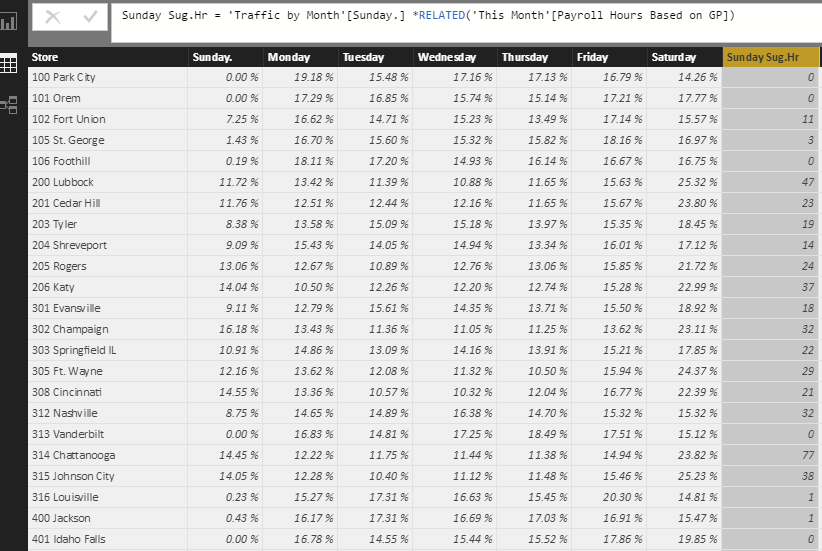
I ran into another problem. I have Calculated colunm called Sunday Sug.Hr. Please see below picture and formular that I used to calculate' 

(Sunday Sug.Hr = 'Traffic by Month'[Sunday.] *RELATED('This Month'[Payroll Hours Based on GP]))

Besed on the result I want to show, 

if result = 0 then "0"

if result <8 then "8"

Else whatevether result 

 I tried several ways. its give me an error, (Ex IF AND, etc)


Column = SWITCH(('Traffic by Month'[Sunday.] * RELATED('This Month'[Payroll Hours Based on GP])) = 0,0,('Traffic by Month'[Sunday.] * RELATED('This Month'[Payroll Hours Based on GP])) < 8,8)

Thank you So much 


Dhana Capture.PNG

1 ACCEPTED SOLUTION
v-huizhn-msft
Microsoft Employee
Microsoft Employee

Hi @dananjayaprasad,

You just need to create a calculated column based on the column "Sunday Sug.Hr" using the formula below.

Column =
IF (
    'Traffic by Month'[Sunday Sug.Hr] = 0,
    0,
    IF (
        'Traffic by Month'[Sunday Sug.Hr] < 8,
        8,
        'Traffic by Month'[Sunday Sug.Hr]
    )
)


Best Regards,
Angelia

View solution in original post

3 REPLIES 3
v-huizhn-msft
Microsoft Employee
Microsoft Employee

Hi @dananjayaprasad,

You just need to create a calculated column based on the column "Sunday Sug.Hr" using the formula below.

Column =
IF (
    'Traffic by Month'[Sunday Sug.Hr] = 0,
    0,
    IF (
        'Traffic by Month'[Sunday Sug.Hr] < 8,
        8,
        'Traffic by Month'[Sunday Sug.Hr]
    )
)


Best Regards,
Angelia

Thank you Angelia. 

As an alternative for using those ugly nested IFs, the SWITCH function has some neat tricks - see https://powerpivotpro.com/2015/03/the-diabolical-genius-of-switch-true/

Helpful resources

Announcements
April Power BI Update Carousel

Power BI Monthly Update - April 2026

Check out the April 2026 Power BI update to learn about new features.

New to Fabric survey Carousel

New to Fabric Survey

If you have recently started exploring Fabric, we'd love to hear how it's going. Your feedback can help with product improvements.

Power BI DataViz World Championships carousel

Power BI DataViz World Championships - June 2026

A new Power BI DataViz World Championship is coming this June! Don't miss out on submitting your entry.

FabCon and SQLCon Highlights Carousel

FabCon &SQLCon Highlights

Experience the highlights from FabCon & SQLCon, available live and on-demand starting April 14th.