
Join us at FabCon Atlanta from March 16 - 20, 2026, for the ultimate Fabric, Power BI, AI and SQL community-led event. Save $200 with code FABCOMM.
Register now!The Power BI Data Visualization World Championships is back! Get ahead of the game and start preparing now! Learn more
Hi Team,
Can some one help me with correcting the below formula?
When i enter this formula encountering the below error.
"too many arguments were passed to the and function. the maximum argument count for the function is 2"
Solved! Go to Solution.
Hi @RanjanThammaiah ,
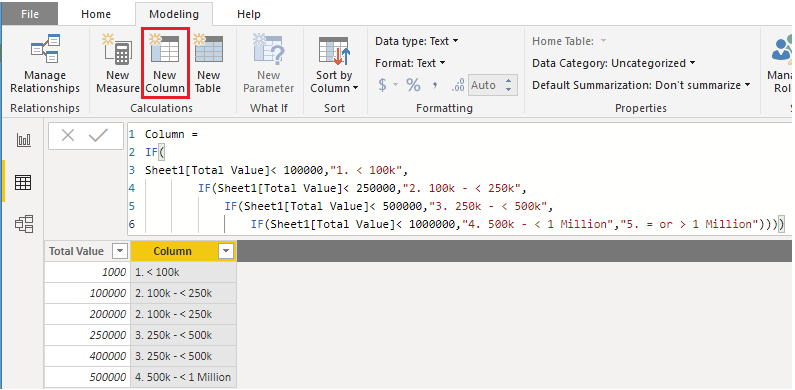
Measures needs the row context to show all values. You could create a calculated column to implement.
Column = IF( Sheet1[Total Value]< 100000,"1. < 100k", IF(Sheet1[Total Value]< 250000,"2. 100k - < 250k", IF(Sheet1[Total Value]< 500000,"3. 250k - < 500k", IF(Sheet1[Total Value]< 1000000,"4. 500k - < 1 Million","5. = or > 1 Million"))))
Best Regards,
Xue Ding
If this post helps, then please consider Accept it as the solution to help the other members find it more quickly.
Hi @RanjanThammaiah ,
Measures needs the row context to show all values. You could create a calculated column to implement.
Column = IF( Sheet1[Total Value]< 100000,"1. < 100k", IF(Sheet1[Total Value]< 250000,"2. 100k - < 250k", IF(Sheet1[Total Value]< 500000,"3. 250k - < 500k", IF(Sheet1[Total Value]< 1000000,"4. 500k - < 1 Million","5. = or > 1 Million"))))
Best Regards,
Xue Ding
If this post helps, then please consider Accept it as the solution to help the other members find it more quickly.
The AND function can only take 2 arguments.
If you require more than 2 arguments to be satisified you can use && between arguments instead of the AND function.
Hope this helps
Thanks,
George
Thanks For the response.
I have changed the formula. The formula works but i am not getting the result right. Could you help me correcting it.
That result would be displayed because the value is greater than or equal to 1m.
Are you placing the measure as a card visual or splitting it out in a table visual?
Thanks,
George
I have added it as new column.
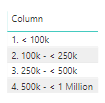
If you see the below difference between BI new column formula and excel formula.
The Power BI Data Visualization World Championships is back! Get ahead of the game and start preparing now!
| User | Count |
|---|---|
| 39 | |
| 38 | |
| 38 | |
| 28 | |
| 25 |
| User | Count |
|---|---|
| 124 | |
| 87 | |
| 70 | |
| 66 | |
| 65 |