cancel
Showing results for 
Search instead for 
Did you mean: 

The Power BI Data Visualization World Championships is back! Get ahead of the game and start preparing now! Learn more

Reply
Naveennegi119
Helper III
Helper III

I want to know it's bug or not

Hi all,


data for use below:-


Sub
 
data of sub
 
A1
B2
C3
A4
B5
C6
A7
B8
C9
A10
B11
C12
A13
B14
C15
A16
B17
C18
A19
B20
C21

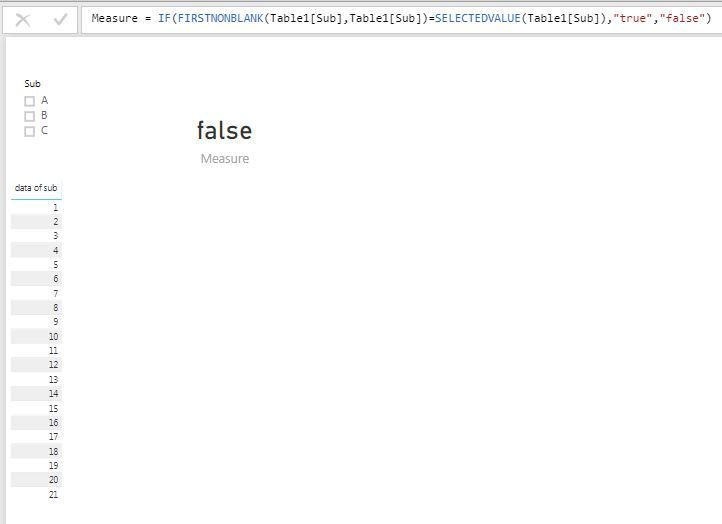
Without using filter.JPG

Without using slicer measure working good........


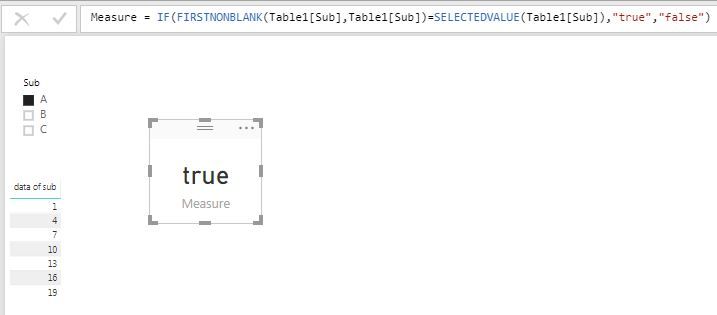
using slicer.JPG

using slicer also dax working fine.......


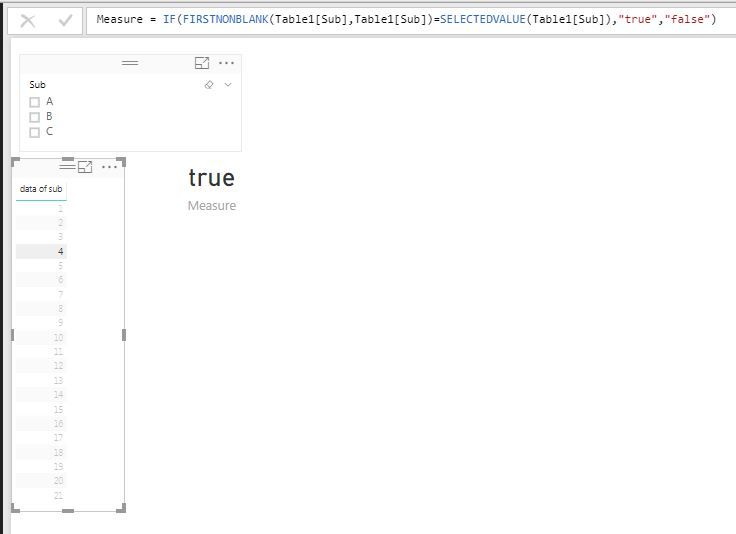
But when i select data of sub why it's showing true....

Bugs or not.JPG


Is it any solution of this when I select data of sub. It show false........


Regards,

NICK


1 ACCEPTED SOLUTION
Anonymous
Not applicable

This is indended behaviour. Your measure is checking if the selected value is the same as the first value. The reason why when you select a value it shows true is that the value you are selecting is filtering your measure down to the sub that it is a part of. Then the selected sub is the same as the first one as there is only one sub in the current context.


In ecessence your table is a filter. To fix this the quick and dirty way is to disable the relationship between the two visuals. A way to do it in DAX would be to use ALL so that you cant filter the measure using data of sub. There might be a better way to do it but this does work.


Measure =
CALCULATE (
IF (
FIRSTNONBLANK ( table1[Sub], Table1[Sub] ) = SELECTEDVALUE ( Table1[Sub] ),
"true",
"false"
),
ALL ( Table1[data of sub] )
)


View solution in original post

3 REPLIES 3
Anonymous
Not applicable

This is indended behaviour. Your measure is checking if the selected value is the same as the first value. The reason why when you select a value it shows true is that the value you are selecting is filtering your measure down to the sub that it is a part of. Then the selected sub is the same as the first one as there is only one sub in the current context.


In ecessence your table is a filter. To fix this the quick and dirty way is to disable the relationship between the two visuals. A way to do it in DAX would be to use ALL so that you cant filter the measure using data of sub. There might be a better way to do it but this does work.


Measure =
CALCULATE (
IF (
FIRSTNONBLANK ( table1[Sub], Table1[Sub] ) = SELECTEDVALUE ( Table1[Sub] ),
"true",
"false"
),
ALL ( Table1[data of sub] )
)


Hi @Anonymous,


Thanks for fast reply.


it resolve my 50% query but one more issue can you resolve,

if I select both(sub and data of sub) then how i get false.


thanks in advance


Regards,

NICK

Anonymous
Not applicable

To do this I just added a check for if there is one value in both sub and data of sub. There might be a better solution depending on the structure of your data but this does work.


Measure 3 =
IF (
HASONEVALUE ( Table1[Sub] ) && HASONEVALUE ( Table1[data of sub] ),
"false",
CALCULATE (
IF (
FIRSTNONBLANK ( table1[Sub], Table1[Sub] ) = SELECTEDVALUE ( Table1[Sub] ),
"true",
"false"
),
ALL ( Table1[data of sub] )
)
)

Helpful resources

Announcements
Power BI DataViz World Championships

Power BI Dataviz World Championships

The Power BI Data Visualization World Championships is back! Get ahead of the game and start preparing now!

December 2025 Power BI Update Carousel

Power BI Monthly Update - December 2025

Check out the December 2025 Power BI Holiday Recap!

FabCon Atlanta 2026 carousel

FabCon Atlanta 2026

Join us at FabCon Atlanta, March 16-20, for the ultimate Fabric, Power BI, AI and SQL community-led event. Save $200 with code FABCOMM.