Join us at FabCon Atlanta from March 16 - 20, 2026, for the ultimate Fabric, Power BI, AI and SQL community-led event. Save $200 with code FABCOMM.
Register now!Get Fabric Certified for FREE during Fabric Data Days. Don't miss your chance! Request now
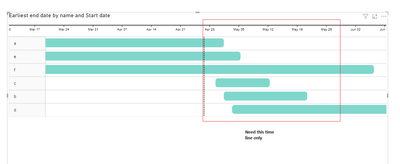
Adding a Gantt chart to my report. I want it to display only the tasks scheduled within the next 30 days from today. Currently, the chart includes all data, but I would like to limit it to just one month. Do you have any suggestions on how I can define this 30-day window?
Solved! Go to Solution.
Hi @Nivethan
For your question, here is the method I provided:
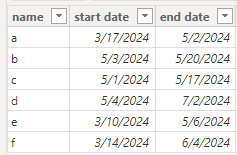
Here's some dummy data
"Table"
Create new columns showing the next 30 days from today.
_Start Date = IF(TODAY() >= 'Table'[start date], TODAY(), 'Table'[start date])
_End Date = IF(TODAY() + 30 >= 'Table'[end date], 'Table'[end date], TODAY() + 30)
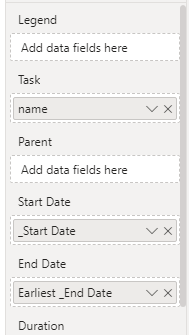
Create a Gantt chart and put in new date columns.
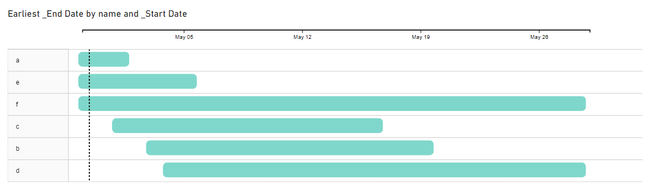
Here is the result.
Regards,
Nono Chen
If this post helps, then please consider Accept it as the solution to help the other members find it more quickly.
Hi @Nivethan
For your question, here is the method I provided:
Here's some dummy data
"Table"
Create new columns showing the next 30 days from today.
_Start Date = IF(TODAY() >= 'Table'[start date], TODAY(), 'Table'[start date])
_End Date = IF(TODAY() + 30 >= 'Table'[end date], 'Table'[end date], TODAY() + 30)
Create a Gantt chart and put in new date columns.
Here is the result.
Regards,
Nono Chen
If this post helps, then please consider Accept it as the solution to help the other members find it more quickly.
Check out the November 2025 Power BI update to learn about new features.
Advance your Data & AI career with 50 days of live learning, contests, hands-on challenges, study groups & certifications and more!