cancel
Showing results for 
Search instead for 
Did you mean: 

Get Fabric Certified for FREE during Fabric Data Days. Don't miss your chance! Request now

Reply
Higgs11
Frequent Visitor

I only want to return the first day of each month using the CALENDAR function

Hello All. I am currently using the CALENDAR function to start my DateDim table. It is currently looking at the dates in my main table called 'TechDev DB'. The date field in the table that the formula is looking at only has one row per date, for example "1/1/2018", "2/1/2018", etc...


The formula I am currently using returns all the days in the month. I only want to return the first day of the month.

My current DAX is:


Dates =
CALENDAR (
    DATE ( YEAR ( MIN ( 'TechDev DB'[Date] ) ), 1, 1 ),
    DATE ( YEAR ( MAX ( 'TechDev DB'[Date] ) ), 12, 1 )
)


These are the date fields I want to return. (my data set in 2017 and 2018).

1/1/2018

2/1/2018

3/1/2018

4/1/2018

5/1/2018

6/1/2018

7/1/2018

8/1/2018

This is what the current formula is doing:


1/1/2018

1/2/2018

1/3/2018

1/4/2018

1/5/2018

1/6/2018

1/7/2018

1/8/2018

basically, all the days in the months, and I only want the 1st day of each month.

I appreciate your assitance.

1 ACCEPTED SOLUTION
v-frfei-msft
Community Support
Community Support

Hi @Higgs11,


You can take the following steps to create the required date table.
1.Enter the data and create a Dates table using this formula.

Dates2 = 
 GENERATE ( CALENDAR(
 DATE ( YEAR ( MIN ( 'TechDev DB'[Date] ) ), 1, 1 ),
 DATE ( YEAR ( MAX ( 'TechDev DB'[Date] ) ), 12, 1 )),
 VAR currentDay = [Date]
 VAR month = MONTH ( currentDay )
 VAR year = YEAR ( currentDay )
 RETURN ROW ( 
 "MMYYDD", DATE(year,month,01) )
 )

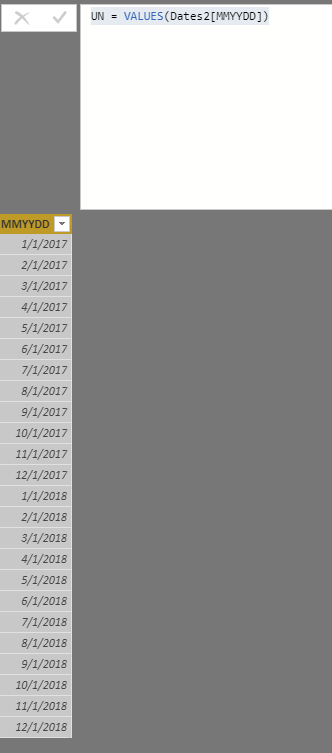
2.   Create another new table based on Dates2


UN = VALUES(Dates2[MMYYDD])

mmyy.png

For more details, please check the pbix as attached.


https://www.dropbox.com/s/a84umbt7vawp0r8/I%20only%20want%20to%202.pbix?dl=0


Regards,

Frank


Community Support Team _ Frank
If this post helps, then please consider Accept it as the solution to help the others find it more quickly.

View solution in original post

2 REPLIES 2
v-frfei-msft
Community Support
Community Support

Hi @Higgs11,


You can take the following steps to create the required date table.
1.Enter the data and create a Dates table using this formula.

Dates2 = 
 GENERATE ( CALENDAR(
 DATE ( YEAR ( MIN ( 'TechDev DB'[Date] ) ), 1, 1 ),
 DATE ( YEAR ( MAX ( 'TechDev DB'[Date] ) ), 12, 1 )),
 VAR currentDay = [Date]
 VAR month = MONTH ( currentDay )
 VAR year = YEAR ( currentDay )
 RETURN ROW ( 
 "MMYYDD", DATE(year,month,01) )
 )

2.   Create another new table based on Dates2


UN = VALUES(Dates2[MMYYDD])

mmyy.png

For more details, please check the pbix as attached.


https://www.dropbox.com/s/a84umbt7vawp0r8/I%20only%20want%20to%202.pbix?dl=0


Regards,

Frank


Community Support Team _ Frank
If this post helps, then please consider Accept it as the solution to help the others find it more quickly.

This works! Thank you. So I have two Steps.

Step 1) Create a new table to extract all the dates in my main DataTable. This in nice because it captures all the dates in my main table.

DateTable1 =
GENERATE (
    CALENDAR (
        DATE ( YEAR ( MIN ( 'Table Name'[Date Field  Name] ) ), 1, 1 ),
        DATE ( YEAR ( MAX ( 'Table Name'[Date Field Name] ) ), 12, 1 )
    ),
    VAR currentDay = [Date]
    VAR month =
        MONTH ( currentDay )
    VAR year =
        YEAR ( currentDay )
    RETURN
        ROW ( "MMYYDD", DATE ( year, month, 01 ) )
)


Step 2) Create a 2nd date table to only show one date for each month. My report is for monthly results and does nout use the days in the month.


DateTable2 =
VALUES ( DateTable1[MMYYDD] )

Helpful resources

Announcements
November Power BI Update Carousel

Power BI Monthly Update - November 2025

Check out the November 2025 Power BI update to learn about new features.

Fabric Data Days Carousel

Fabric Data Days

Advance your Data & AI career with 50 days of live learning, contests, hands-on challenges, study groups & certifications and more!

FabCon Atlanta 2026 carousel

FabCon Atlanta 2026

Join us at FabCon Atlanta, March 16-20, for the ultimate Fabric, Power BI, AI and SQL community-led event. Save $200 with code FABCOMM.

Top Solution Authors
Top Kudoed Authors