Join us at FabCon Atlanta from March 16 - 20, 2026, for the ultimate Fabric, Power BI, AI and SQL community-led event. Save $200 with code FABCOMM.
Register now!Learn from the best! Meet the four finalists headed to the FINALS of the Power BI Dataviz World Championships! Register now
Hello!
I have a database containing student enrolments, the dates of which range from June to October 2021 and May to July 2022.
To do this, I need to calculate the accumulated of these registrations per year and also make a graph of lines to compare the accumulated of both years.
I have tried every possible formula, but nothing is working for me.
I would appreciate your help!!
Best regards
Solved! Go to Solution.
Hi @Syndicate_Admin ,
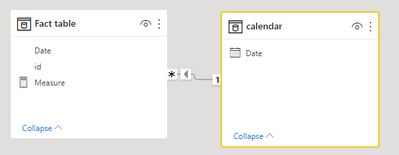
1 create a model like the following( add a calendar table for the fact table):
2 create a measure via:
Measure =
calculate(DISTINCTCOUNT('Fact table'[id]), DATESYTD('calendar'[Date]))
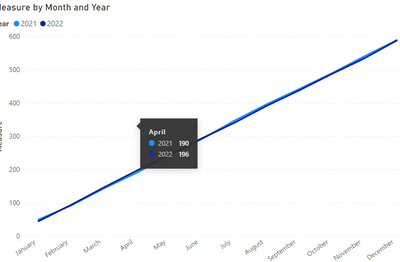
Result:
Pbix in the end you can refer.
Best Regards
Community Support Team _ chenwu zhu
If this post helps, then please consider Accept it as the solution to help the other members find it more quickly.
Hi @Syndicate_Admin ,
1 create a model like the following( add a calendar table for the fact table):
2 create a measure via:
Measure =
calculate(DISTINCTCOUNT('Fact table'[id]), DATESYTD('calendar'[Date]))
Result:
Pbix in the end you can refer.
Best Regards
Community Support Team _ chenwu zhu
If this post helps, then please consider Accept it as the solution to help the other members find it more quickly.
Hello,
As long as you have a unique ID per enrolment and the enrolment date column, marked as data type 'date' and in a relationship with your date table, it should be straightforward to aggregate your enrolments as a measure in DAX;
Number of enrolments = DISTINCTCOUNTNOBLANK(Table[EnrolmentID]),
Then with your date hierarchy - I would drag Year, then month, then date of your date table into the X axis of a line chart so that you can toggle up to Year to compare years. Drag Number of enrolments into the Y axis.
Thank you.
I did as he told me, but my problem persists.
When graphing, the gross and non-accumulated valoes appear as I need.
Also, I need the lines from both years to appear on the same chart.
Share feedback directly with Fabric product managers, participate in targeted research studies and influence the Fabric roadmap.
Check out the February 2026 Power BI update to learn about new features.
| User | Count |
|---|---|
| 52 | |
| 51 | |
| 35 | |
| 15 | |
| 14 |
| User | Count |
|---|---|
| 92 | |
| 75 | |
| 41 | |
| 26 | |
| 25 |