FabCon is coming to Atlanta
Join us at FabCon Atlanta from March 16 - 20, 2026, for the ultimate Fabric, Power BI, AI and SQL community-led event. Save $200 with code FABCOMM.
Register now!- Power BI forums
- Get Help with Power BI
- Desktop
- Service
- Report Server
- Power Query
- Mobile Apps
- Developer
- DAX Commands and Tips
- Custom Visuals Development Discussion
- Health and Life Sciences
- Power BI Spanish forums
- Translated Spanish Desktop
- Training and Consulting
- Instructor Led Training
- Dashboard in a Day for Women, by Women
- Galleries
- Data Stories Gallery
- Themes Gallery
- Contests Gallery
- QuickViz Gallery
- Quick Measures Gallery
- Visual Calculations Gallery
- Notebook Gallery
- Translytical Task Flow Gallery
- TMDL Gallery
- R Script Showcase
- Webinars and Video Gallery
- Ideas
- Custom Visuals Ideas (read-only)
- Issues
- Issues
- Events
- Upcoming Events
The Power BI Data Visualization World Championships is back! Get ahead of the game and start preparing now! Learn more
- Power BI forums
- Forums
- Get Help with Power BI
- Desktop
- Re: I need Help to filter 3 tables in COUNTROWS
- Subscribe to RSS Feed
- Mark Topic as New
- Mark Topic as Read
- Float this Topic for Current User
- Bookmark
- Subscribe
- Printer Friendly Page


- Mark as New
- Bookmark
- Subscribe
- Mute
- Subscribe to RSS Feed
- Permalink
- Report Inappropriate Content
I need Help to filter 3 tables in COUNTROWS
1 Status Amostra = CALCULATE(COUNTROWS('PO Manual','PO Manual - Andamento','SHeet' - I'),FILTERS('PO Manual'[STATUS FATURA]),FILTERS('PO Manual - Andamento'[STATUS FATURA]))

Tables and columns:
1: 2: 3:

Solved! Go to Solution.

- Mark as New
- Bookmark
- Subscribe
- Mute
- Subscribe to RSS Feed
- Permalink
- Report Inappropriate Content
Hi @deniselias ,
I created a sample pbix file(see attachment), please check whether that is what you want.
Table =
UNION (
    SUMMARIZE (
        'PO Manual',
        'PO Manual'[STATUS FATURA],
        "Status Amostra", CALCULATE ( COUNT ( 'PO Manual'[STATUS FATURA] ) )
    ),
    SUMMARIZE (
        'PO Manual - Andamento',
        'PO Manual - Andamento'[STATUS FATURA],
        "Status Amostra", CALCULATE ( COUNT ( 'PO Manual - Andamento'[STATUS FATURA] ) )
    ),
    SUMMARIZE (
        'SHeet',
        'SHeet'[STATUS FATURA],
        "Status Amostra", CALCULATE ( COUNT ( 'SHeet'[STATUS FATURA] ) )
    )
)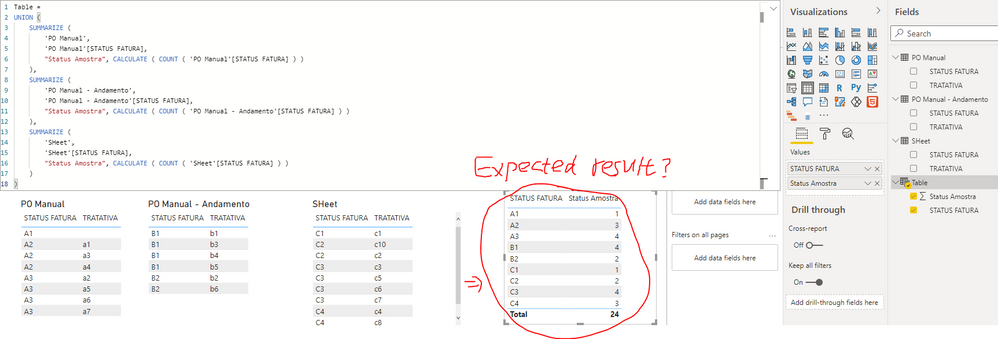
If the above one is not what you want, please provide some sample data in 3 tables and your expected result with specific examples. Please also provide the relationship setting among these tables if there is any relationship. Thank you.
Best Regards
- Mark as New
- Bookmark
- Subscribe
- Mute
- Subscribe to RSS Feed
- Permalink
- Report Inappropriate Content
Hi @deniselias ,
I created a sample pbix file(see attachment), please check whether that is what you want.
Table =
UNION (
    SUMMARIZE (
        'PO Manual',
        'PO Manual'[STATUS FATURA],
        "Status Amostra", CALCULATE ( COUNT ( 'PO Manual'[STATUS FATURA] ) )
    ),
    SUMMARIZE (
        'PO Manual - Andamento',
        'PO Manual - Andamento'[STATUS FATURA],
        "Status Amostra", CALCULATE ( COUNT ( 'PO Manual - Andamento'[STATUS FATURA] ) )
    ),
    SUMMARIZE (
        'SHeet',
        'SHeet'[STATUS FATURA],
        "Status Amostra", CALCULATE ( COUNT ( 'SHeet'[STATUS FATURA] ) )
    )
)
If the above one is not what you want, please provide some sample data in 3 tables and your expected result with specific examples. Please also provide the relationship setting among these tables if there is any relationship. Thank you.
Best Regards
- Mark as New
- Bookmark
- Subscribe
- Mute
- Subscribe to RSS Feed
- Permalink
- Report Inappropriate Content
Thanks Yingyinr,
I love your solution!
I also managed to apply the expression:

But your solution made me create another table and I love it!
Thaks, bye!
- Mark as New
- Bookmark
- Subscribe
- Mute
- Subscribe to RSS Feed
- Permalink
- Report Inappropriate Content
Thanks for the answer @selimovd
I want to make a formula where I can bring information from 3 tables and make a different count for each situation.
Look at the shapes I tried:
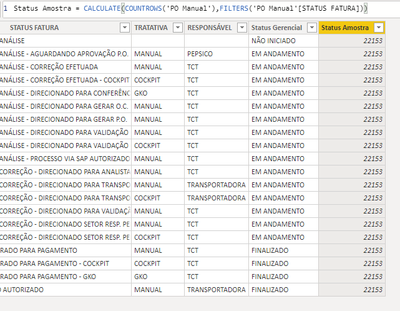
And that was the best way. But data from 2 tables is still missing. I want to include it in COUNTA:

I hope you understand.
Thanks!


- Mark as New
- Bookmark
- Subscribe
- Mute
- Subscribe to RSS Feed
- Permalink
- Report Inappropriate Content
Hey @deniselias ,
how is the relationship between these 3 tables?
Where is the final table coming from? When you want a count from 3 other tables, how should that exactly work? Does it depend on a specific column, is the count from one single table?
Please explain a little more, we don't know your data, so it's hard to help you when you don't give much information.
Best regards
Denis
- Mark as New
- Bookmark
- Subscribe
- Mute
- Subscribe to RSS Feed
- Permalink
- Report Inappropriate Content
Hey @deniselias ,
what exactly do you want to do?
The formula doesn't make any sense and I didn't really understand the descriptiont.
Thank you and best regards
Denis
- Mark as New
- Bookmark
- Subscribe
- Mute
- Subscribe to RSS Feed
- Permalink
- Report Inappropriate Content
I want to make a formula where I can bring information from 3 tables and make a different count for each situation.
Look at the shapes I tried:
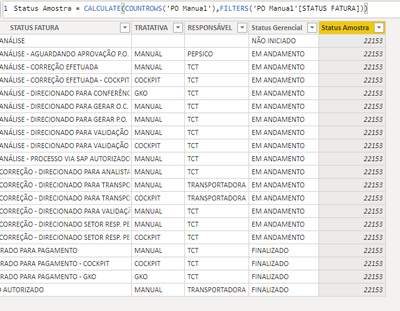
And that was the best way. But data from 2 tables is still missing. I want to include it in COUNTA:
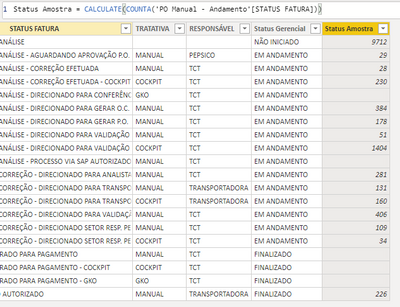
I hope you understand.
Thanks!
Helpful resources

Power BI Monthly Update - November 2025
Check out the November 2025 Power BI update to learn about new features.

Fabric Data Days
Advance your Data & AI career with 50 days of live learning, contests, hands-on challenges, study groups & certifications and more!

FabCon Atlanta 2026
Join us at FabCon Atlanta, March 16-20, for the ultimate Fabric, Power BI, AI and SQL community-led event. Save $200 with code FABCOMM.

| User | Count |
|---|---|
| 58 | |
| 45 | |
| 42 | |
| 20 | |
| 18 |


| User | Count |
|---|---|
| 171 | |
| 110 | |
| 91 | |
| 55 | |
| 45 |


