Join us at FabCon Atlanta from March 16 - 20, 2026, for the ultimate Fabric, Power BI, AI and SQL community-led event. Save $200 with code FABCOMM.
Register now!The Power BI Data Visualization World Championships is back! Get ahead of the game and start preparing now! Learn more
Hello Guys,
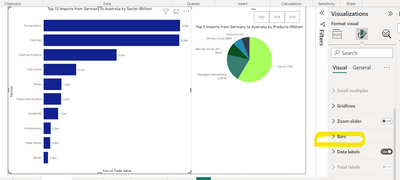
I'm trying to give gradient colors for my bar chart, but the option that is available is just to change it to a solid color through the option "bars", which does not allow me to activate the gradient:
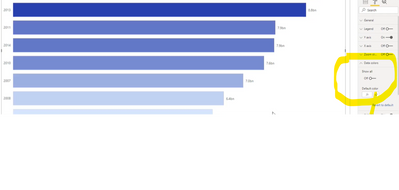
Whereas in some tutorial videos there is an option called "data colors" where the gradient can be activated:
How can I find this option in order to activate the gradient feature?
Hope someone can help me.
In advanced, thank you
Hi @Anonymous ,
If you use Legend or have two values in your X-axis, the FX icon will not be displayed.
Refer to:
Solved: Re: Has Conditional Formatting FX been removed in ... - Microsoft Power BI Community
If this not the case and still it is not coming, can you share sample data and sample output in table format? Or a sample pbix after removing sensitive data. We can better understand the problem and help you.
Best Regards,
Liu Yang
If this post helps, then please consider Accept it as the solution to help the other members find it more quickly
Hello @Anonymous ,
You click on the bar section and then click on Fx and then you can specify the gradient color.
If I answered your question, please mark my post as solution, Appreciate your Kudos 👍
Proud to be a Super User! | |
Hello Idrissshatila,
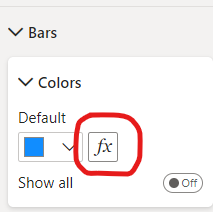
Thanks for your answer. The thing is that I don't have that Function button as follows:
Do you have any idea where about I can activate it?
Thanks again!
Check out the November 2025 Power BI update to learn about new features.
Advance your Data & AI career with 50 days of live learning, contests, hands-on challenges, study groups & certifications and more!
| User | Count |
|---|---|
| 58 | |
| 45 | |
| 42 | |
| 20 | |
| 18 |
| User | Count |
|---|---|
| 171 | |
| 110 | |
| 91 | |
| 55 | |
| 45 |