Join us at FabCon Atlanta from March 16 - 20, 2026, for the ultimate Fabric, Power BI, AI and SQL community-led event. Save $200 with code FABCOMM.
Register now!The Power BI Data Visualization World Championships is back! Get ahead of the game and start preparing now! Learn more
Hi All,
I am very new to Power BI.
I marged two sets of data and saved as new. (relathionship seems ok so they are able to combine)
I can see it in query view but when I return to data view, it is empty.
What I am doing wrong!?!?
Help!
Hi @cocomy,
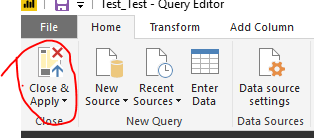
When you have done all operation in query editor, you need to click "Apply" or "Close&Apply"(the query interface will be close if you click this) to save your operations, then Power Desktop data view will show the changes. Have you saved the changes by the button highlighted in red circle below?
Best Regards,
Angelia
Hi Angelia,
Thank you for your reply. Yes, I did close & apply.
Two sets of data are so different in format. (I can not change them as those files are managed by someone else)
For example...
Table A's country name.... USA, UK
Table B's country name... America, England
So I created table C to match both name
Then create relationship and query
(1) A+C Query ⇒ visible in data view
(2) B+C Query ⇒ visible in data view
Then finally merge
(3) A+B+C Query ⇒ can not see in data view
Is it possible it is because they are query's query? Appreciate if you could help.
All the best,
cocomy
Hi @cocomy,
Could you please share your .pbix file for further analysis?
Best Regards,
Angelia
The Power BI Data Visualization World Championships is back! Get ahead of the game and start preparing now!
Check out the November 2025 Power BI update to learn about new features.
| User | Count |
|---|---|
| 59 | |
| 46 | |
| 42 | |
| 23 | |
| 18 |
| User | Count |
|---|---|
| 192 | |
| 125 | |
| 99 | |
| 67 | |
| 48 |