cancel
Showing results for 
Search instead for 
Did you mean: 

The Power BI Data Visualization World Championships is back! Get ahead of the game and start preparing now! Learn more

Reply
revansh
Helper IV
Helper IV

Hyperlink

Hi All,


I have two columns in my table.


Column1 : News heading

Column2:  A URL link which when clicked opens detail page releated to column1.


In my report :  I just want to list Column1(new heading) with hyperlink.  When user clicks on Column1 value, it should open its corresponding URL page.


Table :


Column1    column2

Apple          www.apple.com

Google        www.google.com

powerbi       www.powerbi.com


report:


I want add a scroller on column1 with hyperlinks. when a user clicks on apple it should point to aaple.com.


Thanks


1 ACCEPTED SOLUTION
Anonymous
Not applicable

Hi @revansh, I'm not aware of a way to do this in Power BI. The closest method I've found is to put both columns into a table, and change the formatting of column 2 to set the "URL icon" feature to ON. This then shows a small link icon in column 2, instead of the web url itself. Users can click on the link icon to open the URL.

View solution in original post

5 REPLIES 5
Anonymous
Not applicable

Hi @revansh, I'm not aware of a way to do this in Power BI. The closest method I've found is to put both columns into a table, and change the formatting of column 2 to set the "URL icon" feature to ON. This then shows a small link icon in column 2, instead of the web url itself. Users can click on the link icon to open the URL.

Hi JaredK,


   Can i show the small link icon in a scrollingtextvisual.


Thanks

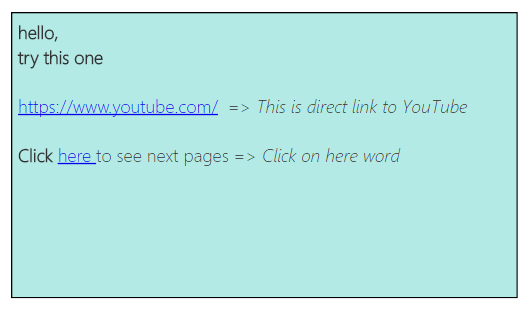
Hi @revansh, instead of going for a custom visual you can opt for Text box and embed a link in that. The Textbox appears under the Insert section of Home ribbon in Power BI. You can go through the following steps : 


1. Select the text box from the Insert section
2. Type in, for e.g : Click here to go to next page
3. Select any word to which you want to apply link, in this case I'll select "here"
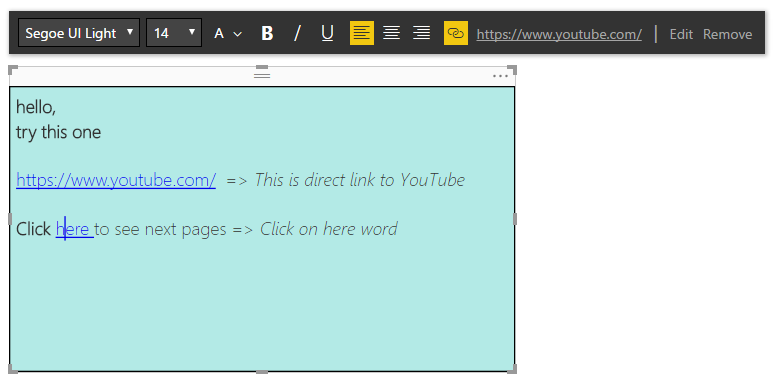
4. Click on Insert link icon
5. Type the url and say done
6. Publish the report to the service and click on the link


Here's a snapshot of what I did,TextBox when published  on Power BI ServiceTextBox when published on Power BI ServiceOn Power BI Desktop, at the time of giving link to a specific wordOn Power BI Desktop, at the time of giving link to a specific word


On Power BI Desktop, at the time of giving link to a specific wordOn Power BI Desktop, at the time of giving link to a specific word


Hello @revansh ,  

If this was helpful, please promote this as a solution.  


Thanks,  

Renu KS.


Anonymous
Not applicable

I believe the link icon is only an option in tables. I'm not aware of a way to use hyperlinks in scrolling visuals. Is this a custom visual?

yes, It is a custom visual.


Thanks

Helpful resources

Announcements
Power BI DataViz World Championships

Power BI Dataviz World Championships

The Power BI Data Visualization World Championships is back! Get ahead of the game and start preparing now!

December 2025 Power BI Update Carousel

Power BI Monthly Update - December 2025

Check out the December 2025 Power BI Holiday Recap!

FabCon Atlanta 2026 carousel

FabCon Atlanta 2026

Join us at FabCon Atlanta, March 16-20, for the ultimate Fabric, Power BI, AI and SQL community-led event. Save $200 with code FABCOMM.