Share feedback directly with Fabric product managers, participate in targeted research studies and influence the Fabric roadmap.
Sign up nowGet Fabric certified for FREE! Don't miss your chance! Learn more
Hi All
I have post a question on :-
@amitchandak offer me below expression work fine :-
Curr month = format(today(),"mmm-yyyy")
Now i try to modify the above expression to display last month :-
Curr month -1 = format(today()-1,"mmm-yyyy")
But it does not work. Hope some one can help me.
Paul
Solved! Go to Solution.
Hi, @admin11
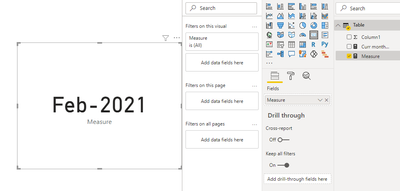
According to your description and DAX formula, I think you can try this measure to get the last month using the Format() function:
Measure =
FORMAT(DATE(YEAR(TODAY()),MONTH(TODAY())-1,DAY(TODAY())),"mmm-yyyy")
And place this measure into a card chart:
And you can get what you want.
Best Regards,
Community Support Team _Robert Qin
If this post helps, then please consider Accept it as the solution to help the other members find it more quickly.
Hi @admin11 ,
Change your DAX Expression as shown below:
Previous Month = FORMAT(EDATE(NOW(),-1),"MMM-YYYY")
Please accept this as a solution if your question has been answered !!
Appreciate a Kudos 😀
Hi, @admin11
According to your description and DAX formula, I think you can try this measure to get the last month using the Format() function:
Measure =
FORMAT(DATE(YEAR(TODAY()),MONTH(TODAY())-1,DAY(TODAY())),"mmm-yyyy")
And place this measure into a card chart:
And you can get what you want.
Best Regards,
Community Support Team _Robert Qin
If this post helps, then please consider Accept it as the solution to help the other members find it more quickly.
If you love stickers, then you will definitely want to check out our Community Sticker Challenge!
Check out the January 2026 Power BI update to learn about new features.
| User | Count |
|---|---|
| 64 | |
| 63 | |
| 49 | |
| 21 | |
| 18 |
| User | Count |
|---|---|
| 122 | |
| 118 | |
| 38 | |
| 36 | |
| 29 |