Join us at FabCon Atlanta from March 16 - 20, 2026, for the ultimate Fabric, Power BI, AI and SQL community-led event. Save $200 with code FABCOMM.
Register now!The Power BI Data Visualization World Championships is back! Get ahead of the game and start preparing now! Learn more
How would I replace individual zeros with blanks but leave zeros if it was contained within say a phone number?
Want to replace 0 with nothing/blank but when I use the repalce values function in power Query Editor, where a number set includes a 0, I do not want it to remove the zero.
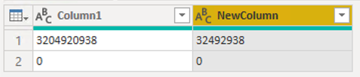
If I used the funtion on say 3204920938 it would change to 32492938. I would want it to stay the same in this case but only make the field blank if it was "0".
Solved! Go to Solution.
Try this Power Query step:
ReplaceText = Table.ReplaceValue(
Source,
each if [Column1] = "0" then null else "0",
each if [Column1] = "0" then [Column1] else "",
Replacer.ReplaceText,
{"Column1"}
)
Proud to be a Super User!
Hi @Jorr13 ,
Please refer to my pbix file to see if it helps you.
= Table.ReplaceValue(Source,"0","",Replacer.ReplaceValue,{"Column1"})
If I have misunderstood your meaning, please provide your pbix file without privacy information and your desired output.
Best Regards
Community Support Team _ Polly
If this post helps, then please consider Accept it as the solution to help the other members find it more quickly.
In Power Query, create a custom column using this if statement. This assumes [Column1] is a text data type.
if [Column1] <> "0" then Text.Replace([Column1], "0", "") else [Column1]
Proud to be a Super User!
Thanks @DataInsights Do you know if there is a way to do the replacement without creating a new column?
Try this Power Query step:
ReplaceText = Table.ReplaceValue(
Source,
each if [Column1] = "0" then null else "0",
each if [Column1] = "0" then [Column1] else "",
Replacer.ReplaceText,
{"Column1"}
)
Proud to be a Super User!
The Power BI Data Visualization World Championships is back! Get ahead of the game and start preparing now!
| User | Count |
|---|---|
| 61 | |
| 43 | |
| 40 | |
| 38 | |
| 22 |
| User | Count |
|---|---|
| 178 | |
| 124 | |
| 116 | |
| 77 | |
| 54 |