FabCon is coming to Atlanta
Join us at FabCon Atlanta from March 16 - 20, 2026, for the ultimate Fabric, Power BI, AI and SQL community-led event. Save $200 with code FABCOMM.
Register now!- Power BI forums
- Get Help with Power BI
- Desktop
- Service
- Report Server
- Power Query
- Mobile Apps
- Developer
- DAX Commands and Tips
- Custom Visuals Development Discussion
- Health and Life Sciences
- Power BI Spanish forums
- Translated Spanish Desktop
- Training and Consulting
- Instructor Led Training
- Dashboard in a Day for Women, by Women
- Galleries
- Data Stories Gallery
- Themes Gallery
- Contests Gallery
- Quick Measures Gallery
- Visual Calculations Gallery
- Notebook Gallery
- Translytical Task Flow Gallery
- TMDL Gallery
- R Script Showcase
- Webinars and Video Gallery
- Ideas
- Custom Visuals Ideas (read-only)
- Issues
- Issues
- Events
- Upcoming Events
Calling all Data Engineers! Fabric Data Engineer (Exam DP-700) live sessions are back! Starting October 16th. Sign up.
- Power BI forums
- Forums
- Get Help with Power BI
- Desktop
- Re: How to write measure to get count of blank val...
- Subscribe to RSS Feed
- Mark Topic as New
- Mark Topic as Read
- Float this Topic for Current User
- Bookmark
- Subscribe
- Printer Friendly Page


- Mark as New
- Bookmark
- Subscribe
- Mute
- Subscribe to RSS Feed
- Permalink
- Report Inappropriate Content
How to write measure to get count of blank value for particular date?
Hi Experts,
Suppose I have below table in which I have some missing value on few days.
Day Value
day1 3
day2
day3
day4
day5
day6
day7 8
day8 7
day9 8
day10
day11
day12 9
As we see above we have 5 day missing value from day 2 to day 6 and 2 day missing from day 9 to day 12.Need to get count of blank space on particular day.
Day Value Expected value
day1 3 3
day2 5
day3 5
day4 5
day5 5
day6 5
day7 8 8
day8 7 7
day9 8 8
day10 2
day11 2
day12 9 9
How to write measures to get count of blank space for particular day in Power BI?
Thanks,
Annu
Solved! Go to Solution.


- Mark as New
- Bookmark
- Subscribe
- Mute
- Subscribe to RSS Feed
- Permalink
- Report Inappropriate Content
Source table "Count of Blank"
let
    Source = Table.FromRows(Json.Document(Binary.Decompress(Binary.FromText("bc/BCcAwCIXhXTwHoqZp4izB/ddoa2rp4YH/5UME1yKrUpWVqVCLvDyoiff01xqwA1gHdgIbaTPaOBNHtNHQpvDvpiYKwu8bi9wv", BinaryEncoding.Base64), Compression.Deflate)), let _t = ((type nullable text) meta [Serialized.Text = true]) in type table [Day = _t, Value = _t, #"Expected value" = _t]),
    #"Changed Type" = Table.TransformColumnTypes(Source,{{"Value", Int64.Type}, {"Expected value", Int64.Type}, {"Day", type date}})
in
    #"Changed Type"
Measure:
CountBlank :=
var d = SELECTEDVALUE('Count of Blank'[Day])
var v = SELECTEDVALUE('Count of Blank'[Value])
var cs = CALCULATE(max('Count of Blank'[Day]),'Count of Blank'[Value]<>BLANK(),'Count of Blank'[Day]<=d,ALLSELECTED('Count of Blank'))
var cf = CALCULATE(min('Count of Blank'[Day]),'Count of Blank'[Value]<>BLANK(),'Count of Blank'[Day]>=d,ALLSELECTED('Count of Blank'))
return if (ISBLANK(v),DATEDIFF(cs,cf,DAY)-1,v)
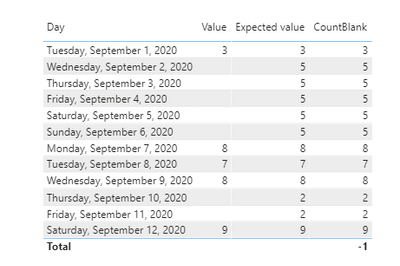
Result:

- Mark as New
- Bookmark
- Subscribe
- Mute
- Subscribe to RSS Feed
- Permalink
- Report Inappropriate Content
Hi,
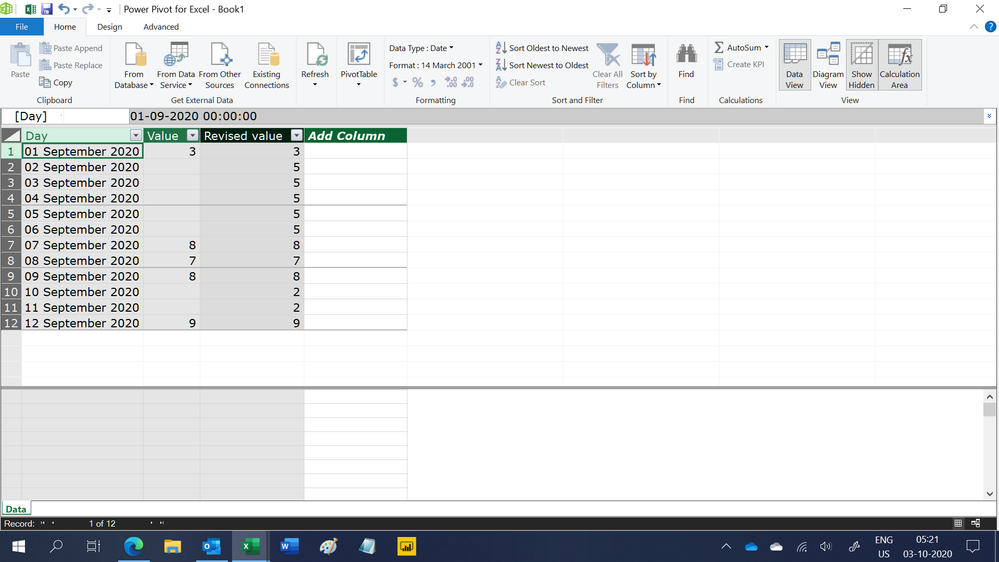
Try this calculated column formula
=if(Data[Value]=BLANK(),CALCULATE(min(Data[Day]),FILTER(Data,Data[Value]>0&&Data[Day]>EARLIER([Day])))-(CALCULATE(MAX(Data[Day]),FILTER(Data,Data[Value]>0&&Data[Day]<EARLIER([Day])))+1),Data[Value])Hope this helps.
Regards,
Ashish Mathur
http://www.ashishmathur.com
https://www.linkedin.com/in/excelenthusiasts/


- Mark as New
- Bookmark
- Subscribe
- Mute
- Subscribe to RSS Feed
- Permalink
- Report Inappropriate Content
If the above posts help, please kindly mark it as a answer to help others find it more quickly. thanks!
If not, please kindly elaborate more.
If this post helps, then please consider Accept it as the solution to help the other members find it more
quickly.
- Mark as New
- Bookmark
- Subscribe
- Mute
- Subscribe to RSS Feed
- Permalink
- Report Inappropriate Content
Hi,
In the Day column, do you have Day1, Day2 or do you have a proper date entry? Please clarify.
Regards,
Ashish Mathur
http://www.ashishmathur.com
https://www.linkedin.com/in/excelenthusiasts/
- Mark as New
- Bookmark
- Subscribe
- Mute
- Subscribe to RSS Feed
- Permalink
- Report Inappropriate Content
Hi ashish,
Thanks for the reply. actual date Date format is : 09/01/2020 (mm/dd/yyyy)
Day 1 starts from 09/01/2020
day 2 09/02/2020
...
day 12 09/12/2020
let me if you need any details.
thanks in advance
- Mark as New
- Bookmark
- Subscribe
- Mute
- Subscribe to RSS Feed
- Permalink
- Report Inappropriate Content
Hi,
Try this calculated column formula
=if(Data[Value]=BLANK(),CALCULATE(min(Data[Day]),FILTER(Data,Data[Value]>0&&Data[Day]>EARLIER([Day])))-(CALCULATE(MAX(Data[Day]),FILTER(Data,Data[Value]>0&&Data[Day]<EARLIER([Day])))+1),Data[Value])Hope this helps.
Regards,
Ashish Mathur
http://www.ashishmathur.com
https://www.linkedin.com/in/excelenthusiasts/
- Mark as New
- Bookmark
- Subscribe
- Mute
- Subscribe to RSS Feed
- Permalink
- Report Inappropriate Content
Source table "Count of Blank"
let
    Source = Table.FromRows(Json.Document(Binary.Decompress(Binary.FromText("bc/BCcAwCIXhXTwHoqZp4izB/ddoa2rp4YH/5UME1yKrUpWVqVCLvDyoiff01xqwA1gHdgIbaTPaOBNHtNHQpvDvpiYKwu8bi9wv", BinaryEncoding.Base64), Compression.Deflate)), let _t = ((type nullable text) meta [Serialized.Text = true]) in type table [Day = _t, Value = _t, #"Expected value" = _t]),
    #"Changed Type" = Table.TransformColumnTypes(Source,{{"Value", Int64.Type}, {"Expected value", Int64.Type}, {"Day", type date}})
in
    #"Changed Type"
Measure:
CountBlank :=
var d = SELECTEDVALUE('Count of Blank'[Day])
var v = SELECTEDVALUE('Count of Blank'[Value])
var cs = CALCULATE(max('Count of Blank'[Day]),'Count of Blank'[Value]<>BLANK(),'Count of Blank'[Day]<=d,ALLSELECTED('Count of Blank'))
var cf = CALCULATE(min('Count of Blank'[Day]),'Count of Blank'[Value]<>BLANK(),'Count of Blank'[Day]>=d,ALLSELECTED('Count of Blank'))
return if (ISBLANK(v),DATEDIFF(cs,cf,DAY)-1,v)
Result:
- Mark as New
- Bookmark
- Subscribe
- Mute
- Subscribe to RSS Feed
- Permalink
- Report Inappropriate Content
You need a sortable column for that. Your example Day column is not working for that sort. Is it really in that format or do you have actual dates?
You can then use FIRSTNONBLANK and LASTNONBLANK to find the boundaries of your gaps etc.

Helpful resources

FabCon Global Hackathon
Join the Fabric FabCon Global Hackathon—running virtually through Nov 3. Open to all skill levels. $10,000 in prizes!

Power BI Monthly Update - October 2025
Check out the October 2025 Power BI update to learn about new features.

FabCon Atlanta 2026
Join us at FabCon Atlanta, March 16-20, for the ultimate Fabric, Power BI, AI and SQL community-led event. Save $200 with code FABCOMM.


